
JSON参数Config Groovy脚本不工作
JSON参数Config Groovy脚本不工作
提问于 2020-09-15 12:54:38
我正在尝试创建一个“扩展选择配置”参数。我把我的代码放在"JSON参数Config Groovy脚本“中,但是我在”用参数构建“屏幕上看不到它。我尝试了这两种方法,普通的json和org.boon,但是没有得到同样的结果。
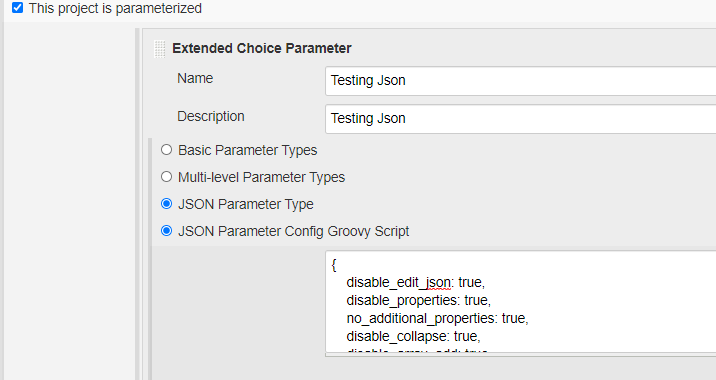
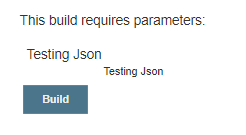
我使用的代码(用于org.boon)与可以在:https://wiki.jenkins.io/pages/viewpage.action?pageId=92736450上找到的代码相同
回答 1
Stack Overflow用户
回答已采纳
发布于 2020-09-15 15:42:13
用下面的代码替换您的配置groovy脚本,它就能工作了。扩展选择参数的JSON参数特性是基于https://github.com/json-editor/json-editor的
groovy脚本应该返回一个JSON对象,该对象对应于json编辑器中引用的"options“对象。
更新
确保扩展的名称选择参数" name“没有空格。因此,在您的示例中,将名称从"testing_json“更改为”testing_json“或Json (没有空格的字符串),它将工作。
    import net.sf.json.JSONObject

def jsonEditorOptions = JSONObject.fromObject(/{
        disable_edit_json: true,
        disable_properties: true,
        no_additional_properties: true,
        disable_collapse: true,
        disable_array_add: true,
        disable_array_delete: true,
        disable_array_reorder: true,
        theme: "bootstrap2",
        iconlib:"fontawesome4",
        schema: {
          "type": "object",
          "title": "Name",
          "properties": {
            "first_name": {
              "type": "string",
              "propertyOrder" : 1
            },
            "last_name": {
              "type": "string",
              "propertyOrder" : 2
            },
            "full_name": {
              "type": "string",
              "propertyOrder" : 3,
              "template": "{{fname}} {{lname}}",
              "watch": {
                "fname": "first_name",
                "lname": "last_name"
              }
            }
          }
        },
        startval: {
            "first_name" : "John",
            "last_name" : "Doe",
            "full_name" : "John Doe"
        }
}/);页面原文内容由Stack Overflow提供。腾讯云小微IT领域专用引擎提供翻译支持
原文链接:
https://stackoverflow.com/questions/63902291
复制相关文章
相似问题
腾讯云开发者

Copyright © 2013 - 2026 Tencent Cloud. All Rights Reserved. 腾讯云 版权所有
深圳市腾讯计算机系统有限公司 ICP备案/许可证号:粤B2-20090059  粤公网安备44030502008569号
腾讯云计算(北京)有限责任公司 京ICP证150476号 | 京ICP备11018762号