
动态ID硒Python Chrome
动态ID硒Python Chrome
提问于 2020-09-17 10:11:44
我正试图在Amazon站点上进行测试自动化,到目前为止,除了ID动态变化的这一部分之外,我做得还不错。
我想要做的是点击“赞助产品”部分的“下一步”按钮。
这是我的密码
first_product="https://www.amazon.com/Love-KANKEI-Floating-Shelves-Bathroom-Carbonized/dp/B07XDHK395/ref=sr_1_18?dchild=1&keywords=rustic+wood&qid=1600334401&sr=8-18"
first_product_xpath = "//*[@id='a-autoid-21']"

first_sponsored_products = driver.find_element_by_xpath("//*[@id='sp_detail-none']/div[1]/div[1]/h2")
driver.execute_script("arguments[0].scrollIntoView();", first_sponsored_products)
time.sleep(2)
select_first_next_sponsored = driver.find_element_by_xpath(first_product_xpath)
select_first_next_sponsored.click()
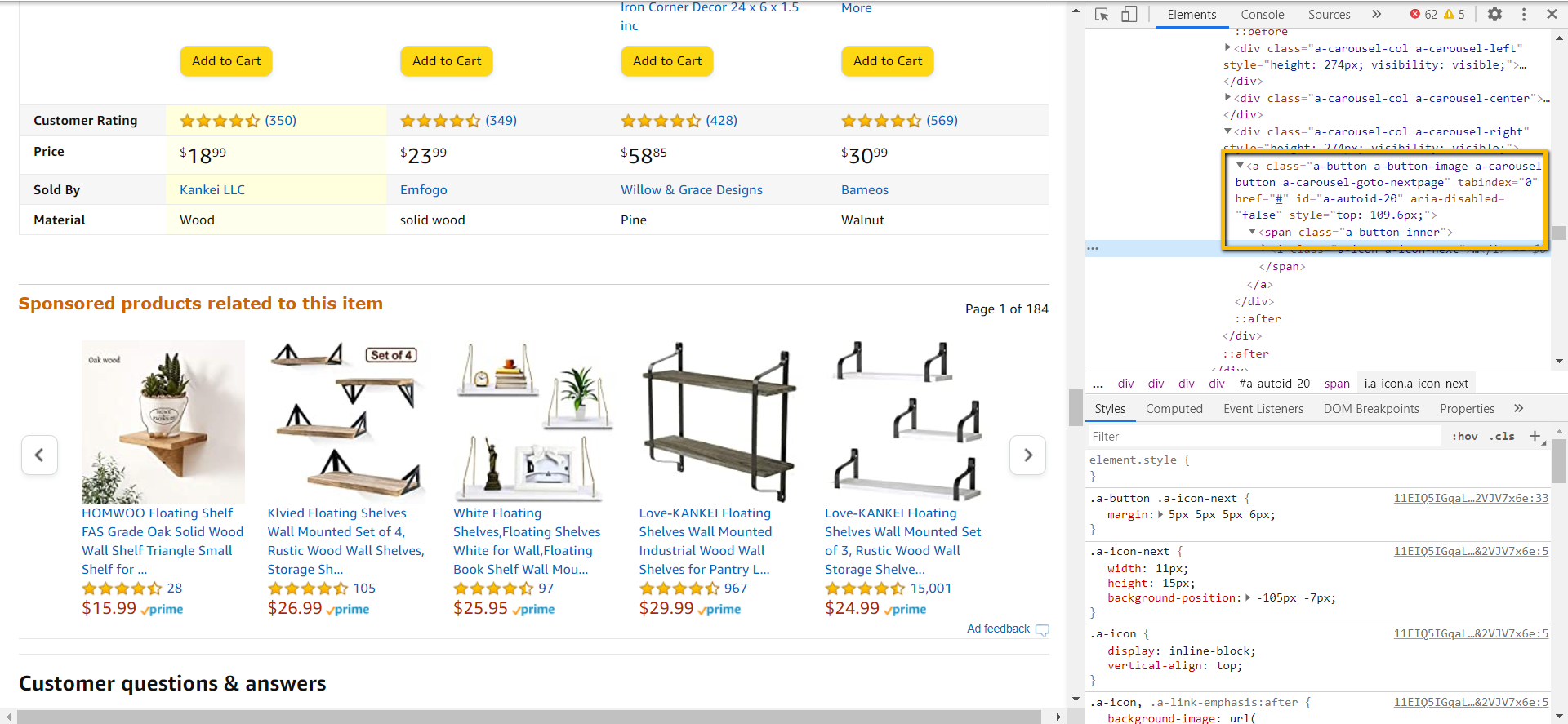
我想不出要使用什么其他方法,因为我试图单击的这个按钮似乎没有任何惟一的东西,除了ID和它的动态变化,所以我不得不一次又一次地检查当前的ID,并希望它不会在脚本的下一次运行中再次更改。
请帮帮忙。谢谢。
回答 2
Stack Overflow用户
回答已采纳
发布于 2020-09-17 10:56:58
由于某些原因,我无法在我的铬中查看赞助项目div。因此,我尝试了“客户谁看这个项目也看了”div。对于本节,div是"desktop-dp-sims_session-similarities-sims-feature“&您的next按钮包含"a-carousel-goto-nextpage”的类名。所以我们可以试试这样的方法,
first_product_xpath = "//div[@id='desktop-dp-sims_session-similarities-sims-feature']//a[contains(@class, 'a-carousel-goto-nextpage')]"因此,更新相应的div id为“与此项目相关的赞助产品”div & try。
Stack Overflow用户
发布于 2020-09-17 11:12:45
这个xpath为您提供了该会话的所有产品。
//div[@id="sp_detail-none"]/descendant::li
页面原文内容由Stack Overflow提供。腾讯云小微IT领域专用引擎提供翻译支持
原文链接:
https://stackoverflow.com/questions/63935862
复制相关文章
相似问题
腾讯云开发者

Copyright © 2013 - 2026 Tencent Cloud. All Rights Reserved. 腾讯云 版权所有
深圳市腾讯计算机系统有限公司 ICP备案/许可证号:粤B2-20090059  粤公网安备44030502008569号
腾讯云计算(北京)有限责任公司 京ICP证150476号 | 京ICP备11018762号