
基于MATLAB的摄像机图像OMR研究
我需要帮助与计算机视觉相关的作业,我必须在MATLAB构建一个OMR使用指定的指令,但我不能这样做。
这是一项任务:
为您提供了示例答卷的图像。使用形态学图像处理操作符,您需要开发一个系统,在Matlab中提取学生为每个问题提供的答案。
提示:
separately.
- For
- 对图像进行二值化--初始二值化可能是一种粗糙的二值化。
- 使用水平结构元素进行扩展,以合并线条中的组件。
- 使用CC标记提取每一行。如果需要,请再次对每一行进行二值化(
- ),使用CC标记查找不同的元素。使用区域信息区分填充和未填充的气泡。--对每一个问题,找出学生的正确答案。输入:基于摄像机的答题纸图像
输出:学生提供的正确答案的向量。
假设:没有多个答案的行,所有问题都有答案。
有用的MATLAB函数
strel,bwlabel,regionprops,imdilate,imerode
这是我写的代码,但没有给我带来结果,我需要更多的代码,或者最好是一些模块来帮助我从填好的答卷中提取正确的答案,附加的是代码和输入表。
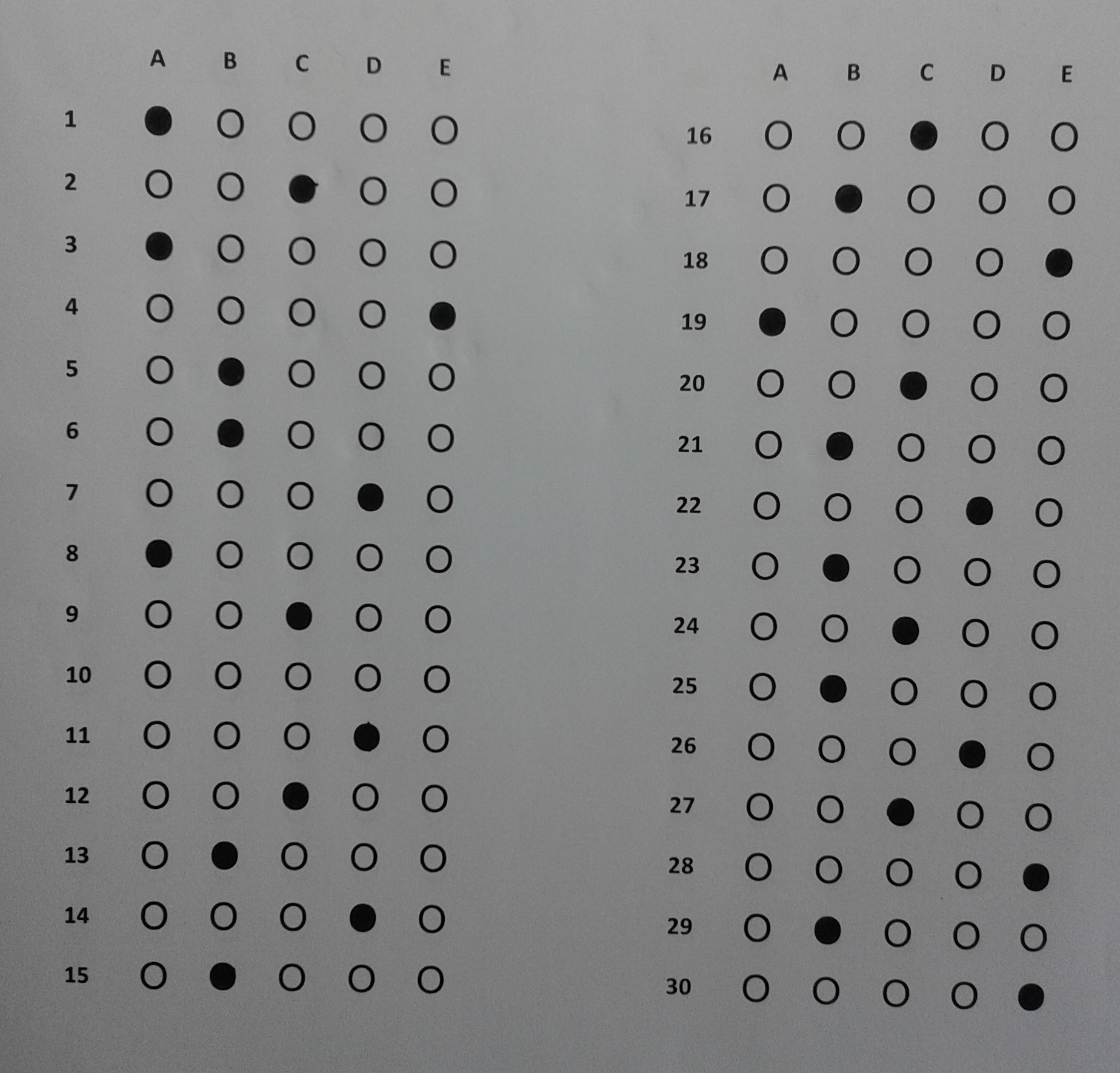
%reading the images

[fn, pn]=uigetfile('.');

InputImage = im2bw(imread([pn fn]));

 figure, imshow(InputImage ), title('Original Binary Image');

 % Removing Noise Pixels

% Rnp = bwareaopen(InputImage,45);
%figure,imshow(Rnp),title('Removed Noise Pixels');

% Strcuturing element
% se = strel('rectangle',[1,1]);
se = strel('rectangle', [15,1]);

% Erosion

%img_eroded = imerode(InputImage,se);
% figure,imshow(img_eroded), title('Eroded Image');

%Dilation
 img_dilated = imdilate(InputImage, se);
figure, imshow(img_dilated), title('Dilated Image')
% figure,imshow(InputImage);

% Calculate the connected components

CC = bwconncomp(img_dilated);

% Create a label matrix

L = labelmatrix(CC);

% Find the maximum value of the label matrix, this value indicates the number of detected objects

numObjects = max(L(:))

% Display the label matrix

figure, imshow(L,[]);


%subplot (1,3,1), imshow(InputImage ), title('Orignal Binary Image');
%subplot (1,3,2), imshow(img_eroded), title('Eroded Image');
%subplot (1,3,3), imshow(img_dilated), title('Dilated Image');


% To make it easier to differentiate the different connected components, display the label matrix as an RGB Image

figure, imshow(label2rgb(L,'jet', 'k', 'shuffle'));回答 2
Stack Overflow用户
发布于 2020-09-18 14:50:42
下面是您的代码的问题:
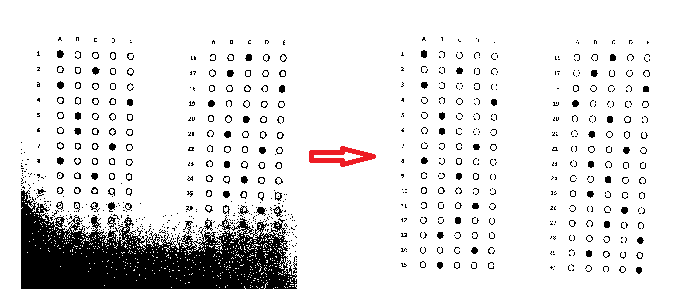
- 您需要为
im2bw指定一个level,因为纸张不是完全白色的。因此,当使用im2bw作为0.5调用level(这是默认值)时,背景的某些部分在黑白图像中变为黑色。
- 注意到
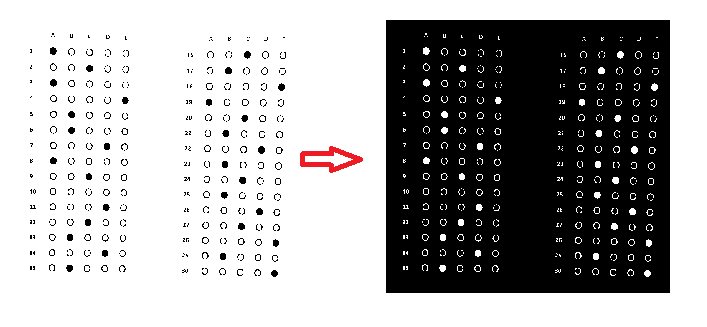
bwconncomp在黑色背景中发现白色像素体。因此,在继续之前,您需要反转二值化的图像。
,
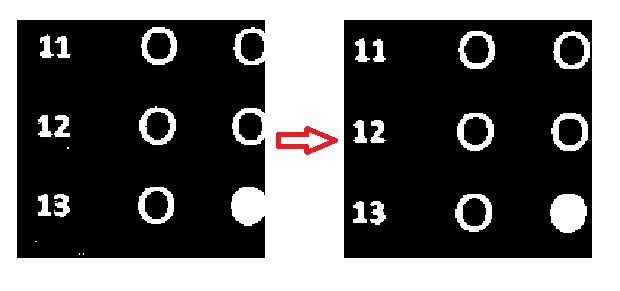
- ,最好通过调用
medfilt2来消除盐和胡椒的噪音。
正如赋值中所期望的那样,
- 需要水平扩展图像以连接线条的组件,因此在调用
strel构造结构元素时需要一个水平矩形。
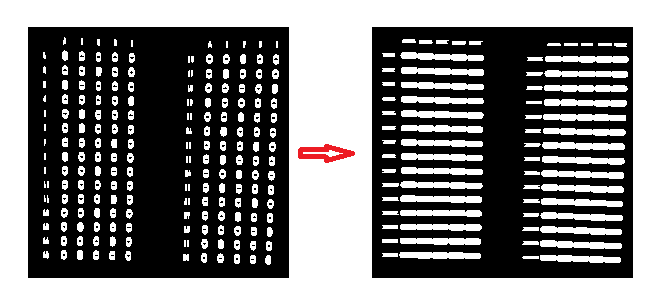
修复这些组件时,您将得到正确的连接组件:
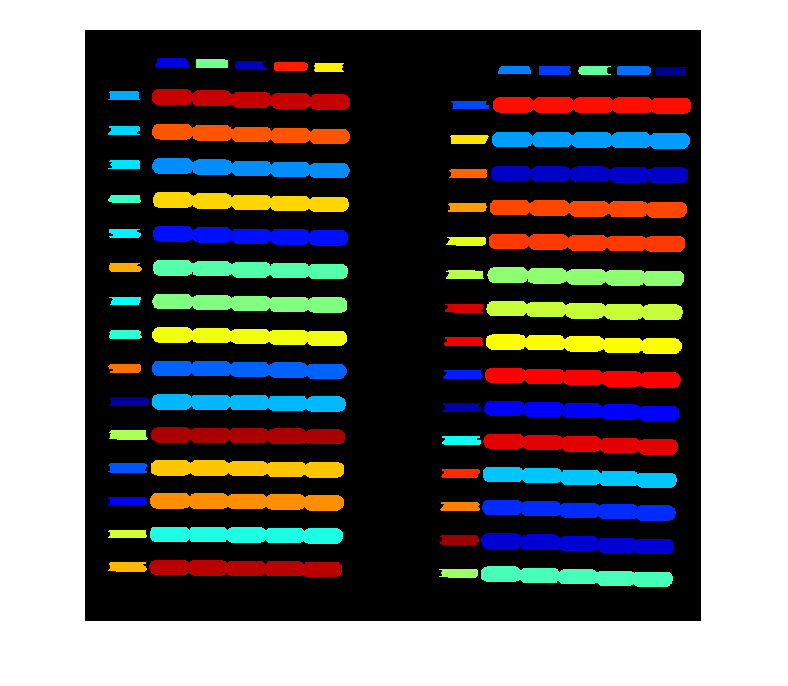
以下是从得到正确标记的图像时需要采取的步骤:
通过调用regionprops.
- Separate找到每个组件的区域、质心和边界框,这些组件对应于答案,方法是为components.
- Also,的区域指定一个阈值。通过为components.
- For的质心x设置另一个阈值来分离左列和右列的组件:
- 按列的y的顺序排列每列的行:
- 根据行和列index.
- Extract计算出问题号,在组件边界框内的内容从二进制图像(不包含标签或放大图像的图像)中计算,并将其保存在单独的图像中。code>Call
regionprops表示分割后的图像,并查找其内部的区域。 - 查找面积最大的组件的索引,由于answer.
将组件从左到右排序,所以将此索引作为所选的regionprops返回
答案=
1 1 2 3 3 1 5 5 5 6 2 7 7 8 1 9 3 10 1 11 4 12 13 2 14 4 15 2 16 3 2 18 5 19 20 3 2 2 22 4 23 2 24 3 25 2 26 4 27 3 28 5 29 2 30 5
PS:虽然作业中明确规定所有问题的答案都已提供,但问题10的答案并没有在您发布的图片中指定。对于这类问题,上述算法的结果是随机的。但是,您可以使用组件区域的偏差来检测是否所有组件都是空白的,就像@Adriaan在评论中建议的那样。
Stack Overflow用户
发布于 2020-09-18 19:29:38
参见这里的完整代码
 close , clear all;
P=0;
Q=0;
I2=imread('132446254287421150.jpg');
G2=rgb2gray(I2);
H2=~(im2bw(G2,graythresh(I2)));
BW2=bwareaopen(H2,1000);
cc2=bwconncomp(BW2);
L= bwlabel(BW2);
figure,imshow(BW2);title('Marked Options');
regionprop = regionprops(BW2,'Area', 'BoundingBox', 'Eccentricity', 'MajorAxisLength', 'MinorAxisLength',
'Orientation', 'Perimeter','Centroid');
coords = vertcat(regionprop.Centroid); % 2-by-18 matrix of centroid data
[~, ~, coords(:, 2)] = histcounts(coords(:, 2), 3); % Bin the "y" data
[~, sortIndex] = sortrows(coords, [2 1]); % Sort by "y" ascending, then "x" ascending
s = regionprop(sortIndex); % Apply sort index to s
figure, imshow(G2)
hold on;
for k = 1:numel(s)
 c = s(k).Centroid;
 text(c(1), c(2), sprintf('%d', k), ...
 'HorizontalAlignment', 'center', ...
 'VerticalAlignment', 'middle', 'color', 'r');
fprintf('Question No: = %d \n Marked Answer: = %d \nT', k,c(1));

end
hold off;
for k = 1:length(sortIndex)
 if(sortIndex(k)==1)
fprintf('\nQ1 filled circle is: A');
 end
 if(sortIndex(k)==2)
fprintf('\nQ3 filled circle is: A');
 end
 if(sortIndex(k)==3)
fprintf('\nQ2 filled circle is: C');
 end
 if(sortIndex(k)==4)
fprintf('\nQ4 filled circle is: E');
 end
 if(sortIndex(k)==5)
fprintf('\nQ19 filled circle is: A');
 end
 if(sortIndex(k)==6)
fprintf('\nQ17 filled circle is: B');
 end
 if(sortIndex(k)==7)
fprintf('\nQ16 filled circle is: C');
 end
 if(sortIndex(k)==8)
fprintf('\nQ18 filled circle is: E');
Mat lab Session:
 end
 if(sortIndex(k)==9)
fprintf('\nQ8 filled circle is: A');
 end
 if(sortIndex(k)==10)
fprintf('\nQ6 filled circle is: B');
 end
 if(sortIndex(k)==11)
fprintf('\nQ5 filled circle is: B');
 end
 if(sortIndex(k)==12)
fprintf('\nQ9 filled circle is: C');
 end
 if(sortIndex(k)==13)
fprintf('\nQ7 filled circle is: D');
 end
 if(sortIndex(k)==14)
fprintf('\nQ25 filled circle is: B');
 end
 if(sortIndex(k)==15)
fprintf('\nQ23 filled circle is: B');
 end
 if(sortIndex(k)==16)
fprintf('\nQ21 filled circle is: B');
 end
 if(sortIndex(k)==17)
fprintf('\nQ24 filled circle is: C');
 end
 if(sortIndex(k)==18)
fprintf('\nQ20 filled circle is: C');
 end
 if(sortIndex(k)==19)
fprintf('\nQ22 filled circle is: D');
 end
 if(sortIndex(k)==20)
fprintf('\nQ15 filled circle is: B');
 end
 if(sortIndex(k)==21)
fprintf('\nQ13 filled circle is: B');
 end
 if(sortIndex(k)==22)
fprintf('\nQ12 filled circle is: C');
 end
 if(sortIndex(k)==23)
fprintf('\nQ14 filled circle is: D');
 end
 if(sortIndex(k)==24)
fprintf('\nQ11 filled circle is: D');
 end
 if(sortIndex(k)==25)
fprintf('\nQ29 filled circle is: B');
 end
 if(sortIndex(k)==26)
fprintf('\nQ27 filled circle is: C');
 end
 if(sortIndex(k)==27)
fprintf('\nQ26 filled circle is: D');
end
 if(sortIndex(k)==28)
fprintf('\nQ30 filled circle is: E');
 end
 if(sortIndex(k)==29)
fprintf('\nQ1 filled circle is: A');
 end
endhttps://stackoverflow.com/questions/63956183
复制相似问题
腾讯云开发者

Copyright © 2013 - 2026 Tencent Cloud. All Rights Reserved. 腾讯云 版权所有
深圳市腾讯计算机系统有限公司 ICP备案/许可证号:粤B2-20090059  粤公网安备44030502008569号
腾讯云计算(北京)有限责任公司 京ICP证150476号 | 京ICP备11018762号