
在ASP.CoreMVC中发布后如何在级联selectList中获取项目
在ASP.CoreMVC中发布后如何在级联selectList中获取项目
提问于 2020-09-21 12:51:23
我有一个用于国家/省/城市的级联列表,它在创建和编辑操作中工作得很好,除了在编辑get中总是变为空之外,这是我的代码:
 public class LocationController : Controller
{
    public List<Country> countries = new List<Country>
    {
        new Country(){Id=1,Name="Country1"},
        new Country(){Id=2,Name="Country2"}
    };
    public List<Province> provinces = new List<Province>()
        {
            new Province() { Id = 1,CountryId = 1,Name = "Province1"},
            new Province() { Id = 2,CountryId = 2,Name = "Province2"},
        };
    public List<City> cities = new List<City>()
        {
            new City() { Id = 1,ProvinceId = 1,Name = "City1" },
            new City() { Id = 2,ProvinceId = 2,Name = "City2" },
            new City() { Id = 3,ProvinceId = 2,Name = "City3" },
        };

    public IActionResult Province(int value)
    {
        var l = provinces.Where(x => x.CountryId == value).ToList();
        return Json(l);
    }

    public IActionResult City(int value)
    {
        var c = cities.Where(c => c.ProvinceId == value).ToList();
        return Json(c);
    }
}
编辑视图:
<div class="form-group row">
                <div class="col-2">
                    <label asp-for="Country" class="col-form-label"></label>
                </div>
                <div class="col-sm-5">
                    <select id="CountryList" asp-for="Country" asp-items="@new LocationController().countries.Select(c=> new SelectListItem() {Text=c.Name,Value=c.Id.ToString() }).ToList() as IEnumerable<SelectListItem>" class="form-control">
                        <option selected disabled value="">--- Choose ---</option>
                    </select>
                </div>
            </div>
            <div class="form-group row">
                <div class="col-2">
                    <label asp-for="Province" class="col-form-label"></label>
                </div>
                <div class="col-sm-5">
                    <select id="ProvinceList" asp-for="Province" data-url="@Url.Action("Province","Location")" class="form-control">
                        <option selected disabled value="">--- Choose ---</option>
                    </select>
                </div>
            </div>
            <div class="form-group row">
                <div class="col-2">
                    <label asp-for="City" class="col-form-label"></label>
                </div>
                <div class="col-sm-5">
                    <select id="CityList" asp-for="City" data-url="@Url.Action("City","Location")" class="form-control">
                        <option selected disabled value="">--- Choose ---</option>
                    </select>
                </div>
            </div>
这是Javascript:
@section Scripts {
    <script>
        $(function () {
            $("#CountryList").change(function () {
                $("#CityList").empty();
                var v = $(this).val();
                var url = $("#ProvinceList").data("url") + '?value=' + v;
                $.getJSON(url, function (data) {
                    $("#ProvinceList").empty();
                    $("#ProvinceList").append('<option selected disabled value="">--- Choose ---</option>');
                    $.each(data, function (i, item) {
                        $("#ProvinceList")
                            .append($("<option>").text(item.name).val(item.id));
                    });
                });
            });
            $("#ProvinceList").change(function () {
                var v = $(this).val();
                var url = $("#CityList").data("url") + '?value=' + v;
                $.getJSON(url, function (data) {
                    $("#CityList").empty();
                    $("#CityList").append('<option selected disabled value="">--- Choose ---</option>');
                    $.each(data, function (i, item) {
                        $("#CityList")
                            .append($("<option>").text(item.name).val(item.id));
                    });
                });
            });
        });
        $('#formId').submit(function () {
            $('#CountryList option').val(function () {
                return $(this).text();
            });
            $('#ProvinceList option').val(function () {
                return $(this).text();
            });
            $('#CityList option').val(function () {
                return $(this).text();
            });
        });
    </script>
}
当然,在get操作中,我尝试从数据库中获取用户的位置,并在get中工作:
 [HttpGet]
    public async Task<IActionResult> Edit(string id)
    {
        var user = await _userManager.FindByIdAsync(id);
        EditUserViewModel modelVM = new EditUserViewModel
        {
            Country = user.Country,
            Region = user.Region,
            City = user.City,
        };
        return View(modelVM);
    }

但在人们看来,省/地区和市都是空的:
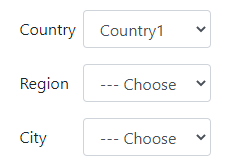
如果我单击更新省和市将为空。
回答 1
Stack Overflow用户
回答已采纳
发布于 2020-09-22 02:10:01
下面是一个关于如何将所选项传递给操作的工作演示:
型号:
public class Country
{
    public int Id { get; set; }
    public string Name { get; set; }
}
public class Province
{
    public int Id { get; set; }
    public string Name { get; set; }
    public int CountryId { get; set; }
}
public class City
{
    public int Id { get; set; }
    public string Name { get; set; }
    public int ProvinceId { get; set; }
}
更新:
看起来您想编辑一个用户,编辑视图将显示用户的默认城市、省和country.So,我认为您的js在编辑视图中是不需要的。
下面是一个示例,如下所示:
型号:
public class UserProfile
{
    public string Id { get; set; }
    public string City { get; set; }
    public string Country { get; set; }
    public string Province { get; set; }
}
public class EditUserViewModel
{
    public string City { get; set; }
    public string Country { get; set; }
    public  string Province { get; set; }
}
Index.cshtml(显示用户数据):
@model IEnumerable<UserProfile>
<table>
    <thead>
        <tr>
            <th>
                @Html.DisplayNameFor(model => model.Country)
            </th>
            <th>
                @Html.DisplayNameFor(model => model.Province)
            </th>
            <th>
                @Html.DisplayNameFor(model => model.City)
            </th>
            <th></th>
        </tr>
    </thead>
    <tbody>
        @foreach (var item in Model)
        {
            <tr>
                <td>
                    @Html.DisplayFor(modelItem => item.Country)
                </td>
                <td>
                    @Html.DisplayFor(modelItem => item.Province)
                </td>
                <td>
                    @Html.DisplayFor(modelItem => item.City)
                </td>
                <td>
                    <a asp-action="Edit" asp-route-id="@item.Id">Edit</a>
                </td>
            </tr>
        }
    </tbody>
</table>
Edit.cshtml:
@model EditUserViewModel
<form id="formId" asp-controller="Location" asp-action="Edit">
    <div class="form-group row">
        <div class="col-2">
            <label asp-for="Country" class="col-form-label"></label>
        </div>
        <div class="col-sm-5">

            //change here....
            <select id="CountryList" asp-for="Country" asp-items="@ViewBag.Country" class="form-control">
                <option selected disabled value="">--- Choose ---</option>
            </select>
        </div>
    </div>
    <div class="form-group row">
        <div class="col-2">
            <label asp-for="Province" class="col-form-label"></label>
        </div>
        <div class="col-sm-5">

            //change here....
            <select id="ProvinceList" asp-for="Province" asp-items="@ViewBag.Province" data-url="@Url.Action("Province","Location")" class="form-control">
                <option selected disabled value="">--- Choose ---</option>
            </select>
        </div>
    </div>
    <div class="form-group row">
        <div class="col-2">
            <label asp-for="City" class="col-form-label"></label>
        </div>
        <div class="col-sm-5">

            //change here....
            <select id="CityList" asp-for="City" asp-items="@ViewBag.City" data-url="@Url.Action("City","Location")"  class="form-control">
                <option selected disabled value="">--- Choose ---</option>
            </select>
        </div>
    </div>
    <input type="submit" value="aaa" />
</form>

@section Scripts
{
    <script>
        $(function () {
            $("#CountryList").change(function () {
                $("#CityList").empty();
                var v = $(this).val();
                var url = $("#ProvinceList").data("url") + '?value=' + v;
                $.getJSON(url, function (data) {
                    $("#ProvinceList").empty();
                    $("#ProvinceList").append('<option selected disabled value="">--- اختر ---</option>');
                    $.each(data, function (i, item) {
                        $("#ProvinceList")
                            .append($("<option>").text(item.name).val(item.id));
                    });
                });
            });
            $("#ProvinceList").change(function () {
                var v = $(this).val();
                var url = $("#CityList").data("url") + '?value=' + v;
                $.getJSON(url, function (data) {
                    $("#CityList").empty();
                    $("#CityList").append('<option selected disabled value="">--- اختر ---</option>');
                    $.each(data, function (i, item) {
                        $("#CityList")
                            .append($("<option>").text(item.name).val(item.id));
                    });
                });
            });
        });
        $('#formId').submit(function () {
            $('#CountryList option').val(function () {
                return $(this).text();
            });
            $('#ProvinceList option').val(function () {
                return $(this).text();
            });
            $('#CityList option').val(function () {
                return $(this).text();
            });
        });
    </script>
}
HomeController:
public class HomeController : Controller
{
    private List<UserProfile> users = new List<UserProfile>()
    {
        new UserProfile(){Id="1",Province="1",Country="1",City="1"},
        new UserProfile(){Id="2",Province="2",Country="2",City="3"},
    };
    public IActionResult Index()
    {
        return View(users);
    }

    [HttpGet]
    public async Task<IActionResult> Edit(string id)
    {
        var user = users.Where(a => a.Id == id).FirstOrDefault();
        ViewBag.Province = new SelectList(new LocationController().provinces,"Id","Name", user.Province);
        ViewBag.City = new SelectList(new LocationController().cities,"Id","Name", user.City);
        ViewBag.Country = new SelectList(new LocationController().countries,"Id","Name", user.Country);
        EditUserViewModel modelVM = new EditUserViewModel
        {
            Country = user.Country,
            Province = user.Province,
            City = user.City,
        };
        return View(modelVM);
    }
    [HttpPost]
    public IActionResult Edit(string city, string province, string country)
    {
        return RedirectToAction("Index");
    }

}
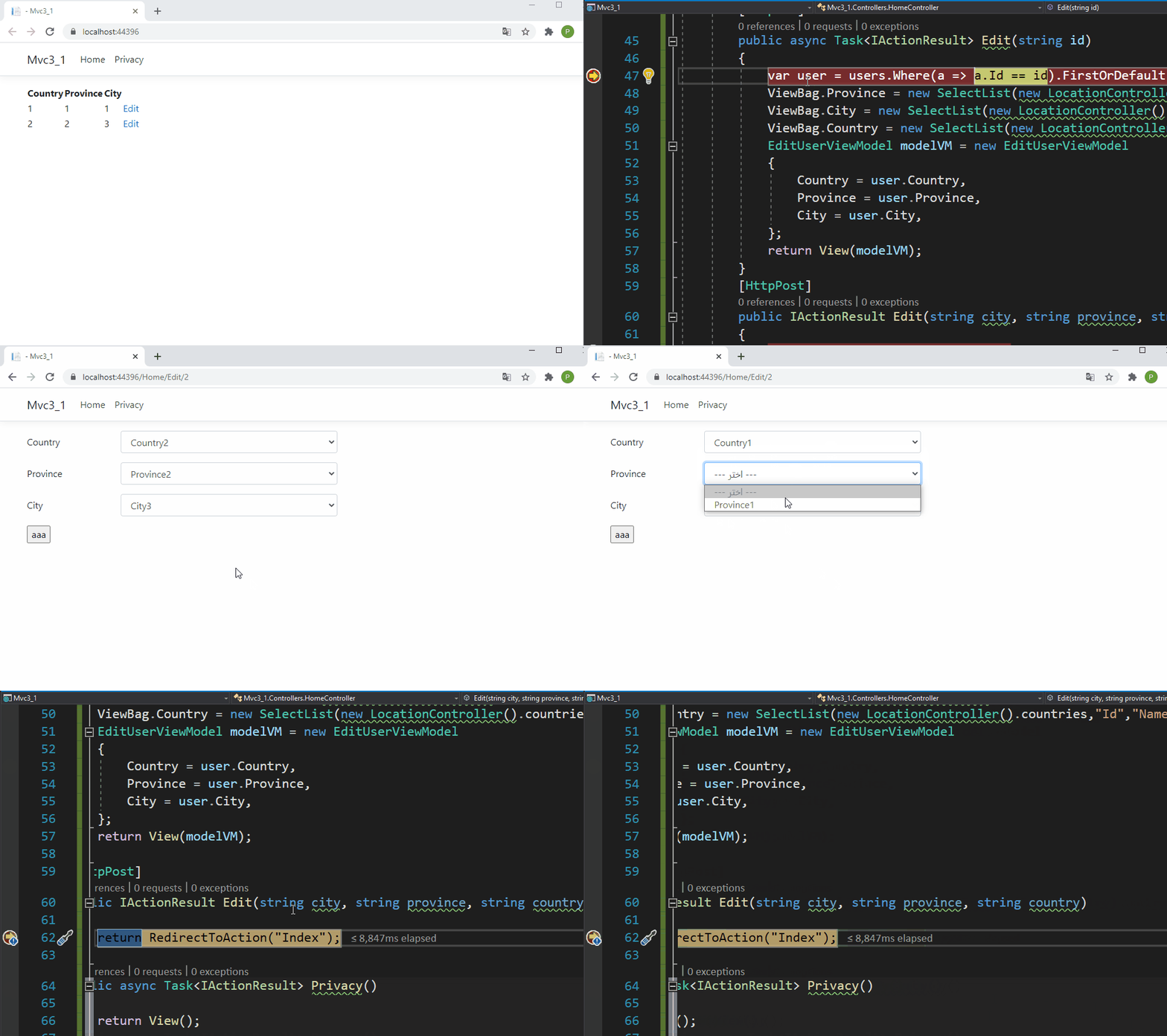
结果:
页面原文内容由Stack Overflow提供。腾讯云小微IT领域专用引擎提供翻译支持
原文链接:
https://stackoverflow.com/questions/63992647
复制相关文章
相似问题
腾讯云开发者

Copyright © 2013 - 2026 Tencent Cloud. All Rights Reserved. 腾讯云 版权所有
深圳市腾讯计算机系统有限公司 ICP备案/许可证号:粤B2-20090059  粤公网安备44030502008569号
腾讯云计算(北京)有限责任公司 京ICP证150476号 | 京ICP备11018762号