
无法读取null的属性'company‘
console.log(profile);工作得很好,它展示了这一点。
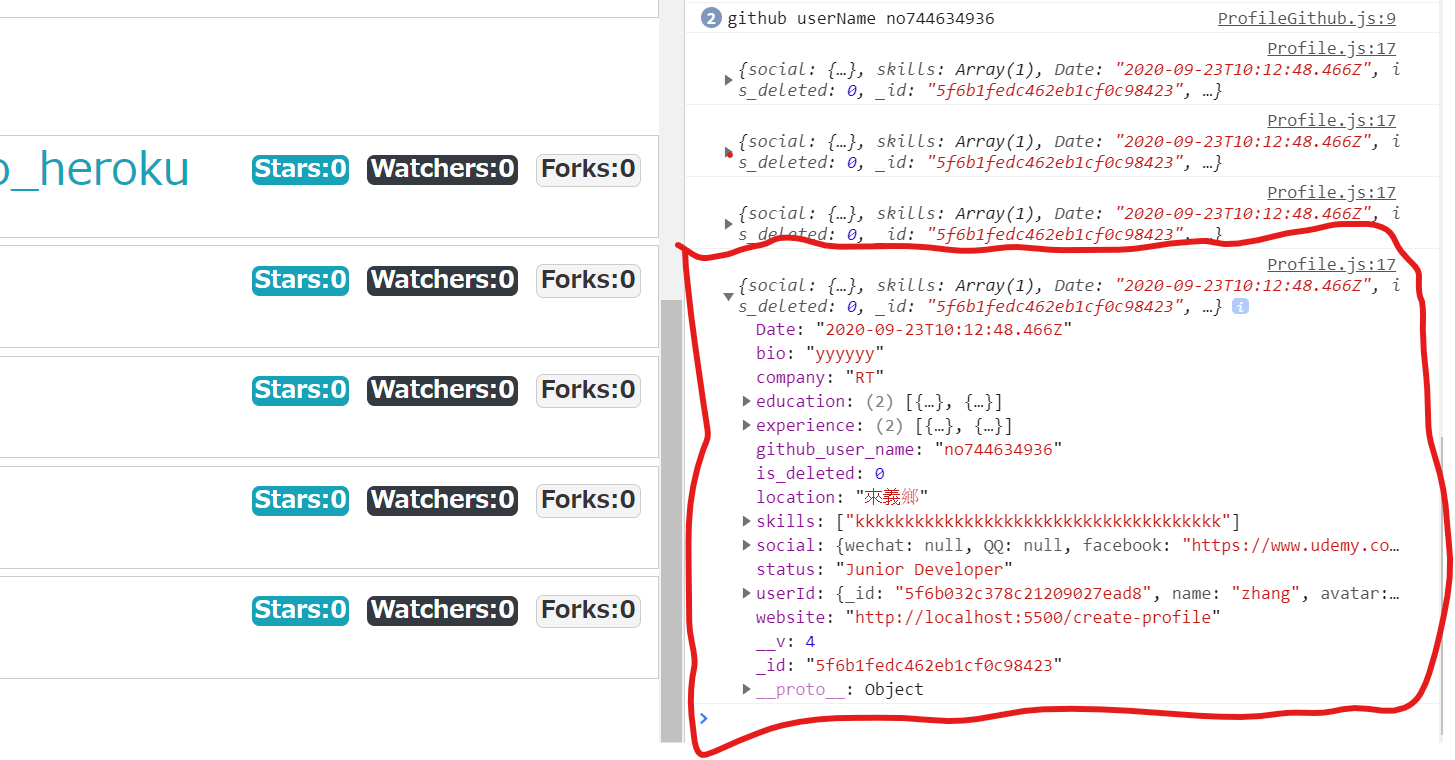
但是当我用console.log(profile.company);来获取公司名称时。它向我展示了Cannot read property 'company' of null错误信息。如何解决这一错误?任何帮助都是非常感谢的。
这是代码
import React,{Fragment,useEffect}from 'react'
import PropTypes from 'prop-types'
import Loading from "../layout/Loading.js"
import {connect} from "react-redux"
import {getProfileById} from "../../redux/profile/profileAction.js"
import { Link } from 'react-router-dom'

import ProfileTop from "./ProfileTop.js"
import ProfileAbout from "./ProfileAbout.js"
import ProfileExperience from "./ProfileExperience.js"
import ProfileEducation from "./ProfileEducation.js"
import ProfileGithub from "./ProfileGithub.js"

const Profile = ({getProfileById,match,profileData,loginData}) => {
    const {loading,profile}=profileData

    console.log(profile);         //works
    console.log(profile.company); //error occurred

    useEffect(()=>{
        getProfileById(match.params.userId)
    },[getProfileById,match.params.userId])
    return (
        <div style={{marginTop:"100px"}}>
            {
                profile ===null||loading? (<Loading/>):
                (<Fragment>
                    <Link to="/profiles" className="btn btn-light"> Back to profiles</Link>
                    {
                        (loginData.isAuthenticated && loginData.loading===false&&loginData.user_data.userid===match.params.userId) ?
                        (<Link to="/edit-profile" className="btn btn-dark">Edit profile</Link>):null
                    }
                    <div className="profile-grid my-1">
                        <ProfileTop profile={profile}></ProfileTop>
                        <ProfileAbout profile={profile}></ProfileAbout>
                        <ProfileExperience profile={profile}></ProfileExperience>
                        <ProfileEducation profile={profile}></ProfileEducation>
                        <ProfileGithub profile={profile}></ProfileGithub>
                        {
                            profile.github_user_name===""? null:<ProfileGithub profile={profile}></ProfileGithub>
                        }

                    </div>
                </Fragment>)
            }
        </div>
    )
}

Profile.propTypes = {
    profileData:PropTypes.object.isRequired,
}

const mapStateToProps=(state)=>{
    return{
        profileData:state.profileData,
        loginData:state.loginData
    }
}

export default connect(mapStateToProps,{getProfileById})(Profile)回答 2
Stack Overflow用户
发布于 2020-09-26 06:28:42
无法读取空错误消息的属性“company”
很明显,'company‘对象为null (可能用于初始呈现),并且您正在获取错误,因为您正在访问空对象上的属性。
对于TypeScript,您可以使用,
profile?.company.
它被称为可选链接https://www.typescriptlang.org/docs/handbook/release-notes/typescript-3-7.html#optional-chaining。
但是在普通的JS中,我们必须使用if语句并检查空情况。
对于上面的例子,模板完全依赖于配置文件。这样,如果这个值是未定义的/null,那么首先检查配置文件的值,然后返回一个空的模板。
if(!profile){
  return null;
}
return <Your template>Stack Overflow用户
发布于 2020-09-26 05:13:01
正如注释中提到的,浏览器控制台不会立即打印对象的内容。要做到这一点,您需要做一些诸如JSON.stringify(profile)之类的事情。
而且,在我看来,在函数组件上使用console.log是非常好的,这将让您知道组件什么时候呈现(但不要太纠结于为什么组件呈现如此频繁,呈现通常并不昂贵)。
如果您正在使用的最新版本,您可以尝试可选的链接(?):
console.log(profile);
console.log(profile?.company); // equivalent to (profile && profile.company)

// Or if you need to know the content exactly in the moment:
console.log(JSON.stringify(profile));https://stackoverflow.com/questions/64074025
复制相似问题
腾讯云开发者

Copyright © 2013 - 2026 Tencent Cloud. All Rights Reserved. 腾讯云 版权所有
深圳市腾讯计算机系统有限公司 ICP备案/许可证号:粤B2-20090059  粤公网安备44030502008569号
腾讯云计算(北京)有限责任公司 京ICP证150476号 | 京ICP备11018762号