
使小部件扩展为SingleChildScrollView widget中的最小高度
使小部件扩展为SingleChildScrollView widget中的最小高度
提问于 2020-09-28 13:27:18
这是我的密码
child: Scaffold(
        resizeToAvoidBottomPadding: false,
        appBar: AppBar(),
        drawer: MyDrawer(),
        body: SingleChildScrollView(
          child: Column(
            mainAxisSize: MainAxisSize.min,
            // direction: Axis.vertical,
            children: [
              Container(
                height: 400,
                child: Text('PageOne'),
              ),
              IntrinsicHeight(
                child: Expanded(
                  child: Container(
                    width: double.infinity,
                    color: Colors.grey,
                    child: Text(
                      'Hi',
                      textAlign: TextAlign.center,
                    ),
                  ),
                ),
              ),
            ],
          ),
        ),
      ),
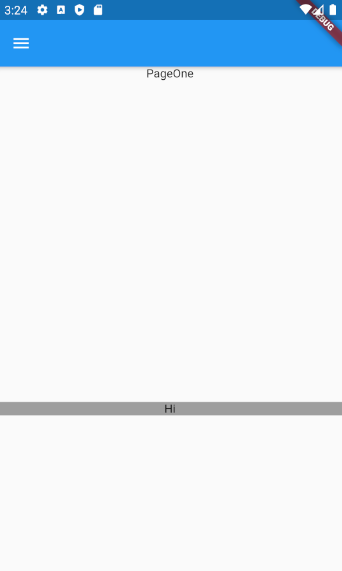
我希望这个灰色容器在屏幕截图中以最小高度填充高度,我需要它对屏幕手机进行响应旋转,对于所有手机屏幕大小,它只在使用SingleChildScrollView时采取静态高度大小,因为有无限的高度可用,所以我设法让他将屏幕的剩余高度作为容器的最小高度。
有什么想法吗?
回答 1
Stack Overflow用户
回答已采纳
发布于 2020-09-28 14:13:37
如果do知道最上面部分的高度,您可以使用LayoutBuilder和ConstrainedBox的组合,如下所示:
import 'dart:math';

import 'package:flutter/material.dart';

main() {
  runApp(MaterialApp(home: MyApp()));
}

class MyApp extends StatelessWidget {
  final double headerHeight = 400;

  @override
  Widget build(BuildContext context) {
    return Scaffold(
      resizeToAvoidBottomPadding: false,
      appBar: AppBar(),
      body: LayoutBuilder(
          builder: (BuildContext context, BoxConstraints constraints) {
            return SingleChildScrollView(
              child: Column(
                mainAxisSize: MainAxisSize.min,
                // direction: Axis.vertical,
                children: [
                  Container(
                    color: Colors.red,
                    height: headerHeight,
                    child: Text('PageOne'),
                  ),
                  ConstrainedBox(
                    constraints: new BoxConstraints(
                      minHeight: max(0, constraints.maxHeight - headerHeight),
                    ),
                    child: Container(
                      width: double.infinity,
                      color: Colors.grey,
                      child: Text(
                        'Hi',
                        textAlign: TextAlign.center,
                      ),
                    ),
                  ),
                ],
              ),
            );
          }
      ),
    );
  }
}如果您的不知道顶部部分的高度,我将使用键(或键)来获取它们的大小,并使用与上面相同的小部件树。
页面原文内容由Stack Overflow提供。腾讯云小微IT领域专用引擎提供翻译支持
原文链接:
https://stackoverflow.com/questions/64103137
复制相关文章
相似问题
腾讯云开发者

Copyright © 2013 - 2026 Tencent Cloud. All Rights Reserved. 腾讯云 版权所有
深圳市腾讯计算机系统有限公司 ICP备案/许可证号:粤B2-20090059  粤公网安备44030502008569号
腾讯云计算(北京)有限责任公司 京ICP证150476号 | 京ICP备11018762号