
NVIDIA Docker -初始化错误: nvml错误:驱动程序未加载
我是码头的新手,所以下面的问题可能有点天真,但是我被困住了,我需要帮助。
我在努力复制一些研究结果。作者们只是为了重现他们的结果而发布的代码以及如何构建Docker映像的规范。相关比特复制如下:
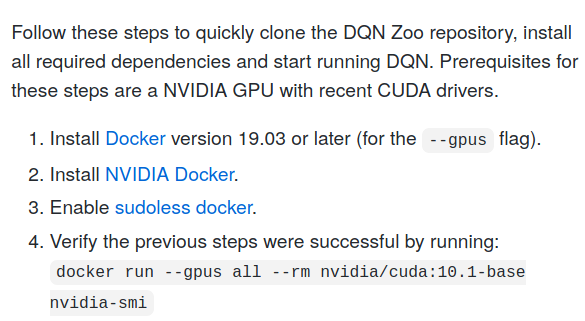
我相信我正确地安装了码头:
$ docker --version
Docker version 19.03.13, build 4484c46d9d
$ sudo docker run hello-world

Hello from Docker!
This message shows that your installation appears to be working correctly.

To generate this message, Docker took the following steps:
 1. The Docker client contacted the Docker daemon.
 2. The Docker daemon pulled the "hello-world" image from the Docker Hub.
    (amd64)
 3. The Docker daemon created a new container from that image which runs the
    executable that produces the output you are currently reading.
 4. The Docker daemon streamed that output to the Docker client, which sent it
    to your terminal.

To try something more ambitious, you can run an Ubuntu container with:
 $ docker run -it ubuntu bash

Share images, automate workflows, and more with a free Docker ID:
 https://hub.docker.com/

For more examples and ideas, visit:
https://docs.docker.com/get-started/但是,当我尝试检查我的nvidia-docker安装是否成功时,我会得到以下错误:
$ sudo docker run --gpus all --rm nvidia/cuda:10.1-base nvidia-smi
docker: Error response from daemon: OCI runtime create failed: container_linux.go:349: starting container process caused "process_linux.go:449: container init caused \"process_linux.go:432: running prestart hook 0 caused \\\"error running hook: exit status 1, stdout: , stderr: nvidia-container-cli: initialization error: nvml error: driver not loaded\\\\n\\\"\"": unknown.
看起来关键的错误是:
nvidia-container-cli: initialization error: nvml error: driver not loaded
我在本地没有GPU,我发现在NVIDIA Docker之前是否需要安装CUDA的信息是相互矛盾的。例如,这位NVIDIA主持人说“一个正确的nvidia对接插件安装开始于一个正确的数据自动化系统安装在基本机器上。”
我的问题如下:
- 不安装CUDA,我可以安装NVIDIA码头吗?
- 如果是的话,这个错误的来源是什么,以及如何修复它?
- 如果没有,如何创建这个Docker映像来再现结果?
回答 1
Stack Overflow用户
发布于 2020-10-04 17:51:14
- 不安装CUDA,我可以安装NVIDIA码头吗?
可以,停那儿吧。自述文件声明nvidia-docker只需要安装NVIDIA驱动程序和码头引擎:
请注意,您不需要在主机系统上安装CUDA工具包,但需要安装NVIDIA驱动程序
- 如果是的话,这个错误的来源是什么,以及如何修复它?
这要么是因为你在本地没有GPU,要么不是NVIDIA,或者你在安装驱动程序时搞砸了。如果您有一个CUDA功能的GPU,我建议使用NVIDIA指南来安装驱动程序。如果你没有本地的GPU,你仍然可以用CUDA构建一个图像,然后你可以把它移到有GPU的地方。
- 如果没有,如何创建这个Docker映像来再现结果?
问题是,即使你设法摆脱了CUDA的码头形象,有软件需要它。在本例中,修复Dockerfile在我看来是不必要的--您可以忽略Docker,开始修复代码,以便在CPU上运行它。
https://stackoverflow.com/questions/64197626
复制相似问题
腾讯云开发者

Copyright © 2013 - 2026 Tencent Cloud. All Rights Reserved. 腾讯云 版权所有
深圳市腾讯计算机系统有限公司 ICP备案/许可证号:粤B2-20090059  粤公网安备44030502008569号
腾讯云计算(北京)有限责任公司 京ICP证150476号 | 京ICP备11018762号