
用Python解析XML文件
用Python解析XML文件
提问于 2020-10-05 19:32:47
对于转换为CSV的XML文件,我无法以这种方式解析数据:
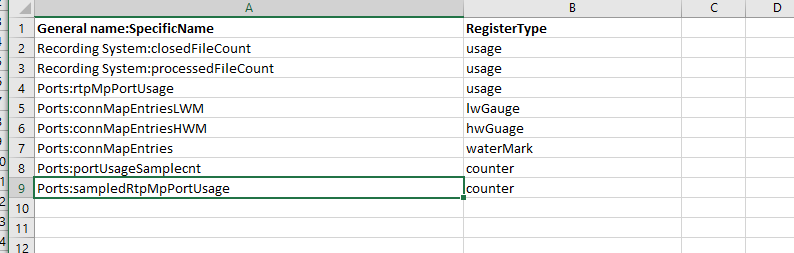
对于第一列,我希望获得通用名称标记(recordingSystem、端口等),并将其与行标记(closedFileCount、processedFileCount等)中的subNames连接起来。
subName所在的标签不断变化,可能是“使用”、"lwGuage“、"hwGauge”等等。我也需要收集这些,并把它放在它旁边的专栏。
请参阅下面的示例XML:
<?xml version="1.0" encoding="UTF-8"?>

<omGroups xmlns="urn:nortel:namespaces:mcp:oms" xmlns:xsi="http://www.w3.org/2001/XMLSchema-instance" xsi:schemaLocation="urn:nortel:namespaces:mcp:oms OMSchema.xsd" >

        <group>
                <name>RecordingSystem</name>
                <row>
                        <package>com.nortelnetworks.mcp.ne.base.recsystem.fw.system</package>
                        <class>RecSysFileOMRow</class>
                        <usage name="closedFileCount" hasThresholds="true">
                                <measures>
                                        closed file count
                                </measures>
                                <description>
                                        This register counts the number
                                        of closed files in the spool directory of a
                                        particular stream and a particular system.
                                        Files in the spool directory store the raw
                                        OAM records where they are sent to the
                                        Element Manager for formatting.
                                </description>
                                <notes>
                                        Minor and major alarms
                                        when the value of closedFileCount
                                        exceeds certain thresholds. Configure
                                        the threshold values for minor and major
                                        alarms for this OM through engineering
                                        parameters for minorBackLogCount and
                                        majorBackLogCount, respectively. These
                                        engineering parameters are grouped under
                                        the parameter group of Log, OM, and
                                        Accounting for the logs’ corresponding
                                        system.
                                </notes>
                        </usage>
                        <usage name="processedFileCount" hasThresholds="true">
                                <measures>
                                        Processed file count
                                </measures>
                                <description>
                                        The register counts the number
                                        of processed files in the spool directory of
                                        a particular stream and a particular system.
                                        Files in the spool directory store the raw
                                        OAM records and then send the records to
                                        the Element Manager for formatting.
                                </description>
                        </usage>
                </row>
                <documentation>
                        <description>
                                Rows of this OM group provide a count of the number of files contained
                                within the directory (which is the OM row key value).
                        </description>
                        <rowKey>
                                The full name of the directory containing the files counted by this row.
                        </rowKey>
                </documentation>
                <generatedOn>
                        <all/>
                </generatedOn>
        </group>
        <group traffic="true">
                <name>Ports</name>
                <row>
                        <package>com.nortelnetworks.ims.cap.mediaportal.host</package>
                        <class>PortsOMRow</class>
                        <usage name="rtpMpPortUsage">
                                <measures>
                                        BCP port usage
                                </measures>
                                <description>
                                        Meter showing number of ports in use.
                                </description>
                        </usage>
                        <lwGauge name="connMapEntriesLWM">
                                <measures>
                                        Lowest simultaneous port usage
                                </measures>
                                <description>
                                        Lowest number of
                                        simultaneous ports detected to be in
                                        use during the collection interval
                                </description>
                        </lwGauge>
                        <hwGauge name="connMapEntriesHWM">
                                <measures>
                                        Highest simultaneous port usage
                                </measures>
                                <description>
                                        Highest number of
                                        simultaneous ports detected to be in
                                        use during the collection interval.
                                </description>
                        </hwGauge>
                        <waterMark name="connMapEntries">
                                <measures>
                                        Connections map entries
                                </measures>
                                <description>
                                        Meter showing the number of connections in the host
                                        CPU connection map.
                                </description>
                                <bwg lwref="connMapEntriesLWM" hwref="connMapEntriesHWM"/>
                        </waterMark>
                        <counter name="portUsageSampleCnt">
                                <measures>
                                    Usage sample count
                                </measures>
                                <description>
                                    The number of 100-second samples taken during the
                                    collection interval contributing to the average report.
                                </description>
                        </counter>
                        <counter name="sampledRtpMpPortUsage">
                                <measures>
                                    In-use ports usage
                                </measures>
                                <description>
                                    Provides the sum of the in-use ports every 100 seconds.
                                </description>
                        </counter>
                        <precollector>
                                <package>com.nortelnetworks.ims.cap.mediaportal.host</package>
                                <class>PortsOMCenturyPrecollector</class>
                                <collector>centurySecond</collector>
                        </precollector>
                </row>
                <documentation>
                        <description>
                        </description>
                        <rowKey>
                        </rowKey>
                </documentation>
                <generatedOn>
                        <list>
                            <ne>sessmgr</ne>
                            <ne>rtpportal</ne>
                        </list>
                </generatedOn>
        </group>

</omGroups>
下面的代码应该得到GeneralName并在csv文件中显示正确的次数,但我无法让它显示任何内容。
from xml.etree import ElementTree
import csv
from copy import copy

import lxml.etree


tree = ElementTree.parse('OM.xml')

sitescope_data = open('OMFileConverted.csv', 'w', newline='', encoding='utf-8')
csvwriter = csv.writer(sitescope_data)


#Create all needed columns here in order and writes them to excel file
col_names = ['name', 'OMRegister']
csvwriter.writerow(col_names)

def recurse(root, props):
    for child in root:
        if child.tag == '{urn:nortel:namespaces:mcp:oms}group':
            p2 = copy(props)
            for event in root.findall('{urn:nortel:namespaces:mcp:oms}group'):
                event_id = event.find('{urn:nortel:namespaces:mcp:oms}name')
                if event_id != None:
                    p2['name'] = event_id.text
                    recurse(child, p2)
                else:
                    recurse(child, props)


    for event in root.findall('{urn:nortel:namespaces:mcp:oms}group'):

        event_data = [props.get('name')]


        csvwriter.writerow(event_data)


root = tree.getroot()
recurse(root,{}) #root + empty dictionary
sitescope_data.close()回答 1
Stack Overflow用户
回答已采纳
发布于 2020-10-05 19:51:04
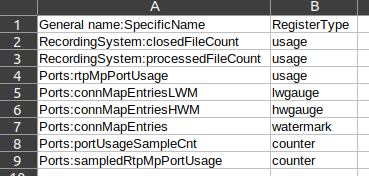
如果xml_string是问题中的XML片段,那么这个脚本:
import csv
from bs4 import BeautifulSoup

soup = BeautifulSoup(xml_string, 'html.parser')

with open('data.csv', 'w', newline='') as f_out:
    writer = csv.writer(f_out)
    writer.writerow(['General name:SpecificName', 'RegisterType'])
    for item in soup.select('row [name]'):
writer.writerow([item.find_previous('name').text + ':' + item['name'], item.name])生成data.csv (来自LibreOffice的屏幕快照):
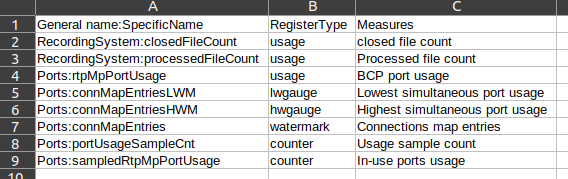
编辑:要将measures标记放到列中,您可以这样做:
import csv
from bs4 import BeautifulSoup

soup = BeautifulSoup(xml_string, 'html.parser')

with open('data.csv', 'w', newline='') as f_out:
    writer = csv.writer(f_out)
    writer.writerow(['General name:SpecificName', 'RegisterType', 'Measures'])
    for item in soup.select('row [name]'):
        writer.writerow([item.find_previous('name').text + ':' + item['name'], item.name, item.find('measures').get_text(strip=True)])
生产:
页面原文内容由Stack Overflow提供。腾讯云小微IT领域专用引擎提供翻译支持
原文链接:
https://stackoverflow.com/questions/64215050
复制相关文章
相似问题
腾讯云开发者

Copyright © 2013 - 2026 Tencent Cloud. All Rights Reserved. 腾讯云 版权所有
深圳市腾讯计算机系统有限公司 ICP备案/许可证号:粤B2-20090059  粤公网安备44030502008569号
腾讯云计算(北京)有限责任公司 京ICP证150476号 | 京ICP备11018762号