
类星体Vue框架:重置验证输入字段
类星体Vue框架:重置验证输入字段
提问于 2020-10-07 20:17:18
我正在开发的类星体应用程序允许在输入字段中拍照和添加一些文本。成功发送图像后,对话框将出现,并提供2个按钮,一个按钮“另一个陷阱”(另一个重定向到另一个页面):
// text input field
<div class="row justify-center q-ma-md">
  <q-input
    v-model="post.caption"
    ref="inputCaption"
    hint="Please enter at least 4 characters."
    :rules="[required(), minLength()]"
    clearable
    label="Caption *"
    dense
    class="col col-sm-6" />
</div>

// Dialog buttons
<q-dialog v-model="savedSuccessfully">
    [...]
    <q-card-actions align="right" class="text-primary">
      <q-btn unelevated rounded color="secondary" label="Take another photo" @click="resetCanvas" />
      <q-btn unelevated rounded color="primary" label="Go to postings" @click="goToPostings" />
</q-card-actions>"resetCanvas“函数不仅重置图像画布,而且不幸地在resetValidation()上重新设置输入字段--根据类星体的文档,输入字段应该完成--输入字段仍然被认为是脏的:
resetCanvas() {
  [...]

  this.$refs.inputCaption.resetValidation()
  this.$refs.inputCaption.isDirty = false
},我甚至在重置脚本中添加了一个this.$refs.inputCaption.isDirty = false,但是没有效果。(见截图)
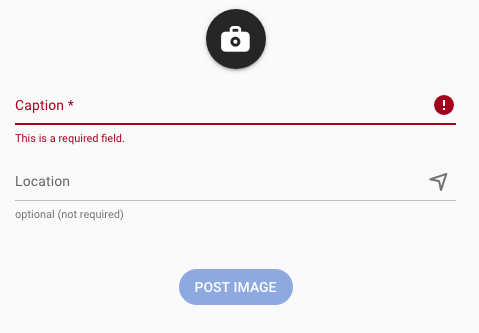
在重置时,我需要做些什么才能正确清除输入字段?
回答 2
Stack Overflow用户
发布于 2021-12-08 16:18:31
对于我而言,我使用的是Vue 3和类星体,这是我在提交后重置表单的一种方式:
在模板使用中:
<q-form ref="myForm">
  <!-- Your input field -->
</q-form>
在您的脚本标记中:
<script>
import {defineComponent, ref} from "vue"

export default defineComponent({
  setup(){
   const myForm = ref(null)

   const onSubmit = () => {
    //Your code....
    myForm.value.reset()
   }
   return{
    myForm,
    onSubmit
   }
  }
})
</script>
Stack Overflow用户
发布于 2022-03-14 03:13:51
唯一对我有用的是在字段上使用@blur并重新设置原始数据。
页面原文内容由Stack Overflow提供。腾讯云小微IT领域专用引擎提供翻译支持
原文链接:
https://stackoverflow.com/questions/64251703
复制相关文章
相似问题
腾讯云开发者

Copyright © 2013 - 2026 Tencent Cloud. All Rights Reserved. 腾讯云 版权所有
深圳市腾讯计算机系统有限公司 ICP备案/许可证号:粤B2-20090059  粤公网安备44030502008569号
腾讯云计算(北京)有限责任公司 京ICP证150476号 | 京ICP备11018762号