
insertSubview()覆盖整个Mainview,即使插入到0
insertSubview()覆盖整个Mainview,即使插入到0
提问于 2020-10-07 19:20:17
我使用以下代码将UIView插入到UIButton中:
        let backgroundView = UIView()
        backgroundView.backgroundColor = .red
        backgroundView.translatesAutoresizingMaskIntoConstraints = false

        blueButton.insertSubview(backgroundView, at: 0)
        NSLayoutConstraint.activate([
            backgroundView.leadingAnchor.constraint(equalTo: blueButton.leadingAnchor),
            backgroundView.trailingAnchor.constraint(equalTo: blueButton.trailingAnchor),
            backgroundView.topAnchor.constraint(equalTo: blueButton.topAnchor),
            backgroundView.bottomAnchor.constraint(equalTo: blueButton.bottomAnchor)
        ])
问题是,backgroundView覆盖了整个按钮,而我只看到红色字段,而不是带有红色背景(我的subView)的按钮(它是图像)。
这是我形象中的故事板部分。除了尝试将subView放入代码中,我不使用此按钮在代码中执行其他操作:
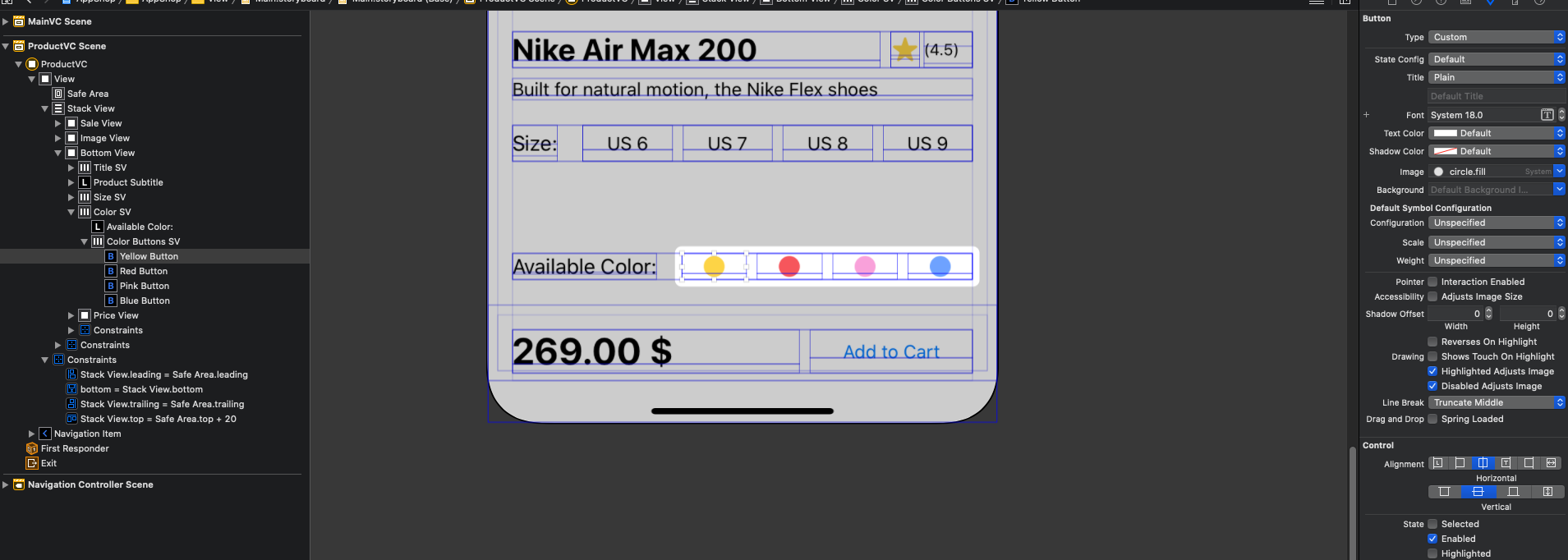
,我的目标是有一个圆圈背景,如下图所示。例如,红色圆圈按钮有一个圆形的红色(但比红色的按钮亮),按钮的backgroundView.The标准背景应该保持不变。

我还试图将subView发送到后台,但它对我无效:
blueButton.sendSubviewToBack(backgroundView)我减少了子视图的alpha值,以查看按钮图像是否仍然存在。
for view in blueButton.subviews {
    view.alpha = 0.5
}
它是:

我该如何解决这个问题?
回答 1
Stack Overflow用户
回答已采纳
发布于 2020-10-07 19:44:52
不要向按钮中注入额外的子视图。如果目标是使按钮的背景色变为红色,则将其backgroundColor设置为.red。如果目标是在按钮图像后面放置一些东西,这就是backgroundImage的目的。或者让按钮图像看起来像你真正想要的图像。
我做了这个按钮:

看上去很像你的照片。下面是代码:
let im = UIGraphicsImageRenderer(size: CGSize(width: 30, height: 30)).image {
    ctx in
    UIColor.red.withAlphaComponent(0.2).setFill()
    ctx.cgContext.fillEllipse(in: CGRect(x: 0, y: 0, width: 30, height: 30))
    UIColor.red.setFill()
    ctx.cgContext.fillEllipse(in: CGRect(x: 5, y: 5, width: 20, height: 20))
}
b.setImage(im.withRenderingMode(.alwaysOriginal), for: .normal)
我认为这比破坏不受欢迎的非法子视图要好得多。
页面原文内容由Stack Overflow提供。腾讯云小微IT领域专用引擎提供翻译支持
原文链接:
https://stackoverflow.com/questions/64250911
复制相关文章
相似问题
腾讯云开发者

Copyright © 2013 - 2026 Tencent Cloud. All Rights Reserved. 腾讯云 版权所有
深圳市腾讯计算机系统有限公司 ICP备案/许可证号:粤B2-20090059  粤公网安备44030502008569号
腾讯云计算(北京)有限责任公司 京ICP证150476号 | 京ICP备11018762号