
Django部署教程中的Google资源错误
Django部署教程中的Google资源错误
提问于 2020-10-10 07:47:24
我一直在寻找一种很好的方法来部署Django应用程序,我发现Google是一个很好的解决方案。我在应用程序部署方面没有多少经验,因此我将与官方Google教程一起讨论部署。
在最后一步中,本教程指示我在cmd提示符:gcloud app deploy中部署应用程序。
我跟着走。在我收到这条信息之前一切看起来都很好:
更新服务默认设置。
过了一会儿,我收到一条消息:
Updating service [default] (this may take several minutes)...failed.
ERROR: (gcloud.app.deploy) Error Response: [13] Flex operation <stuff..> error [INTERNAL]: An internal error occurred while processing task /app-engine-flex/insert_flex_deployment/flex_create_resources>2020-10-10T07:36:04.734Z7747.ue.0: Deployment Manager operation <stuff..> errors: [code: "RESOURCE_ERROR"
location: "<stuff...>"
message: "{\"ResourceType\":\"compute.beta.regionAutoscaler\",\"ResourceErrorCode\":\"403\",\"ResourceErrorMessage\":{\"code\":403,\"message\":\"The caller does not have permission\",\"status\":\"PERMISSION_DENIED\",\"statusMessage\":\"Forbidden\",\"requestPath\":\"<stuff..>",\"httpMethod\":\"POST\"}}"
]每次重新运行命令gcloud app deploy时,都会得到完全相同的错误。知道怎么解决吗?谷歌搜索没有为我透露任何东西。
回答 1
Stack Overflow用户
回答已采纳
发布于 2020-10-10 13:01:19
首先,尝试给自己以下的权限。这的回答将有助于一些解释。
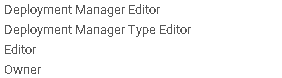
另外,尝试在您的.yaml文件中添加以下内容,看看它是否解决了它
automatic_scaling:
    min_num_instances: 1
max_num_instances: 7 页面原文内容由Stack Overflow提供。腾讯云小微IT领域专用引擎提供翻译支持
原文链接:
https://stackoverflow.com/questions/64291193
复制相关文章
相似问题
腾讯云开发者

Copyright © 2013 - 2026 Tencent Cloud. All Rights Reserved. 腾讯云 版权所有
深圳市腾讯计算机系统有限公司 ICP备案/许可证号:粤B2-20090059  粤公网安备44030502008569号
腾讯云计算(北京)有限责任公司 京ICP证150476号 | 京ICP备11018762号