
引导程序正在为表行添加额外的边框。
引导程序正在为表行添加额外的边框。
提问于 2020-10-11 09:33:30
我编写了CSS以将第一个和最后一个td隐藏在一个表中,但是如果页面存在引导CSS,那么它会添加一个额外的边框,即使我已经将border-collapse设置为collapse。
如果有加载到页面的mo引导CSS,代码就能正常工作。
不加载到页面的引导程序:

使用引导CSS:
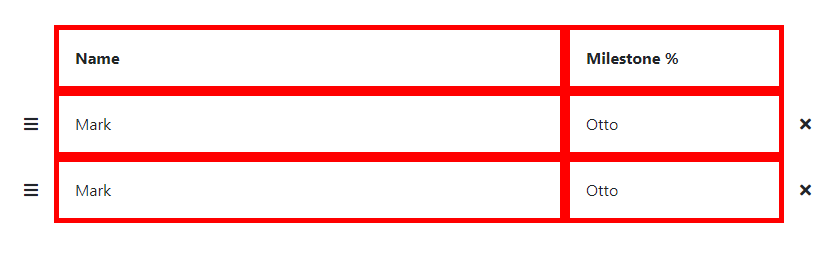
.action-table {
  border-collapse: collapse;
}

.action-table tr>*:not(:first-child):not(:last-child) {
  border: 5px solid red;
}<!DOCTYPE html>
<html>
<head>
<meta charset="utf-8">
<meta name="viewport" content="width=device-width">
<link rel="stylesheet" href="https://stackpath.bootstrapcdn.com/bootstrap/4.5.2/css/bootstrap.min.css" integrity="sha384-JcKb8q3iqJ61gNV9KGb8thSsNjpSL0n8PARn9HuZOnIxN0hoP+VmmDGMN5t9UJ0Z" crossorigin="anonymous">
<link href="https://cdnjs.cloudflare.com/ajax/libs/font-awesome/5.15.1/css/all.min.css" rel="stylesheet" />
<title>Double Border</title>
</head>
<body>
<table class="w-100 action-table mt-5">
<thead>
<tr class="row align-items-center">
<th class="col-1 p-3"></th>
<th class="col-7 p-3">First Name</th>
<th class="col-3 p-3">Second</th>
<th class="col-1 p-3"></th>
</tr>
</thead>
<tbody>
<tr class="row align-items-center">
<td class="text-right col-1 p-3"><i class="fa fa-bars cursor-grab"></i></td>
<td class="col-7 p-3">Mark</td>
<td class="col-3 p-3">Otto</td>
<td class="col-1 p-3"><i class="fa fa-times"></i></td>
</tr>
<tr class="row align-items-center">
<td class="text-right col-1 p-3"><i class="fa fa-bars cursor-grab"></i></td>
<td class="col-7 p-3">Mark</td>
<td class="col-3 p-3">Otto</td>
<td class="col-1 p-3"><i class="fa fa-times"></i></td>
</tr>
</tbody>
</table>
</body>
</html>
回答 2
Stack Overflow用户
回答已采纳
发布于 2020-10-11 09:54:34
边框正在执行您告诉他们的操作,即在所有td上添加一个5px,这不是第一个或最后一个。
因此,我调整您的css,使之如我所料:
.action-table tr>*:not(:first-child):not(:last-child) {
  border: 5px solid red;
  border-bottom: none;
  border-left: none;
}
.action-table tr > *:nth-child(2){
  border-left:  5px solid red !important; /** !important needed **/
}

.action-table tbody tr:last-child>*:not(:first-child):not(:last-child){
  border-bottom:  5px solid red;
}
演示
.action-table {
  border-collapse: collapse;
}

.action-table tr>*:not(:first-child):not(:last-child) {
  border: 5px solid red;
  border-bottom: none;
  border-left: none;
}
.action-table tr > *:nth-child(2){
  border-left:  5px solid red !important;
}

.action-table tbody tr:last-child>*:not(:first-child):not(:last-child){
  border-bottom:  5px solid red;
}<!DOCTYPE html>
<html>
<head>
<meta charset="utf-8">
<meta name="viewport" content="width=device-width">
<link rel="stylesheet" href="https://stackpath.bootstrapcdn.com/bootstrap/4.5.2/css/bootstrap.min.css" integrity="sha384-JcKb8q3iqJ61gNV9KGb8thSsNjpSL0n8PARn9HuZOnIxN0hoP+VmmDGMN5t9UJ0Z" crossorigin="anonymous">
<link href="https://cdnjs.cloudflare.com/ajax/libs/font-awesome/5.15.1/css/all.min.css" rel="stylesheet" />
<title>Double Border</title>
</head>
<body>
<table class="w-100 action-table mt-5">
<thead>
<tr class="row align-items-center">
<th class="col-1 p-3"></th>
<th class="col-7 p-3">First Name</th>
<th class="col-3 p-3">Second</th>
<th class="col-1 p-3"></th>
</tr>
</thead>
<tbody>
<tr class="row align-items-center">
<td class="text-right col-1 p-3"><i class="fa fa-bars cursor-grab"></i></td>
<td class="col-7 p-3">Mark</td>
<td class="col-3 p-3">Otto</td>
<td class="col-1 p-3"><i class="fa fa-times"></i></td>
</tr>
<tr class="row align-items-center">
<td class="text-right col-1 p-3"><i class="fa fa-bars cursor-grab"></i></td>
<td class="col-7 p-3">Mark</td>
<td class="col-3 p-3">Otto</td>
<td class="col-1 p-3"><i class="fa fa-times"></i></td>
</tr>
</tbody>
</table>
</body>
</html>
Stack Overflow用户
发布于 2022-01-07 14:01:07
派对有点晚了。
您还可以仅使用margin属性解决此问题。
.action-table {
  border-collapse: collapse;
}

.action-table tr>*:not(:first-child):not(:last-child) {
  border: 5px solid red;
  margin: -5px 0 0 -5px;
}<!DOCTYPE html>
<html>
<head>
<meta charset="utf-8">
<meta name="viewport" content="width=device-width">
<link rel="stylesheet" href="https://stackpath.bootstrapcdn.com/bootstrap/4.5.2/css/bootstrap.min.css" integrity="sha384-JcKb8q3iqJ61gNV9KGb8thSsNjpSL0n8PARn9HuZOnIxN0hoP+VmmDGMN5t9UJ0Z" crossorigin="anonymous">
<link href="https://cdnjs.cloudflare.com/ajax/libs/font-awesome/5.15.1/css/all.min.css" rel="stylesheet" />
<title>Double Border</title>
</head>
<body>
<table class="w-100 action-table mt-5">
<thead>
<tr class="row align-items-center">
<th class="col-1 p-3"></th>
<th class="col-7 p-3">First Name</th>
<th class="col-3 p-3">Second</th>
<th class="col-1 p-3"></th>
</tr>
</thead>
<tbody>
<tr class="row align-items-center">
<td class="text-right col-1 p-3"><i class="fa fa-bars cursor-grab"></i></td>
<td class="col-7 p-3">Mark</td>
<td class="col-3 p-3">Otto</td>
<td class="col-1 p-3"><i class="fa fa-times"></i></td>
</tr>
<tr class="row align-items-center">
<td class="text-right col-1 p-3"><i class="fa fa-bars cursor-grab"></i></td>
<td class="col-7 p-3">Mark</td>
<td class="col-3 p-3">Otto</td>
<td class="col-1 p-3"><i class="fa fa-times"></i></td>
</tr>
</tbody>
</table>
</body>
</html>
页面原文内容由Stack Overflow提供。腾讯云小微IT领域专用引擎提供翻译支持
原文链接:
https://stackoverflow.com/questions/64302527
复制相关文章
相似问题
腾讯云开发者

Copyright © 2013 - 2026 Tencent Cloud. All Rights Reserved. 腾讯云 版权所有
深圳市腾讯计算机系统有限公司 ICP备案/许可证号:粤B2-20090059  粤公网安备44030502008569号
腾讯云计算(北京)有限责任公司 京ICP证150476号 | 京ICP备11018762号