
Xamarin窗体标签不包装在WPF平台上。
在我的Xamarin表单应用程序中,我有一个简单的ListView,绑定到一个集合中。每个集合项由我在标签中显示的两个字符串组成。字符串可能不适合一行,在这种情况下,它们应该换行并接受多行。
我将代码减少到最低限度,以便在这里发布:
<ScrollView Orientation="Vertical">
    <ListView x:Name="lv" ItemsSource="{Binding MessageItems}" HasUnevenRows="True" Margin="10,10,30,10">
        <ListView.ItemTemplate>
            <DataTemplate>
                <ViewCell>
                    <Frame VerticalOptions="FillAndExpand" HorizontalOptions="FillAndExpand" HasShadow="True" BorderColor="#0A2966" Margin="10,10,10,10">
                        <StackLayout Orientation="Vertical" VerticalOptions="FillAndExpand" HorizontalOptions="FillAndExpand">
                            <Label x:Name="ShortText" LineBreakMode="NoWrap" HorizontalOptions="FillAndExpand" VerticalOptions="FillAndExpand">
                                Short Text
                            </Label>
                            <Label x:Name="LongText" LineBreakMode="WordWrap" HorizontalOptions="FillAndExpand" VerticalOptions="FillAndExpand" Text="{Binding MessageText}">
                                This is a long message. It is so long it is going to wrap to the next line. It goes on and on and on to demonstrate word wrapping.
                            </Label>
                        </StackLayout>
                    </Frame>
                </ViewCell>
            </DataTemplate>
        </ListView.ItemTemplate>
    </ListView>
</ScrollView>
所有这些都如UWP所期望的那样工作:
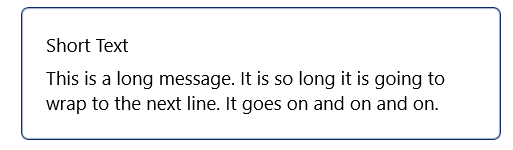
但是在WPF中,它只在一行上显示每个标签,如果不合适,就切断文本:
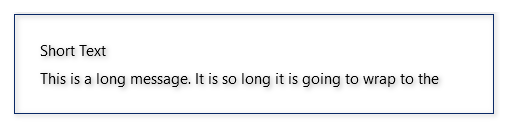
我已经在XAML中指定了LineBreakMode="WordWrap",尽管它是默认值,但是文本仍然没有包装。
似乎有很多讨论的标签没有包装在Xamarin论坛,例如这一个https://forums.xamarin.com/discussion/79278/word-wrap-on-label-doesnt-appear-to-be-working,但他们没有提供和回答我。
Github上有一个错误,它似乎准确地描述了我的问题(https://github.com/xamarin/Xamarin.Forms/issues/3558),但是它被标记为解决了,并且修复已经合并了一段时间。我想它已经包含在最新发布的Xamarin表单中了,但是我不知道如何检查。
我正在使用Xamarin Forms 4.8.0.1534 (最新版本),我还尝试了几个不同的4.8.x和4.7.x构建,但都没有成功。
回答 2
Stack Overflow用户
发布于 2020-10-14 02:20:22
这里的罪魁祸首是<Frame>元素。我通过简化示例代码来确定这一点,删除一个或另一个部分。将<StackLayout>直接放置在<ViewCell>中(没有中间的<Frame>)修复布局,并按预期的方式使Label文本包装。
当然,如果你这样做,你也失去了你的标签周围漂亮的视觉边框。别担心。我们可以画另一个边框,并给它正确的大小和位置,这样它看起来就像包装了你的内容。这里的诀窍是使用一个网格,并将<Frame>和<StackLayout>同时放置到Grid 0列中。
在进行了上述两项更改之后,我们最终得到如下结果:
<ScrollView Orientation="Vertical">
    <ListView x:Name="lv" ItemsSource="{Binding MessageItems}" HasUnevenRows="True" Margin="10,10,30,10">
        <ListView.ItemTemplate>
            <DataTemplate>
                <ViewCell>
                    <Grid VerticalOptions="FillAndExpand" HorizontalOptions="FillAndExpand" Margin="10,10,10,10">
                        <Frame VerticalOptions="FillAndExpand" HorizontalOptions="FillAndExpand" HasShadow="True" BorderColor="#0A2966"/>
                        <StackLayout Orientation="Vertical" VerticalOptions="FillAndExpand" HorizontalOptions="FillAndExpand" Margin="20">
                            <Label x:Name="ShortText" LineBreakMode="NoWrap" HorizontalOptions="FillAndExpand" VerticalOptions="FillAndExpand">
                                Short Text
                            </Label>
                            <Label x:Name="LongText" LineBreakMode="WordWrap" HorizontalOptions="FillAndExpand" VerticalOptions="FillAndExpand" Text="{Binding MessageText}">
                                This is a long message. It is so long it is going to wrap to the next line. It goes on and on and on.
                            </Label>
                        </StackLayout>
                    </Grid>
                </ViewCell>
            </DataTemplate>
        </ListView.ItemTemplate>
    </ListView>
</ScrollView>
现在标签包装如预期在WPF和UWP和边框仍然显示。
Stack Overflow用户
发布于 2020-10-12 12:51:09
XF仍在β.还有许多其他的问题涉及标签,如跨度,字体大小.
关于您的问题,我想是ListView控件。它的开发已经停止,微软积极推荐CollectionView或BindableLayout。
https://stackoverflow.com/questions/64300403
复制相似问题
腾讯云开发者

Copyright © 2013 - 2026 Tencent Cloud. All Rights Reserved. 腾讯云 版权所有
深圳市腾讯计算机系统有限公司 ICP备案/许可证号:粤B2-20090059  粤公网安备44030502008569号
腾讯云计算(北京)有限责任公司 京ICP证150476号 | 京ICP备11018762号