
模糊css中除选定区域以外的所有图像
模糊css中除选定区域以外的所有图像
提问于 2020-10-14 06:49:22
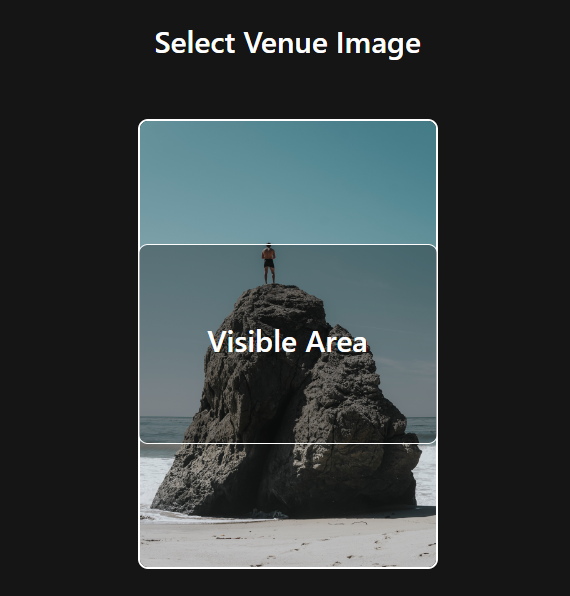
我的要求是模糊图像,同时保持它在选定的区域不模糊。我把一个div放在图像的绝对位置上。图像只在这个区域可见,除了这个区域,所有其他图像都是模糊的。
这是我的DOM结构
<div className="col-md-12 align-center mgb-30">
//within this area image is unblur while rest of image is blurred
<div className="venue-image-filter flex all-center color-white">
<h3 className="heading">Visible Area</h3>
</div>
<img src="https://i.picsum.photos/id/237/200/300.jpg" className="border-radius-10" alt="Venue" />
</div>
滤池造型
.venue-image-filter
{
position:absolute;
top:50%;
left:50%;
width:300px;
height:200px;
transform:translate(-50%,-50%);
}回答 1
Stack Overflow用户
回答已采纳
发布于 2020-10-14 07:04:02
下面是一个演示,您可以这样做:
document.querySelector('.image').addEventListener('mousemove', ({ offsetX, offsetY, target }) => {
  const x = offsetX / target.clientWidth;
  const y = offsetY / target.clientHeight;
  target.style.setProperty('--x', `${x * 100}%`);
  target.style.setProperty('--y', `${y * 100}%`);
});.image {
width: 640px;
height: 200px;
position: relative;
}
.image::before, .image::after {
content: '';
display: block;
position: absolute;
width: 100%;
height: 100%;
top: 0;
left: 0;
background-image: var(--image);
}
.image::before {
filter: blur(10px);
}
.image::after {
clip-path: circle(20% at var(--x, 50%) var(--y, 50%));
z-index: 1;
}<div class="image" style="--image: url(https://picsum.photos/id/862/640/200)"><div>
页面原文内容由Stack Overflow提供。腾讯云小微IT领域专用引擎提供翻译支持
原文链接:
https://stackoverflow.com/questions/64347988
复制相关文章
相似问题
腾讯云开发者

Copyright © 2013 - 2026 Tencent Cloud. All Rights Reserved. 腾讯云 版权所有
深圳市腾讯计算机系统有限公司 ICP备案/许可证号:粤B2-20090059  粤公网安备44030502008569号
腾讯云计算(北京)有限责任公司 京ICP证150476号 | 京ICP备11018762号