
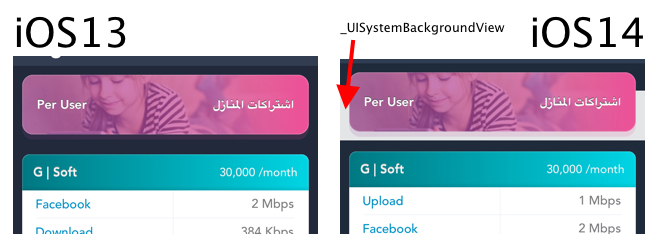
iOS14中表节标题中的白色背景
iOS14中表节标题中的白色背景
提问于 2020-10-14 14:09:55
这一问题是在“建筑到iOS14和xcode12”之后出现的。
我有一个具有透明背景的节标题,在iOS14上,随着新的_UISystemBackgroundView添加到层次结构中,它变成白色。
回答 4
Stack Overflow用户
回答已采纳
发布于 2020-10-14 14:09:55
iOS 14提供了新的两种单元配置:
- 内容配置.
UIContentConfiguration
顾名思义,内容配置可以帮助您操作单元格的内容,如图像、文本、辅助文本、布局度量和行为。
- 背景配置
UIBackgroundConfiguration
可以帮助操纵背景颜色,视觉效果,笔画,镶嵌和角半径。所有单元格都将继承默认的背景配置,即使我们没有指定一个。
解决方案
要摆脱默认的iOS14白色背景,需要按以下方式更改UITableViewCell或UITableViewHeaderFooterView backgroundConfiguration
    // Add this code in your AppDelegate didFinishLauncingWithOptions
    // or you can change configuration of certain subclass using self. backgroundConfiguration = ...
    if #available(iOS 14.0, *) {
        var bgConfig = UIBackgroundConfiguration.listPlainCell()
        bgConfig.backgroundColor = UIColor.clear
        UITableViewHeaderFooterView.appearance().backgroundConfiguration = bgConfig
        //For cell use: UITableViewCell.appearance().backgroundConfiguration = bgConfig
}阅读这篇文章以获得更多信息
Stack Overflow用户
发布于 2020-12-04 07:12:35
在UITableViewHeaderFooterView / UITableViewCell自定义类中-使用实现示例重写下一个方法:
Swift:
@available(iOS 14.0, *)
override func updateConfiguration(using state: UICellConfigurationState) {
    backgroundConfiguration = UIBackgroundConfiguration.clear()
}
目标-C:
- (void)updateConfigurationUsingState:(UICellConfigurationState *)state {
    self.backgroundConfiguration = [UIBackgroundConfiguration clearConfiguration];
}Stack Overflow用户
发布于 2020-12-03 15:43:22
目标-C版@Husam溶液:
if (@available(iOS 14.0, *)) {
    UIBackgroundConfiguration *bgConfig = [UIBackgroundConfiguration listPlainCellConfiguration];
    bgConfig.backgroundColor = UIColor.clearColor;
    [UITableViewHeaderFooterView appearance].backgroundConfiguration = bgConfig;
}页面原文内容由Stack Overflow提供。腾讯云小微IT领域专用引擎提供翻译支持
原文链接:
https://stackoverflow.com/questions/64355156
复制相关文章
相似问题
腾讯云开发者

Copyright © 2013 - 2026 Tencent Cloud. All Rights Reserved. 腾讯云 版权所有
深圳市腾讯计算机系统有限公司 ICP备案/许可证号:粤B2-20090059  粤公网安备44030502008569号
腾讯云计算(北京)有限责任公司 京ICP证150476号 | 京ICP备11018762号