
TypeError:在Vuex 4和Vue 3上服务时无法读取未定义的属性“getter”
TypeError:在Vuex 4和Vue 3上服务时无法读取未定义的属性“getter”
提问于 2020-10-15 02:14:52
我是Vuex的新手,我有问题。我无法使用npm run serve正确地服务我的应用程序。我可以在本地主机上打开这个应用程序,但是它什么也不显示,只有带有样式背景颜色的html主体。以前我做过npm run build
    F:\Javascript\CodeHighlighter>npm run build

    > code-highlighter@0.1.0 build F:\Javascript\CodeHighlighter
    > vue-cli-service build


    -  Building for production...

     DONE  Compiled successfully in 6447ms                                                      08:44:40

      File                                 Size                         Gzipped

      dist\js\chunk-vendors.74c072d0.js    120.47 KiB                   42.78 KiB
      dist\js\app.f18138cd.js              5.18 KiB                     2.08 KiB
      dist\css\app.60b393b9.css            1.78 KiB                     0.65 KiB

      Images and other types of assets omitted.

     DONE  Build complete. The dist directory is ready to be deployed.
INFO Check out deployment instructions at https://cli.vuejs.org/guide/deployment.html然后我做npm run serve
F:\Javascript\CodeHighlighter>npm run serve

> code-highlighter@0.1.0 serve F:\Javascript\CodeHighlighter
> vue-cli-service serve

 INFO  Starting development server...
98% after emitting CopyPlugin

 DONE  Compiled successfully in 4139ms                                                      08:45:52


  App running at:
  - Local:   http://localhost:8080/
  - Network: http://192.168.0.116:8080/

  Note that the development build is not optimized.
To create a production build, run npm run build当我打开http://localhost:8080/并打开控制台时。有一个错误和两个警告。
[Vue warn]: Property "$store" was accessed during render but is not defined on instance.
  at <Header>
  at <App>

[Vue warn]: Unhandled error during execution of render function
  at <Header>
  at <App>

Uncaught TypeError: Cannot read property 'getters' of undefined
这是我的目录
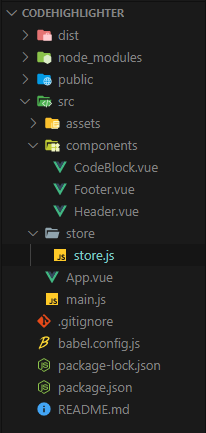
这是我的全部密码
main.js
    import { createApp } from 'vue'
    import { createStore } from 'vuex'
    import { store } from './store/store'
    import App from './App.vue'

    // console.log(store);

    const app = createApp(App).mount('#app');
    const vuestore = createStore(store);
    app.use(vuestore);
store.js
    import Vuex from 'vuex';

    export const store = new Vuex.Store({
        strict:true,
        state:{
            title: 'Code Highlighter',
            copyright:{
                license : 'MIT',
                author : 'Philip Purwoko',
                repository : 'https://github.com/PhilipPurwoko/CodeHighlighter'
            },
            api: "https://highlight-code-api.jefrydco.vercel.app/api",
            langs: ["javascript", "python"]
        },
        getters:{
            getTitle:state=>{
                return state.title;
            },
            getCopyright:state=>{
                return state.copyright;
            },
            getAPI:state=>{
                return state.api;
            },
            getLangs:state=>{
                return state.langs;
            }
        }
    });
App.vue
    <template>
        <main>
            <app-header></app-header>
            <code-block></code-block>
            <app-footer></app-footer>
        </main>
    </template>

    <script>
    import Header from "./components/Header.vue";
    import Footer from "./components/Footer.vue";
    import CodeBlock from "./components/CodeBlock.vue";

    export default {
        components: {
            "app-header": Header,
            "code-block": CodeBlock,
            "app-footer": Footer,
        },
    };
    </script>
CodeBlock.vue
    <template>
        <div>
            <form>
                <strong class="monospace">Select Language</strong>
                <select v-model="lang" @change="highlight">
                    <option selected disabled>Choose Language</option>
                    <option v-bind:key="lan" v-for="lan in getLangs">{{ lan }}</option>
                </select>
            </form>
            <section class="code-container">
                <textarea class="code-block" v-model="code" @input="highlight" ></textarea>
                <div class="code-block formated" v-html="formated"></div>
            </section>
        </div>
    </template>

    <script>
        import axios from "axios";
        import { mapGetters } from 'vuex';

        export default {
            data: function() {
                return {
                    lang: "",
                    code: "",
                    formated: ""
                };
            },
            computed:{
                ...mapGetters([
                    'getAPI',
                    'getLangs',
                    'getFormated',
                    'getCode'
                ])
            },
            methods: {
                highlight() {
                    if (this.code == "") {
                        this.code = " ";
                    }
                    if (this.lang != "") {
                        axios
                            .post(
                                this.getAPI + `?lang=${this.lang}`,
                                {
                                    code: this.code
                                }
                            )
                            .then(res => {
                                this.formated = res.data.data;
                            });
                    } else {
                        this.formated = "<p class='monospace' style='color:azure;'>No language selected. Please select a language</p>";
                    }
                }
            }
        };
    </script>
package.json
    {
      "name": "code-highlighter",
      "version": "0.1.0",
      "private": true,
      "scripts": {
        "serve": "vue-cli-service serve",
        "build": "vue-cli-service build",
        "lint": "vue-cli-service lint"
      },
      "dependencies": {
        "axios": "^0.20.0",
        "core-js": "^3.6.5",
        "vue": "^3.0.0",
        "vuex": "^4.0.0-beta.4"
      },
      "devDependencies": {
        "@vue/cli-plugin-babel": "~4.5.0",
        "@vue/cli-plugin-eslint": "~4.5.0",
        "@vue/cli-service": "~4.5.0",
        "@vue/compiler-sfc": "^3.0.0",
        "babel-eslint": "^10.1.0",
        "eslint": "^6.7.2",
        "eslint-plugin-vue": "^7.0.0-0"
      },
      "eslintConfig": {
        "root": true,
        "env": {
          "node": true
        },
        "extends": [
          "plugin:vue/vue3-essential",
          "eslint:recommended"
        ],
        "parserOptions": {
          "parser": "babel-eslint"
        },
        "rules": {}
      },
      "browserslist": [
        "> 1%",
        "last 2 versions",
        "not dead"
      ]
}您还可以在这里访问我的github存储库(https://github.com/PhilipPurwoko/CodeHighlighter/tree/restart)。我真的很感谢你所有的回应。谢谢
回答 1
Stack Overflow用户
回答已采纳
发布于 2020-10-15 04:35:32
首先请阅读Vue 3的Vuex文档。然后,我发现了你犯的最大错误,那就是在挂载vue实例之前,应该使用Vue插件。。应该是这样的。祝好运!
import { createApp } from 'vue'
import { store } from './store'
import App from './App.vue'

// Create vue instance
const app = createApp(App);

// Install the plugin first
app.use(store);

// Mount your app
app.mount('#app');页面原文内容由Stack Overflow提供。腾讯云小微IT领域专用引擎提供翻译支持
原文链接:
https://stackoverflow.com/questions/64363921
复制相关文章
相似问题
腾讯云开发者

Copyright © 2013 - 2026 Tencent Cloud. All Rights Reserved. 腾讯云 版权所有
深圳市腾讯计算机系统有限公司 ICP备案/许可证号:粤B2-20090059  粤公网安备44030502008569号
腾讯云计算(北京)有限责任公司 京ICP证150476号 | 京ICP备11018762号