
自定义视图的SwiftUI ViewModifier
是否有一种方法来创建一个修饰符来更新正在修改的视图中的@State private var?
我有一个自定义视图,它返回带有“动态”背景色的Text或具有“动态”前景色的Circle。
struct ChildView: View {
    var theText = ""

    @State private var color = Color(.purple)

    var body: some View {
        HStack {
            if theText.isEmpty {          // If there's no theText, a Circle is created
                Circle()
                    .foregroundColor(color)
                    .frame(width: 100, height: 100)
            } else {                      // If theText is provided, a Text is created
                Text(theText)
                    .padding()
                    .background(RoundedRectangle(cornerRadius: 25.0)
                                    .foregroundColor(color))
                    .foregroundColor(.white)
            }
        }
    }
}我在我的应用程序周围的不同部分重复使用这个视图。如您所见,我需要指定的唯一参数是theText。因此,创建此ChildView的可能方法如下:
struct SomeParentView: View {
    var body: some View {
        VStack(spacing: 20) {
            ChildView()   // <- Will create a circle

            ChildView(theText: "Hello world!")   // <- Will create a text with background
        }
    }
}
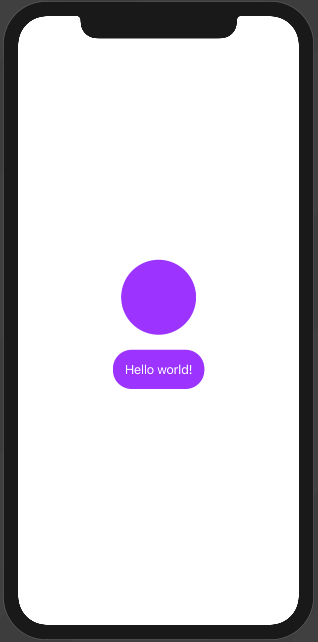
到目前为止还没什么好想的。现在,我需要创建(可能)一个修饰符或类似的东西,以便在父视图中,如果需要对@State private var color进行更多的定制,我就可以将.red的值更改为其他颜色。我想要达到的目标的例子:
struct SomeOtherParentView: View {
    var body: some View {
        HStack(spacing: 20) {
            ChildView()

            ChildView(theText: "Hello world!")
                .someModifierOrTheLike(color: Color.green)   // <- what I think I need
        }
    }
}我知道我可以将private关键字从var中移除,并在构造函数(ex:ChildView(theText: "Hello World", color: .green))中将color作为参数传递,但我不认为这是解决这个问题的方法,因为如果我需要对子视图进行更多的定制,我将得到一个非常大的构造函数。
那么,关于如何实现我想要的目标,有什么想法吗?希望我能解释一下自己:)谢谢!
回答 3
Stack Overflow用户
发布于 2020-10-15 03:40:51
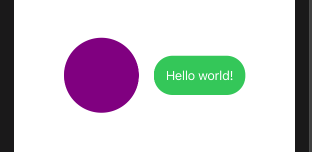
它是您的视图,而修饰符只是生成另一个修改的视图的函数,所以.这里有一些可能的简单方法来实现你想要的。
用Xcode 12 / iOS 14测试
struct ChildView: View {
    var theText = ""

    @State private var color = Color(.purple)

    var body: some View {
        HStack {
            if theText.isEmpty {          // If there's no theText, a Circle is created
                Circle()
                    .foregroundColor(color)
                    .frame(width: 100, height: 100)
            } else {                      // If theText is provided, a Text is created
                Text(theText)
                    .padding()
                    .background(RoundedRectangle(cornerRadius: 25.0)
                                    .foregroundColor(color))
                    .foregroundColor(.white)
            }
        }
    }

    // simply modify self, as self is just a value
    public func someModifierOrTheLike(color: Color) -> some View {
        var view = self
        view._color = State(initialValue: color)
        return view.id(UUID())
    }
}Stack Overflow用户
发布于 2020-10-15 02:12:51
使用自定义ViewModifier确实是一种帮助向用户公开更简单界面的方法,但是如何将自定义参数传递给视图(除了使用init之外)的一般想法是通过使用.environment的环境变量。
struct MyColorKey: EnvironmentKey {
   static var defaultValue: Color = .black
}

extension EnvironmentValues {
   var myColor: Color {
      get { self[MyColorKey] }
      set { self[MyColorKey] = newValue }
   }
}
然后,您可以在您的视图中依赖于此:
struct ChildView: View {
   @Environment(\.myColor) var color: Color

   var body: some View {
      Circle()
         .foregroundColor(color)
         .frame(width: 100, height: 100)
   }
}
其用途如下:
ChildView()
   .environment(\.myColor, .blue)
通过使用视图修饰符,可以使其变得更好:
struct MyColorModifier: ViewModifier {
   var color: Color

   func body(content: Content) -> some View {
      content
         .environment(\.myColor, color)
   }
}

extension ChildView {
   func myColor(_ color: Color) {
      self.modifier(MyColorModifier(color: color)
   }
}ChildView()
.myColor(.blue)当然,如果您有多个自定义设置,或者这对用户来说太低,您可以创建一个公开其中一个子集的ViewModifier,或者创建一个封装样式的类型,就像SwiftUI对.buttonStyle(_:)所做的那样。
Stack Overflow用户
发布于 2021-06-09 21:37:21
下面是如何根据Asperi`s的答案来链接方法:
struct ChildView: View {
    @State private var foregroundColor = Color.red
    @State private var backgroundColor = Color.blue

    var body: some View {
        Text("Hello World")
            .foregroundColor(foregroundColor)
            .background(backgroundColor)
    }

    func foreground(color: Color) -> ChildView {
        var view = self
        view._foregroundColor = State(initialValue: color)
        return view
    }

    func background(color: Color) -> ChildView {
        var view = self
        view._backgroundColor = State(initialValue: color)
        return view
    }
}

struct ParentView: View {
    var body: some View {
        ChildView()
            .foreground(color: .yellow)
            .background(color: .green)
            .id(UUID())
    }
}https://stackoverflow.com/questions/64363228
复制相似问题
腾讯云开发者

Copyright © 2013 - 2026 Tencent Cloud. All Rights Reserved. 腾讯云 版权所有
深圳市腾讯计算机系统有限公司 ICP备案/许可证号:粤B2-20090059  粤公网安备44030502008569号
腾讯云计算(北京)有限责任公司 京ICP证150476号 | 京ICP备11018762号