
在项目中添加eslint-webpack-plugin,以提供打印文本。
我很难在Webpack的项目中插上打字稿林特。
显然,eslint-loader是不受欢迎的,他们给eslint-webpack-plugin作为替代方案。此外,我使用的是typescript-eslint/parser,而不是tslint (不推荐的)--问题是,我在.eslintrc.js中设置的规则似乎没有得到考虑。我在.eslintrc中添加了一个简单的规则,在使用分号时应该会抛出一个错误。
export default class A {
  static yes = 'this is static'; // ";" <- should be invalidated by eslint
}
我的依赖关系是:
"@typescript-eslint/eslint-plugin": "^4.5.0",
"@typescript-eslint/parser": "^4.5.0",
"eslint": "^7.11.0",
"eslint-webpack-plugin": "^2.1.0",
"ts-loader": "^8.0.6",
"typescript": "^4.0.3",
"webpack": "^4.41.3",
"webpack-cli": "^3.3.10",
"webpack-dev-server": "^3.9.0"
如果我正确理解,它应该是这样工作的:
                                                        # # # # # # # # # # # # # #
@typescript-eslint/parser --> eslint-webpack-plugin --> #                         #
      (uses eslint?)        (replaces eslint-loader)    #       webpack v4        #
                                                        #  w/ webpack-dev-server  #
       typescript         -->       ts-loader       --> #                         #
# # # # # # # # # # # # # #附带注意:我使用的是webpack-dev-server,而不是的 服务命令。
启动服务器的命令:webpack-dev-server --hot --inline
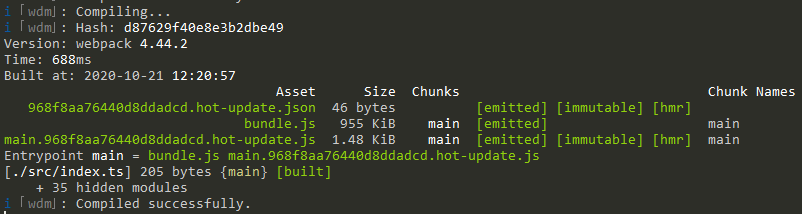
- 项目结构:
./
├─── src
│    └─── index.ts
└─── dist
     ├─── bundle.js
└─── index.html <- imports bundle.js- webpack.config.js
const path = require('path')
const ESLintPlugin = require('eslint-webpack-plugin')

module.exports = {
  mode: 'development',
  entry: './src/index.ts',
  devtool: 'inline-source-map',
  devServer: {
    contentBase: path.resolve(__dirname, 'dist')
    // publicPath: "/assets", // path of the served resources (js, img, fonts...)
  },
  module: {
    rules: [
      {
        test: /\.tsx?$/,
        use: 'ts-loader',
        exclude: /node_modules/,
      },
    ],
  },
  plugins: [
    new ESLintPlugin({
      files: 'src/**/*.ts',
    })
  ],
  resolve: {
    extensions: [ '.tsx', '.ts', '.js' ],
  },
  output: {
    filename: 'bundle.js',
    path: path.resolve(__dirname, 'dist'),
  },
}- .eslintrc.js
module.exports = {
  root: true,
  env: {
    node: true,
  },
  parser: '@typescript-eslint/parser',
  extends: [
    'plugin:@typescript-eslint/recommended'
  ],
  parserOptions: {
    ecmaVersion: 2020,
    sourceType: 'module',
  },
  rules: {
    'semi': ['error', 'never'],
  },
  ignorePatterns: [ "dist/*" ],
}- tsconfig.json
{
  "compilerOptions": {
    "target": "esnext",
    "module": "esnext",
    "strict": true,
    "importHelpers": true,
    "moduleResolution": "node",
    "experimentalDecorators": true,
    "esModuleInterop": true,
    "allowSyntheticDefaultImports": true,
    "sourceMap": true,
    "baseUrl": ".",
    "paths": {
      "@/*": [
        "src/*"
      ]
    },
    "lib": [
      "dom",
      "dom.iterable",
    ]
  },
  "include": [
    "src/**/*.ts",
    "tests/**/*.ts",
  ],
  "exclude": [
    "node_modules"
  ]
}回答 2
Stack Overflow用户
发布于 2020-11-24 05:53:03
在尝试将eslint-webpack-plugin与.vue文件一起使用时,我遇到了类似的问题。
我的解决方案是使用extensions设置而不是files。试试这个:
new ESLintPlugin({
  extensions: ['ts']
})Stack Overflow用户
发布于 2022-08-23 23:58:57
我修复了这个问题,我当前的ESLintPlugin options对象如下:
const lintJSOptions = {
  context: path.join(paths.context, paths.js),
  extensions: ['js', 'ts'],
  emitError: true,
  emitWarning: true,
  failOnWarning: false,
  failOnError: false,
  // Toggle autofix
  fix: false,
  cache: false,

  formatter: require('eslint-friendly-formatter'),
};
希望这能有所帮助。
PD:context属性是*.js或*.ts文件相对于package.json文件的根位置,您可以使用path.resolve(__dirname, './src/scripts');或任何存储脚本的地方。
https://stackoverflow.com/questions/64461635
复制相似问题
腾讯云开发者

Copyright © 2013 - 2026 Tencent Cloud. All Rights Reserved. 腾讯云 版权所有
深圳市腾讯计算机系统有限公司 ICP备案/许可证号:粤B2-20090059  粤公网安备44030502008569号
腾讯云计算(北京)有限责任公司 京ICP证150476号 | 京ICP备11018762号