
我该怎么用这张表格做个模版呢?
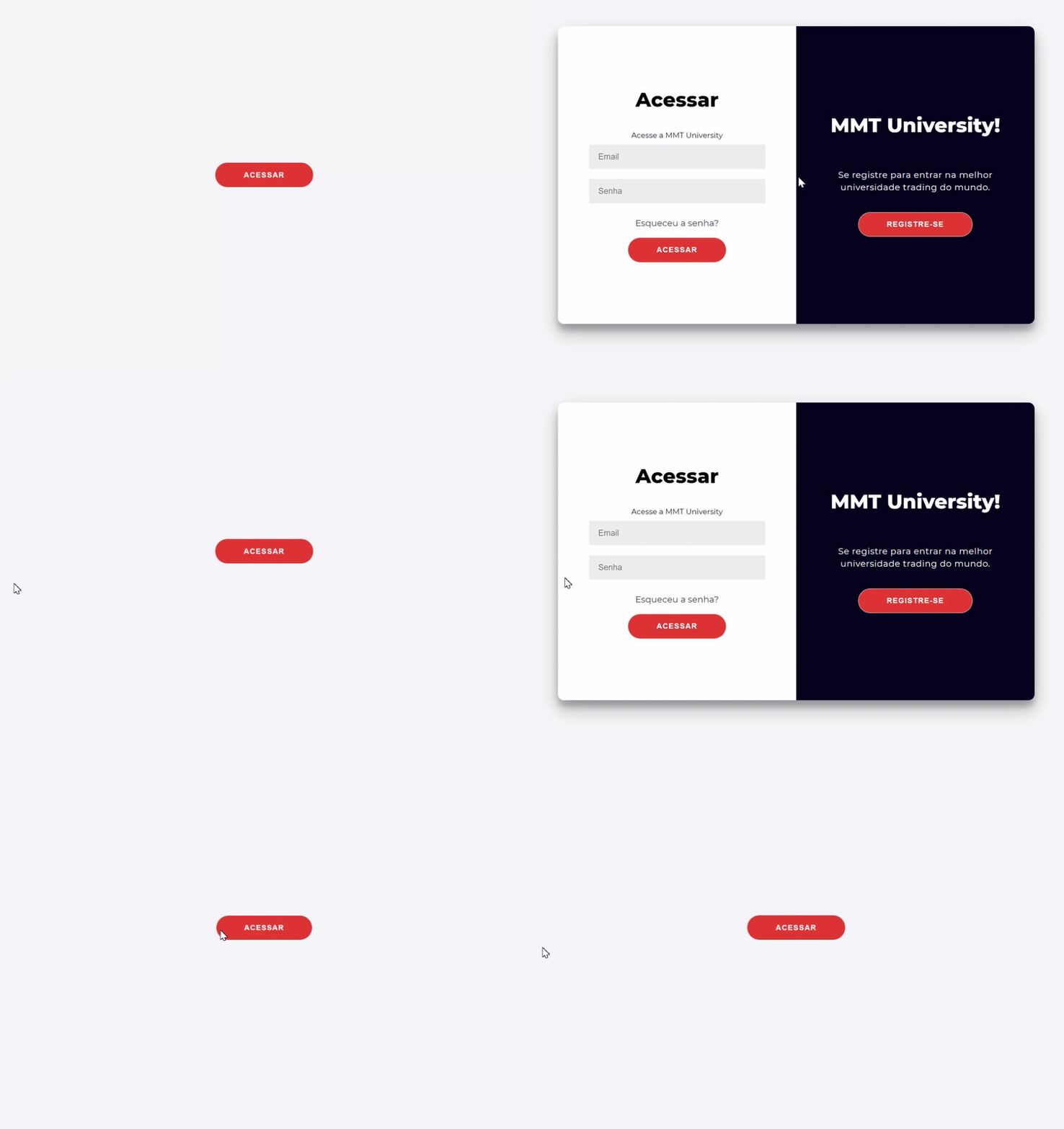
我已经开发了一个表单,我希望它是隐藏的,当用户按下一个按钮时,它就会打开。我使用html/css和js。我已经在一个单独的文件夹上构建了它,并希望将它添加到现有的文件夹中。我希望表格高于另一页的其余部分。所以你可以看到我在做什么,这是我的表单的视频,channel=TraversyMedia,现在我希望这个表单开始隐藏,然后按一下按钮打开。
这是我的密码。
<script src="https://cdnjs.cloudflare.com/ajax/libs/jquery/3.0.0/jquery.min.js"></script>
<script src="https://cdnjs.cloudflare.com/ajax/libs/jquery-modal/0.9.1/jquery.modal.min.js"></script>
<link rel="stylesheet" href="https://cdnjs.cloudflare.com/ajax/libs/jquery-modal/0.9.1/jquery.modal.min.css" />


<div class="container" id="container">
<div class="form-container sign-up-container">
<form action="#">
<h1>MMT University</h1>
<span>Se registre para começar</span>
<input type="text" placeholder="Usuário" />
<input type="email" placeholder="Email" />
<input type="password" placeholder="Senha" />
<input type="password" placeholder="Repita a sua senha" />
<button>Registrar</button>
</form>
</div>
<div class="form-container sign-in-container">
<form action="#">
<h1>Acessar</h1>

<span>Acesse a MMT University</span>
<input type="email" placeholder="Email" />
<input type="password" placeholder="Senha" />
<a href="#">Esqueceu a senha?</a>
<button>Acessar</button>
</form>
</div>
<div class="overlay-container">
<div class="overlay">
<div class="overlay-panel overlay-left">
  <h1>Bem vindo!</h1>
  <p>Para continuar aprendendo, acesse a sua conta!</p>
  <button class="ghost" id="signIn">Sign In</button>
</div>
<div class="overlay-panel overlay-right">
  <h1>MMT University!</h1>
  <p>Se registre para entrar na melhor universidade trading do mundo.</p>
  <button class="ghost" id="signUp">Registre-se</button>
</div>
</div>
</div>
</div>
<script src="main.js"></script>
<script src="modal.js"></script>

<button href="#ex1" rel="modal:open" id="myBtn">Acessar</button>
    </body>
这是我的css:
@import url('https://fonts.googleapis.com/css?family=Montserrat:400,800');

* {
    box-sizing: border-box;
}

body {
    background: #f6f5f7;
    display: flex;
    justify-content: center;
    align-items: center;
    flex-direction: column;
    font-family: 'Montserrat', sans-serif;
    height: 100vh;
    margin: -20px 0 50px;
}


h1 {
    font-weight: bold;
    margin: 0;
  margin-bottom: 5vh;
}

h2 {
    text-align: center;
}

p {
    font-size: 14px;
    font-weight: 100;
    line-height: 20px;
    letter-spacing: 0.5px;
    margin: 20px 0 30px;
}

span {
    font-size: 12px;
}

a {
    color: #333;
    font-size: 14px;
    text-decoration: none;
    margin: 15px 0;
}

button {
    border-radius: 20px;
    border: 1px solid rgb(220,52,52);
    background-color: rgb(220,52,52);
    color: #FFFFFF;
    font-size: 12px;
    font-weight: bold;
    padding: 12px 45px;
    letter-spacing: 1px;
    text-transform: uppercase;
    transition: transform 80ms ease-in;
}

button:active {
    transform: scale(0.95);
}

button:focus {
    outline: none;
}

button.ghost {
    background-color: transparent;
    border-color: #FFFFFF;
  color: #fff;
  background-color: rgb(220,52,52);
}

form {
    background-color: #FFFFFF;
    display: flex;
    align-items: center;
    justify-content: center;
    flex-direction: column;
    padding: 0 50px;
    height: 100%;
    text-align: center;
  overflow: auto;
}

input {
    background-color: #eee;
    border: none;
    padding: 12px 15px;
    margin: 8px 0;
    width: 100%;
}

.container {
    background-color: #fff;
    border-radius: 10px;
  box-shadow: 0 14px 28px rgba(0,0,0,0.25),
    0 10px 10px rgba(0,0,0,0.22);
    position: relative;
    overflow: hidden;
    width: 768px;
    max-width: 100%;
    min-height: 480px;
}

.form-container {
    position: absolute;
    top: 0;
    height: 100%;
    transition: all 0.6s ease-in-out;
}

.sign-in-container {
    left: 0;
    width: 50%;
    z-index: 2;
}

.container.right-panel-active .sign-in-container {
    transform: translateX(100%);
}

.sign-up-container {
    left: 0;
    width: 50%;
    opacity: 0;
    z-index: 1;
}

.container.right-panel-active .sign-up-container {
    transform: translateX(100%);
    opacity: 1;
    z-index: 5;
    animation: show 0.6s;
}

@keyframes show {
    0%, 49.99% {
        opacity: 0;
        z-index: 1;
    }

    50%, 100% {
        opacity: 1;
        z-index: 5;
    }
}
.close {
  /* Position it in the top right corner outside of the modal */
  position: absolute;
  right: 25px;
  top: 0;
  color: #000;
  font-size: 35px;
  font-weight: bold;
}

/* Close button on hover */
.close:hover,
.close:focus {
  color: red;
  cursor: pointer;
}

/* Add Zoom Animation */
.animate {
  -webkit-animation: animatezoom 0.6s;
  animation: animatezoom 0.6s
}

@-webkit-keyframes animatezoom {
  from {-webkit-transform: scale(0)}
  to {-webkit-transform: scale(1)}
}

@keyframes animatezoom {
  from {transform: scale(0)}
  to {transform: scale(1)}
}
.overlay-container {
    position: absolute;
    top: 0;
    left: 50%;
    width: 50%;
    height: 100%;
    overflow: hidden;
    transition: transform 0.6s ease-in-out;
    z-index: 100;
}

.container.right-panel-active .overlay-container{
    transform: translateX(-100%);
}

.overlay {
    background:  #05031b;
    background: -webkit-linear-gradient(to right, #05031b, #05031b);
    background: linear-gradient(to right, #05031b, #05031b);
    background-repeat: no-repeat;
    background-size: cover;
    background-position: 0 0;
    color: #FFFFFF;
    position: relative;
    left: -100%;
    height: 100%;
    width: 200%;
    transform: translateX(0);
    transition: transform 0.6s ease-in-out;
}

.container.right-panel-active .overlay {
    transform: translateX(50%);
}

.overlay-panel {
    position: absolute;
    display: flex;
    align-items: center;
    justify-content: center;
    flex-direction: column;
    padding: 0 40px;
    text-align: center;
    top: 0;
    height: 100%;
    width: 50%;
    transform: translateX(0);
    transition: transform 0.6s ease-in-out;
}

.overlay-left {
    transform: translateX(-20%);
}

.container.right-panel-active .overlay-left {
    transform: translateX(0);
}

.overlay-right {
    right: 0;
    transform: translateX(0);
}

.container.right-panel-active .overlay-right {
    transform: translateX(20%);
}

.social-container {
    margin: 20px 0;
}

.social-container a {
    border: 1px solid #DDDDDD;
    border-radius: 50%;
    display: inline-flex;
    justify-content: center;
    align-items: center;
    margin: 0 5px;
    height: 40px;
    width: 40px;
}

footer {
    background-color: #222;
    color: #fff;
    font-size: 14px;
    bottom: 0;
    position: fixed;
    left: 0;
    right: 0;
    text-align: center;
    z-index: 999;
}

footer p {
    margin: 10px 0;
}

footer i {
    color: red;
}

footer a {
    color: #3c97bf;
    text-decoration: none;
}
下面是我从互联网上复制的一个文件,它对我的按钮进行了管理,以便跟踪这些ids。(文件名为modal.js,这是我在那里导入的脚本。)( main.js是表单的动画)
Javascript文件modal.js
var modal = document.getElementById("myModal");

// Get the button that opens the modal
var btn = document.getElementById("myBtn");

// Get the <span> element that closes the modal
var span = document.getElementsByClassName("close")[0];

// When the user clicks on the button, open the modal
btn.onclick = function() {
  modal.style.display = "block";
}

// When the user clicks on <span> (x), close the modal
span.onclick = function() {
  modal.style.display = "none";
}

// When the user clicks anywhere outside of the modal, close it
window.onclick = function(event) {
  if (event.target == modal) {
    modal.style.display = "none";
  }
}回答 1
Stack Overflow用户
发布于 2020-10-21 22:54:57
有几件事你应该注意:
在HTML中,在定义modal.js之前加载myBtn
...
</div>
</div>
<script src="main.js"></script>
<script src="modal.js"></script> <--- Loading modal.js

<button href="#ex1" rel="modal:open" id="myBtn">Acessar</button> <--- defining myBtn所以当modal.js运行时,它做的第一件事就是寻找myBtn,
var modal = document.getElementById("myModal");...which还不存在。
因此,您可能应该将modal.js加载到文档的头部( <head>标记之间)或结束时,以避免出现这些问题。
在将id myModal添加到容器后,模式可能不会单击按钮就加载。那是因为它从来没有被隐藏过。您需要通过JS或CSS隐藏它。下面是JS的一个示例(您只需将显示设置为none):
// Get the modal
var modal = document.getElementById("myModal");
modal.style.display = "none";
现在,它不应该显示,直到您单击按钮。但是要隐藏它,当你点击外部,你需要检查你点击的地方是不是(1)模态,和(2)在模式。这相对容易:
window.onclick = function (event) {
  if (modal !== event.target && !modal.contains(event.target)) { // Evaluates to true if the modal is not the clicked element and the
    modal.style.display = "none";                                // modal does not contain the clicked element
    btn.style.display = 'block'
  }
}
但你现在拥有的是:
window.onclick = function(event) {
  if (event.target == modal) {
    modal.style.display = "none";
  }
}
这是检查单击的元素是否是模态,如果是这样,则关闭它。这不是您想要的,所以请使用前面的示例
--
还可以将打开模式的代码添加到此侦听器中,从而简化整个代码(modal.js的完整代码):
// Get the modal
var modal = document.getElementById("myModal");
modal.style.display = "none";

// Get the button that opens the modal
var btn = document.getElementById("myBtn");


// Handle clicks
window.onclick = function (event) {
  if(event.target.id == "myBtn") { // If the button is clicked, open the modal and hide the "open the modal" button
    modal.style.display = "block";
    btn.style.display = 'none'
  }
  else if (modal !== event.target && !modal.contains(event.target)) { // If the click is outside the modal, hide the modal and show the "open the modal" button
    modal.style.display = "none";
    btn.style.display = 'block'
  }
}
如果您遇到任何问题,请告诉我。
https://stackoverflow.com/questions/64472362
复制相似问题
腾讯云开发者

Copyright © 2013 - 2026 Tencent Cloud. All Rights Reserved. 腾讯云 版权所有
深圳市腾讯计算机系统有限公司 ICP备案/许可证号:粤B2-20090059  粤公网安备44030502008569号
腾讯云计算(北京)有限责任公司 京ICP证150476号 | 京ICP备11018762号