
netlify部署:在“构建站点”阶段失败:生成脚本返回非零退出代码:2
netlify部署:在“构建站点”阶段失败:生成脚本返回非零退出代码:2
提问于 2020-10-21 17:36:18
我正试图通过Github将我的reactjs站点部署到Netlify,但没有成功。
错误信息是
在“建设站点”阶段失败:生成脚本返回非零退出代码:2
下面是完整的Netlify日志。
11:59:46 AM: Build ready to start
11:59:48 AM: build-image version: b0258b965567defc4a2d7e2f2dec2e00c8f73ad6
11:59:48 AM: build-image tag: v3.4.1
11:59:48 AM: buildbot version: 0a44c930054be748eff0c581d346282fece89cc0
11:59:48 AM: Building without cache
11:59:48 AM: Starting to prepare the repo for build
11:59:48 AM: No cached dependencies found. Cloning fresh repo
11:59:48 AM: git clone https://github.com/Helloiain/movie-app
11:59:49 AM: Preparing Git Reference refs/heads/master
11:59:50 AM: Starting build script
11:59:50 AM: Installing dependencies
11:59:50 AM: Python version set to 2.7
11:59:51 AM: v12.18.0 is already installed.
11:59:52 AM: Now using node v12.18.0 (npm v6.14.4)
11:59:52 AM: Started restoring cached build plugins
11:59:52 AM: Finished restoring cached build plugins
11:59:52 AM: Attempting ruby version 2.7.1, read from environment
11:59:53 AM: Using ruby version 2.7.1
11:59:54 AM: Using PHP version 5.6
11:59:54 AM: 5.2 is already installed.
11:59:54 AM: Using Swift version 5.2
11:59:54 AM: Started restoring cached node modules
11:59:54 AM: Finished restoring cached node modules
11:59:54 AM: Started restoring cached yarn cache
11:59:54 AM: Finished restoring cached yarn cache
11:59:54 AM: Installing yarn at version 1.22.4
11:59:54 AM: Installing Yarn!
11:59:54 AM: > Downloading tarball...
11:59:54 AM: [1/2]: https://yarnpkg.com/downloads/1.22.4/yarn-v1.22.4.tar.gz --> /tmp/yarn.tar.gz.aq7yGqZqlV
11:59:54 AM: % Total % Received % Xferd Average Speed Time Time Time Current
11:59:54 AM: Dload Upload Total Spent Left Speed
11:59:54 AM: 0 0 0 0 0 0 0 0 --:--:-- --:--:-- --:--:-- 0
11:59:54 AM: 100 80 100 80 0 0 285 0 --:--:-- --:--:-- --:--:-- 285
11:59:54 AM: 0 0 0 0 0 0 0 0 --:--:-- --:--:-- --:--:-- 0
11:59:54 AM: 100 93 100 93 0 0 156 0 --:--:-- --:--:-- --:--:-- 556
11:59:55 AM: 100 643 100 643 0 0 749 0 --:--:-- --:--:-- --:--:-- 749
11:59:55 AM: 100 1215k 100 1215k 0 0 947k 0 0:00:01 0:00:01 --:--:-- 947k
11:59:55 AM: [2/2]: https://yarnpkg.com/downloads/1.22.4/yarn-v1.22.4.tar.gz.asc --> /tmp/yarn.tar.gz.aq7yGqZqlV.asc
11:59:55 AM: 100 84 100 84 0 0 3088 0 --:--:-- --:--:-- --:--:-- 3088
11:59:55 AM: 100 97 100 97 0 0 1692 0 --:--:-- --:--:-- --:--:-- 1692
11:59:55 AM: 100 647 100 647 0 0 7321 0 --:--:-- --:--:-- --:--:-- 7321
11:59:55 AM: 0 1028 0 0 0 0 0 0 --:--:-- --:--:-- --:--:-- 0
11:59:55 AM: 100 1028 100 1028 0 0 8135 0 --:--:-- --:--:-- --:--:-- 1003k
11:59:55 AM: > Verifying integrity...
11:59:55 AM: gpg: Signature made Mon 09 Mar 2020 03:52:13 PM UTC using RSA key ID 69475BAA
11:59:55 AM: gpg: Good signature from "Yarn Packaging <yarn@dan.cx>"
11:59:55 AM: gpg: WARNING: This key is not certified with a trusted signature!
11:59:55 AM: gpg: There is no indication that the signature belongs to the owner.
11:59:55 AM: Primary key fingerprint: 72EC F46A 56B4 AD39 C907 BBB7 1646 B01B 86E5 0310
11:59:55 AM: Subkey fingerprint: 6D98 490C 6F1A CDDD 448E 4595 4F77 6793 6947 5BAA
11:59:55 AM: > GPG signature looks good
11:59:55 AM: > Extracting to ~/.yarn...
11:59:55 AM: > Adding to $PATH...
11:59:56 AM: > Successfully installed Yarn 1.22.4! Please open another terminal where the `yarn` command will now be available.
11:59:56 AM: Installing NPM modules using Yarn version 1.22.4
11:59:57 AM: yarn install v1.22.4
11:59:57 AM: [1/4] Resolving packages...
11:59:58 AM: [2/4] Fetching packages...
12:00:22 PM: info fsevents@2.1.2: The platform "linux" is incompatible with this module.
12:00:22 PM: info "fsevents@2.1.2" is an optional dependency and failed compatibility check. Excluding it from installation.
12:00:22 PM: info fsevents@1.2.12: The platform "linux" is incompatible with this module.
12:00:22 PM: info "fsevents@1.2.12" is an optional dependency and failed compatibility check. Excluding it from installation.
12:00:22 PM: [3/4] Linking dependencies...
12:00:22 PM: warning " > @testing-library/user-event@7.2.1" has unmet peer dependency "@testing-library/dom@>=5".
12:00:22 PM: warning "react-scripts > @typescript-eslint/eslint-plugin > tsutils@3.17.1" has unmet peer dependency "typescript@>=2.8.0 || >= 3.2.0-dev || >= 3.3.0-dev || >= 3.4.0-dev || >= 3.5.0-dev || >= 3.6.0-dev || >= 3.6.0-beta || >= 3.7.0-dev || >= 3.7.0-beta".
12:00:34 PM: [4/4] Building fresh packages...
12:00:36 PM: success Saved lockfile.
12:00:36 PM: Done in 38.98s.
12:00:36 PM: NPM modules installed using Yarn
12:00:36 PM: Started restoring cached go cache
12:00:36 PM: Finished restoring cached go cache
12:00:36 PM: go version go1.14.4 linux/amd64
12:00:36 PM: go version go1.14.4 linux/amd64
12:00:36 PM: Installing missing commands
12:00:36 PM: Verify run directory
12:00:37 PM:
12:00:37 PM: ┌─────────────────────────────┐
12:00:37 PM: │ Netlify Build │
12:00:37 PM: └─────────────────────────────┘
12:00:37 PM:
12:00:37 PM: ❯ Version
12:00:37 PM: @netlify/build 5.0.2
12:00:37 PM:
12:00:37 PM: ❯ Flags
12:00:37 PM: deployId: 5f9069020af24e00933f58d3
12:00:37 PM: mode: buildbot
12:00:37 PM:
12:00:37 PM: ❯ Current directory
12:00:37 PM: /opt/build/repo
12:00:37 PM:
12:00:37 PM: ❯ Config file
12:00:37 PM: No config file was defined: using default values.
12:00:37 PM:
12:00:37 PM: ❯ Context
12:00:37 PM: production
12:00:37 PM:
12:00:37 PM: ┌───────────────────────────────────┐
12:00:37 PM: │ 1. Build command from Netlify app │
12:00:37 PM: └───────────────────────────────────┘
12:00:37 PM:
12:00:37 PM: $ yarn build
12:00:38 PM: yarn run v1.22.4
12:00:38 PM: $ react-scripts build
12:00:39 PM: Creating an optimized production build...
12:00:41 PM: Browserslist: caniuse-lite is outdated. Please run the following command: `npx browserslist --update-db`
12:00:42 PM: Failed to compile.
12:00:42 PM:
12:00:42 PM: ./src/index.js
12:00:42 PM: Cannot find file './app.js' in './src'.
12:00:42 PM: error Command failed with exit code 1.
12:00:42 PM: info Visit https://yarnpkg.com/en/docs/cli/run for documentation about this command.
12:00:42 PM:
12:00:42 PM: ┌─────────────────────────────┐
12:00:42 PM: │ "build.command" failed │
12:00:42 PM: └─────────────────────────────┘
12:00:42 PM:
12:00:42 PM: Error message
12:00:42 PM: Command failed with exit code 1: yarn build
12:00:42 PM:
12:00:42 PM: Error location
12:00:42 PM: In Build command from Netlify app:
12:00:42 PM: yarn build
12:00:42 PM:
12:00:42 PM: Resolved config
12:00:42 PM: build:
12:00:42 PM: command: yarn build
12:00:42 PM: commandOrigin: ui
12:00:42 PM: publish: /opt/build/repo/build
12:00:42 PM: Caching artifacts
12:00:42 PM: Started saving node modules
12:00:42 PM: Finished saving node modules
12:00:42 PM: Started saving build plugins
12:00:42 PM: Finished saving build plugins
12:00:42 PM: Started saving yarn cache
12:00:42 PM: Finished saving yarn cache
12:00:42 PM: Started saving pip cache
12:00:42 PM: Finished saving pip cache
12:00:42 PM: Started saving emacs cask dependencies
12:00:42 PM: Finished saving emacs cask dependencies
12:00:42 PM: Started saving maven dependencies
12:00:42 PM: Finished saving maven dependencies
12:00:42 PM: Started saving boot dependencies
12:00:42 PM: Finished saving boot dependencies
12:00:42 PM: Started saving go dependencies
12:00:42 PM: Finished saving go dependencies
12:00:45 PM: Build failed due to a user error: Build script returned non-zero exit code: 2
12:00:45 PM: Failing build: Failed to build site
12:00:45 PM: Failed during stage 'building site': Build script returned non-zero exit code: 2
12:00:45 PM: Finished processing build request in 57.736891768s在搜索了类似的问题之后,我认为这可能是依赖问题,但是,在使用‘Yarn’安装依赖关系之后,我仍然会遇到同样的问题。和当地的建设与“纱线建设”工作良好。
回答 6
Stack Overflow用户
回答已采纳
发布于 2021-05-12 11:55:22
当我试图将我的单页React web应用程序部署到Netlify时,我发现了同样的错误。
下面是我解决问题和成功部署站点所遵循的过程。
Settings.
- 转到站点
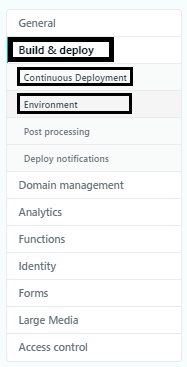
- 从菜单中选择Build & Deploy下拉菜单。
- 从下拉列表中选择连续部署选项卡。
在“settings.编译设置”一节中,选择“
- ”,选择“编辑”。
- Change the _**build command**_ as `CI= npm run build`
- Click **Save**.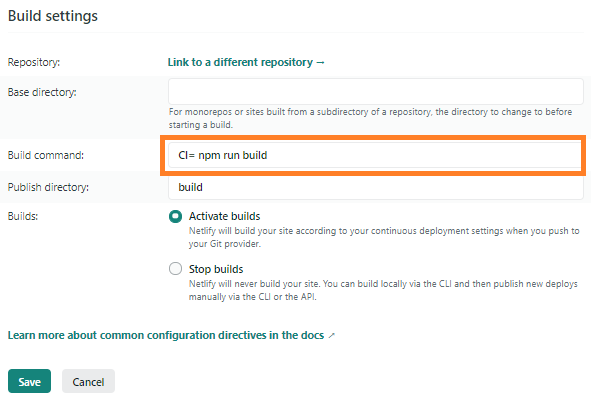
- 然后从下拉列表中选择Environment选项卡。
- Select **Edit variables**.
- As the _**Key**_ enter `CI` and, as the _**value**_ enter `false`.
- Click **Save**.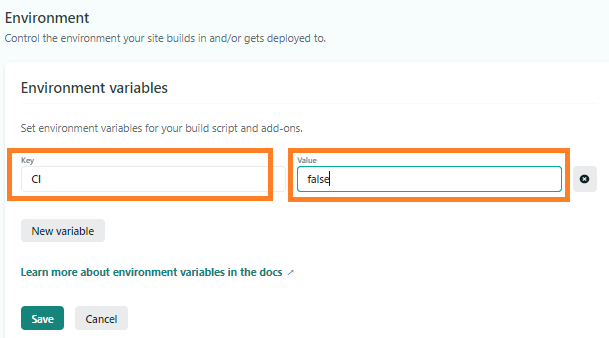
- 终于重新尝试了重新部署站点.
这将帮助您解决与在Netlify中托管'Rect JS‘应用程序有关的问题&您的应用程序将成功部署。
Stack Overflow用户
发布于 2021-04-08 11:43:35
您必须更改环境变量值,这样它才能成功构建。按照以下步骤执行:
Deploy settings.
- Click
- 转到
Environment上,然后单击Edit Variables按钮。
- 将键设置为
CI,E 112值E 213以false.
- Now单击
Save按钮。<>H 218f 219
现在,您可以构建和部署您的项目,而不会出现错误。
Stack Overflow用户
发布于 2022-09-22 13:08:58
遵循以下步骤,因为我也有同样的问题,直到我做了如下所述的:
Deployment.
- Go
- 转到站点设置> Build & Deploy >到Build Settings >
E 112编辑
- 您的生成命令
E 217到CI= npm run build(查看npm run build和d20之间的空格。在第二节中,单击E 148触发部署E 249,并在H 250G 251.
You >上选择清晰的缓存和部署站点。
这将解决错误,现在您可以部署您的网站。享受吧!
页面原文内容由Stack Overflow提供。腾讯云小微IT领域专用引擎提供翻译支持
原文链接:
https://stackoverflow.com/questions/64468843
复制相关文章
相似问题
腾讯云开发者

Copyright © 2013 - 2026 Tencent Cloud. All Rights Reserved. 腾讯云 版权所有
深圳市腾讯计算机系统有限公司 ICP备案/许可证号:粤B2-20090059  粤公网安备44030502008569号
腾讯云计算(北京)有限责任公司 京ICP证150476号 | 京ICP备11018762号