
Azure Kubernetes -伊斯蒂奥·雌妞不工作
Azure Kubernetes -伊斯蒂奥·雌妞不工作
提问于 2020-10-21 15:38:18
我使用了以下配置来设置Istio
cat << EOF | kubectl apply -f -
apiVersion: install.istio.io/v1alpha1
kind: IstioOperator
metadata:
  namespace: istio-system
  name: istio-control-plane
spec:
  # Use the default profile as the base
  # More details at: https://istio.io/docs/setup/additional-setup/config-profiles/
  profile: default
  # Enable the addons that we will want to use
  addonComponents:
    grafana:
      enabled: true
    prometheus:
      enabled: true
    tracing:
      enabled: true
    kiali:
      enabled: true
  values:
    global:
      # Ensure that the Istio pods are only scheduled to run on Linux nodes
      defaultNodeSelector:
        beta.kubernetes.io/os: linux
    kiali:
      dashboard:
        auth:
          strategy: anonymous
  components:
    egressGateways:
    - name: istio-egressgateway
      enabled: true
EOF
我可以看到
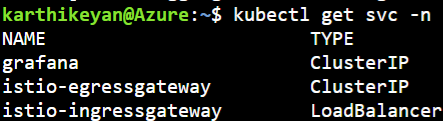
-n istio-系统
我已经部署了睡眠应用程序
kubectl apply -f https://raw.githubusercontent.com/istio/istio/release-1.7/samples/sleep/sleep.yaml
-n akv2k8s-test
并部署了ServiceEntry
kubectl apply -f - <<EOF
apiVersion: networking.istio.io/v1alpha3
kind: ServiceEntry
metadata:
  name: httpbin-ext
  namespace: akv2k8s-test
spec:
  hosts:
  - httpbin.org
  ports:
  - number: 80
    name: http
    protocol: HTTP
  resolution: DNS
  location: MESH_EXTERNAL
EOF
并尝试访问外部URL
export SOURCE_POD=$(kubectl get -n  akv2k8s-test  pod -l app=sleep -o jsonpath='{.items..metadata.name}')
kubectl exec "$SOURCE_POD"  -n  akv2k8s-test  -c sleep -- curl -sI http://httpbin.org/headers | grep  "HTTP/";
但是,我看不到代理上报告的任何日志。
kubectl logs "$SOURCE_POD" -n akv2k8s-test -c istio-proxy | tail
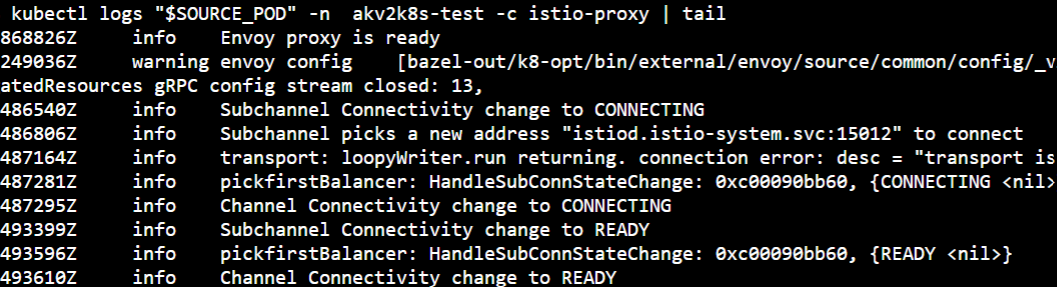
根据文档,我应该看到
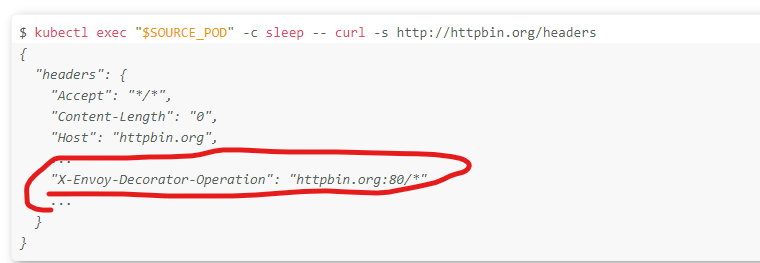
但是我没有看到标题

我是不是漏掉了什么?
回答 2
Stack Overflow用户
回答已采纳
发布于 2020-10-24 13:25:54
我让它像下面提到的那样起作用
cat << EOF | kubectl apply -f -
apiVersion: install.istio.io/v1alpha1
kind: IstioOperator
metadata:
  namespace: istio-system
  name: istio-control-plane
spec:
  # Use the default profile as the base
  # More details at: https://istio.io/docs/setup/additional-setup/config-profiles/
  profile: default
  # Enable the addons that we will want to use
  addonComponents:
    grafana:
      enabled: true
    prometheus:
      enabled: true
    tracing:
      enabled: true
    kiali:
      enabled: true
  values:
    global:
      # Ensure that the Istio pods are only scheduled to run on Linux nodes
      defaultNodeSelector:
        beta.kubernetes.io/os: linux
    kiali:
      dashboard:
        auth:
          strategy: anonymous
  components:
    egressGateways:
    - name: istio-egressgateway
      enabled: true
  meshConfig:
    accessLogFile: /dev/stdout
    outboundTrafficPolicy:
      mode: REGISTRY_ONLY
EOF


cat << EOF | kubectl apply -f -
apiVersion: v1
kind: Namespace
metadata:
  name: akv2k8s-test
  labels:
    istio-injection: enabled
    azure-key-vault-env-injection: enabled
---
apiVersion: networking.istio.io/v1alpha3
kind: ServiceEntry
metadata:
  name: cnn
  namespace: akv2k8s-test
spec:
  hosts:
  - edition.cnn.com
  ports:
  - number: 80
    name: http-port
    protocol: HTTP
  - number: 443
    name: https
    protocol: HTTPS
  resolution: DNS
---
apiVersion: networking.istio.io/v1alpha3
kind: Gateway
metadata:
  name: istio-egressgateway
  namespace: akv2k8s-test
spec:
  selector:
    istio: egressgateway
  servers:
  - port:
      number: 80
      name: http
      protocol: HTTP
    hosts:
    - edition.cnn.com
---
apiVersion: networking.istio.io/v1alpha3
kind: DestinationRule
metadata:
  name: egressgateway-for-cnn
  namespace: akv2k8s-test
spec:
  host: istio-egressgateway.istio-system.svc.cluster.local
  subsets:
  - name: cnn
---
apiVersion: networking.istio.io/v1alpha3
kind: VirtualService
metadata:
  name: direct-cnn-through-egress-gateway
  namespace: akv2k8s-test
spec:
  hosts:
  - edition.cnn.com
  gateways:
  - istio-egressgateway
  - mesh
  http:
  - match:
    - gateways:
      - mesh
      port: 80
    route:
    - destination:
        host: istio-egressgateway.istio-system.svc.cluster.local
        subset: cnn
        port:
          number: 80
      weight: 100
  - match:
    - gateways:
      - istio-egressgateway
      port: 80
    route:
    - destination:
        host: edition.cnn.com
        port:
          number: 80
      weight: 100
EOF

kubectl apply -f https://raw.githubusercontent.com/istio/istio/release-1.7/samples/sleep/sleep.yaml -n akv2k8s-test
export SOURCE_POD=$(kubectl get pod -l app=sleep -n akv2k8s-test -o jsonpath={.items..metadata.name})
kubectl exec "$SOURCE_POD" -n akv2k8s-test -c sleep -- curl -sL -o /dev/null -D - http://edition.cnn.com/politics
kubectl logs -l istio=egressgateway -c istio-proxy -n istio-system | tail


kubectl delete -n akv2k8s-test gateway istio-egressgateway
kubectl delete -n akv2k8s-test serviceentry cnn
kubectl delete -n akv2k8s-test virtualservice direct-cnn-through-egress-gateway
kubectl delete -n akv2k8s-test destinationrule egressgateway-for-cnnStack Overflow用户
发布于 2020-10-27 06:42:35
只是为了澄清Karthikeyan Vijayakumar是怎么做的。
从理论上讲,istio在这里不能工作,因为您还没有使用它,您只是使用istio条目从您的Istio集群中访问可公开访问的服务edition.cnn.com。
看看文档这里,您需要更多的组件才能真正使用它。
根据上面的文档第3点和第4点,您缺少了平衡网关、目标规则和虚拟服务。
服务条目允许向Istio的内部服务注册中心添加额外的条目,这样在mesh中自动发现的服务就可以访问/路由到这些手动指定的服务。这不是说你启用了出口网关,就这样,所有的流量都通过了母线网关。
当您在下面添加依赖项时,流量如下所示,我假设您正在使用集群内的吊舱与外部服务进行通信。
睡眠舱-特使->网网关->出口网关->外部服务
页面原文内容由Stack Overflow提供。腾讯云小微IT领域专用引擎提供翻译支持
原文链接:
https://stackoverflow.com/questions/64467070
复制相关文章
相似问题
腾讯云开发者

Copyright © 2013 - 2026 Tencent Cloud. All Rights Reserved. 腾讯云 版权所有
深圳市腾讯计算机系统有限公司 ICP备案/许可证号:粤B2-20090059  粤公网安备44030502008569号
腾讯云计算(北京)有限责任公司 京ICP证150476号 | 京ICP备11018762号