
使用MKMapSnapshotter创建可单击的地图预览
我有一个地图,目前显示用户的当前位置,没有引脚显示他们的确切位置。我想让这张地图成为用户设置位置的照片。我只知道如何显示他们的设备在哪里,并需要他们能够设置他们的操作基地。我不需要具体地址。我只需要他们居住的城市。
然后,我需要图像能够被点击。当点击时,图像使MapKit全屏和交互式。然后,他们可以在地图周围缩放,并查看其他用户设置操作基础的位置。
我对编码很陌生,不知道如何让用户设置一个永久的位置,即使他们在全国各地移动。我也不知道如何设置映射快照,并且当点击显示一个完全工作的地图视图时,我也不知道如何设置该展开的顶部。
我目前只能问,我是否可以激活位置服务,然后显示他们的地图视图时,他们是在加载。以下是代码:
import UIKit
import CoreLocation
import MapKit

class HomeTableViewController: UITableViewController, UICollectionViewDataSource, UICollectionViewDelegate, UICollectionViewDelegateFlowLayout, CLLocationManagerDelegate, MKMapViewDelegate {

@IBOutlet weak var activityIndicator: UIActivityIndicatorView!

@IBOutlet weak var mapPreviewImageView: UIImageView!

@IBOutlet weak var mapView: MKMapView!

let manager = CLLocationManager()

override func viewDidLoad() {
    super.viewDidLoad()

    manager.desiredAccuracy = kCLLocationAccuracyBest // battery
    manager.delegate = self
    manager.requestWhenInUseAuthorization()
    manager.startUpdatingLocation()

    // Always adopt a light interface style.
    overrideUserInterfaceStyle = .light

    takeSnapShot()

}

override func numberOfSections(in tableView: UITableView) -> Int {
    // #warning Incomplete implementation, return the number of sections
    return 1
}

override func tableView(_ tableView: UITableView, numberOfRowsInSection section: Int) -> Int {
    // #warning Incomplete implementation, return the number of rows
    return 7
}

func locationManager(_ manager: CLLocationManager, didUpdateLocations locations: [CLLocation]) {
    if let location = locations.first {
        manager.stopUpdatingLocation()

        render(location)
    }
}

func render (_ location: CLLocation) {

    let coordinate = CLLocationCoordinate2D(latitude: location.coordinate.latitude, longitude: location.coordinate.longitude)

    let span = MKCoordinateSpan(latitudeDelta: 0.1, longitudeDelta: 0.1)

    let region = MKCoordinateRegion(center: coordinate, span: span)

    mapView.setRegion(region, animated: true)

 }

 func takeSnapShot() {
    let location = CLLocation()

    let mapSnapshotOptions = MKMapSnapshotter.Options()

    let coordinate = CLLocationCoordinate2D(latitude: location.coordinate.latitude, longitude: location.coordinate.longitude)

    let span = MKCoordinateSpan(latitudeDelta: 0.1, longitudeDelta: 0.1)

    let region = MKCoordinateRegion(center: coordinate, span: span)
    mapSnapshotOptions.region = region

    // Set the scale of the image. We'll just use the scale of the current device, which is 2x scale on Retina screens.
    mapSnapshotOptions.scale = UIScreen.main.scale

    // Show buildings and Points of Interest on the snapshot
    mapSnapshotOptions.showsBuildings = true
    mapSnapshotOptions.mapType = .satellite

    let snapShotter = MKMapSnapshotter(options: mapSnapshotOptions)

    snapShotter.start() { snapshot, error in
        guard let snapshot = snapshot else {
            return
        }
        self.mapPreviewImageView.image = snapshot.image
    }
 }

}
谢谢你提前帮忙。我真的需要在这个应用上取得一些进展,我似乎找不到任何教程或网页结果如何做到这一点。
编辑:
我尝试添加一个函数,将我的UIImage转换为快照。我能够返回一个图像,但它没有显示我的位置,它比我的UIImage小。我已经编辑了上面的代码,以反映我所做的更改。我不知道我做错了什么。
回答 1
Stack Overflow用户
发布于 2020-10-23 22:04:29
在您的示例中,您正在创建一个CLLocationManager,但不使用它。您正在使用CLLocation()。它显然没有(有意义的)与它相关的坐标。确保提供有效的坐标。例如,让didUpdateLocations调用takeSnapshot
class ViewController: UIViewController {

    @IBOutlet weak var imageView: UIImageView!

    private weak var snapshotter: MKMapSnapshotter?

    private lazy var manager: CLLocationManager = {
        let manager = CLLocationManager()
        manager.delegate = self
        manager.distanceFilter = 20
        return manager
    }()

    override func viewDidLoad() {
        super.viewDidLoad()

        if manager.authorizationStatus == .notDetermined {
            manager.requestWhenInUseAuthorization()
        }

        manager.startUpdatingLocation()
    }

    func takeSnapshot(of location: CLLocation) {
        snapshotter?.cancel()                         // cancel prior one, if any

        let options = MKMapSnapshotter.Options()

        options.camera = MKMapCamera(lookingAtCenter: location.coordinate, fromDistance: 1000, pitch: 0, heading: 0)
        options.mapType = .satellite
        options.size = imageView.bounds.size

        let snapshotter = MKMapSnapshotter(options: options)

        snapshotter.start() { snapshot, _ in
            self.imageView.image = snapshot?.image
        }

        self.snapshotter = snapshotter
    }
}

extension ViewController: CLLocationManagerDelegate {
    func locationManager(_ manager: CLLocationManager, didUpdateLocations locations: [CLLocation]) {
        guard let location = locations.last(where: { $0.horizontalAccuracy >= 0 } ) else { return }

        takeSnapshot(of: location)
    }
}
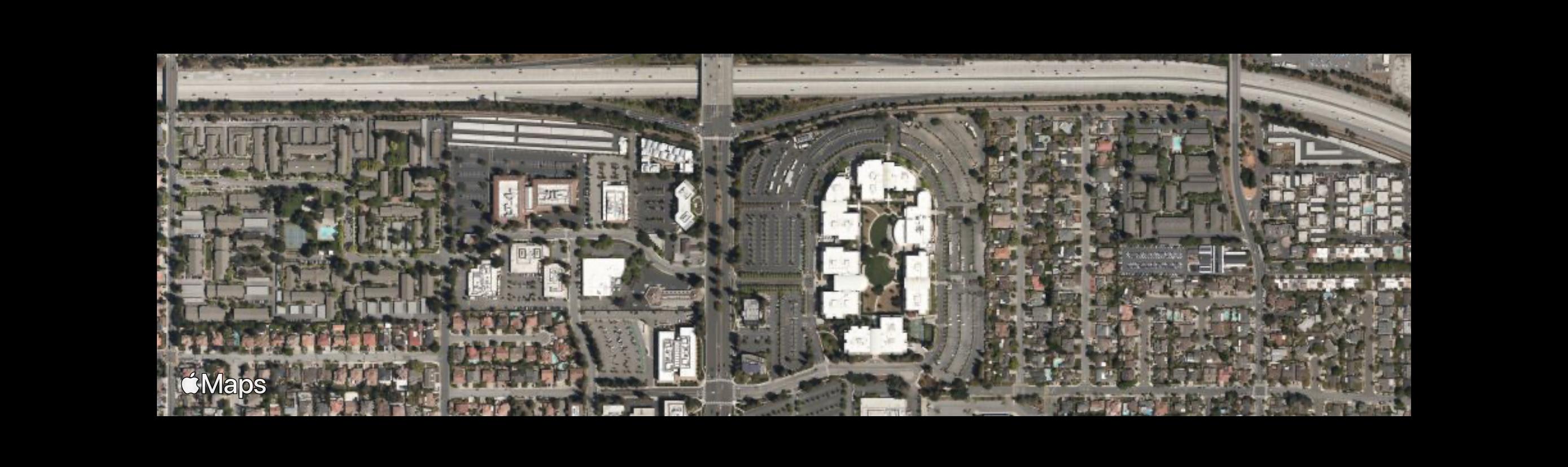
这会产生:
无关的意见:
- 您正在使用
MKCoordinateSpan(latitudeDelta: 0.1, longitudeDelta: 0.1)。我个人认为,学位跨度并不是非常有用的。我可能会建议你用电表。 options.region =MKCoordinateRegion(中心: location.coordinate,latitudinalMeters: 1000,longitudinalMeters: 1000) 或者使用MKMapCamera: options.camera = MKMapCamera(lookingAtCenter: location.coordinate,fromDistance: 1000,螺距: 0,标题: 0) - 如果您使用的是映射类型的
showsBuildings,那么使用satellite是没有意义的。医生们说: 要显示挤出的建筑物,必须将mapType属性设置为MKMapType.standard。 - 我不认为你必须设置
scale。医生们说: 此属性设置为与当前设备显示的分辨率相对应的默认值。
此外,无论如何,这个财产现在已经被废弃了。
- 不过,我建议设置图像的
size。
https://stackoverflow.com/questions/64493563
复制相似问题
腾讯云开发者

Copyright © 2013 - 2026 Tencent Cloud. All Rights Reserved. 腾讯云 版权所有
深圳市腾讯计算机系统有限公司 ICP备案/许可证号:粤B2-20090059  粤公网安备44030502008569号
腾讯云计算(北京)有限责任公司 京ICP证150476号 | 京ICP备11018762号