
是否有一种方法可以使用金牛座/JMeter从测试计划中运行一个测试?
是否有一种方法可以使用金牛座/JMeter从测试计划中运行一个测试?
提问于 2020-10-27 17:01:03
我试图使用金牛座和JMeter通过Gitlab运行性能测试。我有一个包含多个要测试端点的NavWeb.jmx,但我正在尝试设置两个作业,一个作业运行整个测试计划,另一个作业包含一个作业矩阵,您可以在其中选择和选择要测试的端点。
示例:
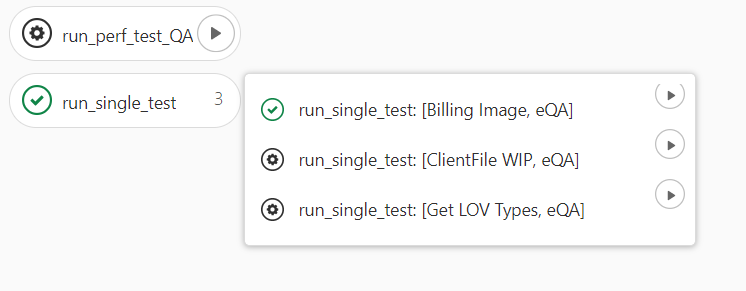
(run_perf_test_QA将它们全部运行在一起,而run_single_test允许您选择运行哪个测试)
我目前的解决方案是有两个JMX文件,一个是启用测试的,另一个是禁用的。然后,我使用启用一个特定测试的金牛座“启用”修改。这个解决方案并不理想,因为它需要保持JMeter脚本的两个副本保持同步。另一种解决方案是在YML中显式禁用每个测试,然后以编程方式启用其中一个测试。是否有一种方法可以通过一个JMX文件来完成这一任务,而不需要显式地列出YML文件中的每个测试?
回答 1
Stack Overflow用户
回答已采纳
发布于 2020-10-27 17:40:33
您可以在一个测试计划中使用:
试验计划大纲:
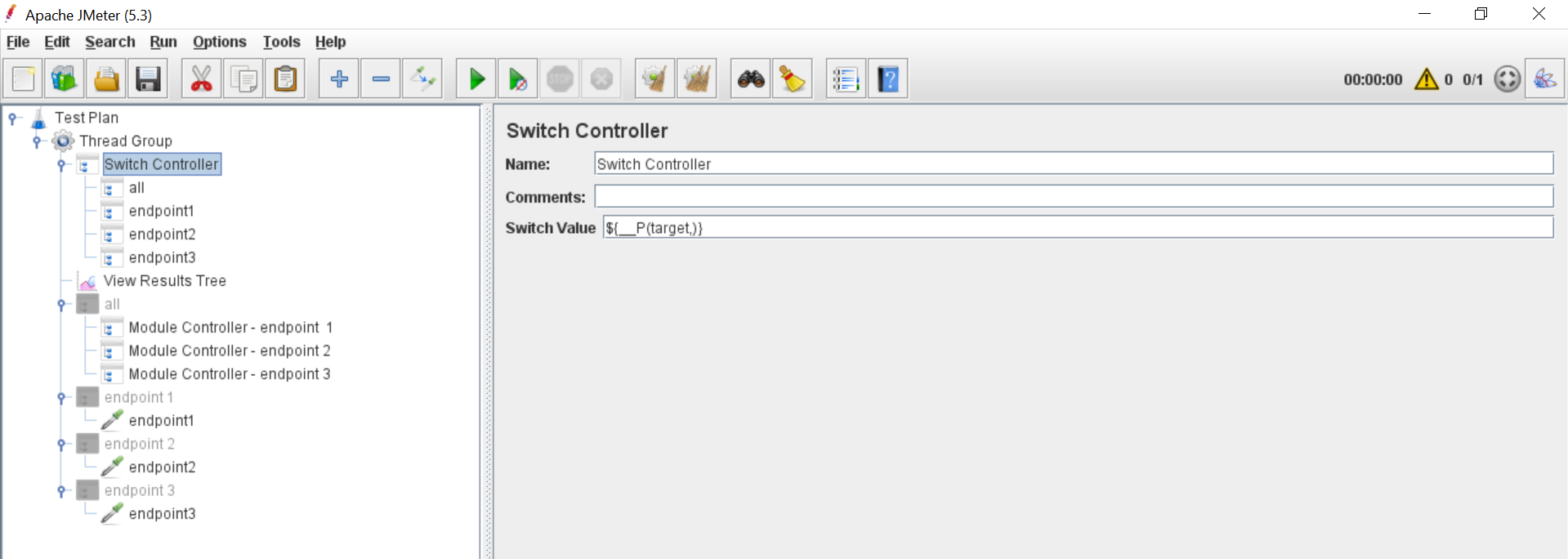
所以
- 如果您将JMeter运行为: 千兆表-Jtarget=all 它将执行所有三个端点。
- 如果您将JMeter运行为:
千兆表-Jtarget=endpoint1
它将只执行
endpoint1 - 等。
如果您想使用金牛座触发测试(但是我没有看到金牛座的有效用例),您可以通过命令行参数传递属性如下:
bzt -o modules.jmeter.properties.target=all或
bzt -o modules.jmeter.properties.target=endpoint1全面测试计划,以防万一:
<?xml version="1.0" encoding="UTF-8"?>
<jmeterTestPlan version="1.2" properties="5.0" jmeter="5.3">
  <hashTree>
    <TestPlan guiclass="TestPlanGui" testclass="TestPlan" testname="Test Plan" enabled="true">
      <stringProp name="TestPlan.comments"></stringProp>
      <boolProp name="TestPlan.functional_mode">false</boolProp>
      <boolProp name="TestPlan.tearDown_on_shutdown">true</boolProp>
      <boolProp name="TestPlan.serialize_threadgroups">false</boolProp>
      <elementProp name="TestPlan.user_defined_variables" elementType="Arguments" guiclass="ArgumentsPanel" testclass="Arguments" testname="User Defined Variables" enabled="true">
        <collectionProp name="Arguments.arguments"/>
      </elementProp>
      <stringProp name="TestPlan.user_define_classpath"></stringProp>
    </TestPlan>
    <hashTree>
      <ThreadGroup guiclass="ThreadGroupGui" testclass="ThreadGroup" testname="Thread Group" enabled="true">
        <stringProp name="ThreadGroup.on_sample_error">continue</stringProp>
        <elementProp name="ThreadGroup.main_controller" elementType="LoopController" guiclass="LoopControlPanel" testclass="LoopController" testname="Loop Controller" enabled="true">
          <boolProp name="LoopController.continue_forever">false</boolProp>
          <stringProp name="LoopController.loops">1</stringProp>
        </elementProp>
        <stringProp name="ThreadGroup.num_threads">1</stringProp>
        <stringProp name="ThreadGroup.ramp_time">1</stringProp>
        <boolProp name="ThreadGroup.scheduler">false</boolProp>
        <stringProp name="ThreadGroup.duration"></stringProp>
        <stringProp name="ThreadGroup.delay"></stringProp>
        <boolProp name="ThreadGroup.same_user_on_next_iteration">true</boolProp>
      </ThreadGroup>
      <hashTree>
        <SwitchController guiclass="SwitchControllerGui" testclass="SwitchController" testname="Switch Controller" enabled="true">
          <stringProp name="SwitchController.value">${__P(target,)}</stringProp>
        </SwitchController>
        <hashTree>
          <ModuleController guiclass="ModuleControllerGui" testclass="ModuleController" testname="all" enabled="true">
            <collectionProp name="ModuleController.node_path">
              <stringProp name="764597751">Test Plan</stringProp>
              <stringProp name="764597751">Test Plan</stringProp>
              <stringProp name="-1948168983">Thread Group</stringProp>
              <stringProp name="96673">all</stringProp>
            </collectionProp>
          </ModuleController>
          <hashTree/>
          <ModuleController guiclass="ModuleControllerGui" testclass="ModuleController" testname="endpoint1" enabled="true">
            <collectionProp name="ModuleController.node_path">
              <stringProp name="764597751">Test Plan</stringProp>
              <stringProp name="764597751">Test Plan</stringProp>
              <stringProp name="-1948168983">Thread Group</stringProp>
              <stringProp name="-1837756314">endpoint 1</stringProp>
            </collectionProp>
          </ModuleController>
          <hashTree/>
          <ModuleController guiclass="ModuleControllerGui" testclass="ModuleController" testname="endpoint2" enabled="true">
            <collectionProp name="ModuleController.node_path">
              <stringProp name="764597751">Test Plan</stringProp>
              <stringProp name="764597751">Test Plan</stringProp>
              <stringProp name="-1948168983">Thread Group</stringProp>
              <stringProp name="-1837756313">endpoint 2</stringProp>
            </collectionProp>
          </ModuleController>
          <hashTree/>
          <ModuleController guiclass="ModuleControllerGui" testclass="ModuleController" testname="endpoint3" enabled="true">
            <collectionProp name="ModuleController.node_path">
              <stringProp name="764597751">Test Plan</stringProp>
              <stringProp name="764597751">Test Plan</stringProp>
              <stringProp name="-1948168983">Thread Group</stringProp>
              <stringProp name="-1837756312">endpoint 3</stringProp>
            </collectionProp>
          </ModuleController>
          <hashTree/>
        </hashTree>
        <ResultCollector guiclass="ViewResultsFullVisualizer" testclass="ResultCollector" testname="View Results Tree" enabled="true">
          <boolProp name="ResultCollector.error_logging">false</boolProp>
          <objProp>
            <name>saveConfig</name>
            <value class="SampleSaveConfiguration">
              <time>true</time>
              <latency>true</latency>
              <timestamp>true</timestamp>
              <success>true</success>
              <label>true</label>
              <code>true</code>
              <message>true</message>
              <threadName>true</threadName>
              <dataType>true</dataType>
              <encoding>false</encoding>
              <assertions>true</assertions>
              <subresults>true</subresults>
              <responseData>false</responseData>
              <samplerData>false</samplerData>
              <xml>false</xml>
              <fieldNames>true</fieldNames>
              <responseHeaders>false</responseHeaders>
              <requestHeaders>false</requestHeaders>
              <responseDataOnError>false</responseDataOnError>
              <saveAssertionResultsFailureMessage>true</saveAssertionResultsFailureMessage>
              <assertionsResultsToSave>0</assertionsResultsToSave>
              <bytes>true</bytes>
              <sentBytes>true</sentBytes>
              <url>true</url>
              <threadCounts>true</threadCounts>
              <idleTime>true</idleTime>
              <connectTime>true</connectTime>
            </value>
          </objProp>
          <stringProp name="filename"></stringProp>
        </ResultCollector>
        <hashTree/>
        <TestFragmentController guiclass="TestFragmentControllerGui" testclass="TestFragmentController" testname="all" enabled="false"/>
        <hashTree>
          <ModuleController guiclass="ModuleControllerGui" testclass="ModuleController" testname="Module Controller - endpoint  1" enabled="true">
            <collectionProp name="ModuleController.node_path">
              <stringProp name="764597751">Test Plan</stringProp>
              <stringProp name="764597751">Test Plan</stringProp>
              <stringProp name="-1948168983">Thread Group</stringProp>
              <stringProp name="-1481272069">Test Fragment - endpoint 1</stringProp>
            </collectionProp>
          </ModuleController>
          <hashTree/>
          <ModuleController guiclass="ModuleControllerGui" testclass="ModuleController" testname="Module Controller - endpoint 2" enabled="true">
            <collectionProp name="ModuleController.node_path">
              <stringProp name="764597751">Test Plan</stringProp>
              <stringProp name="764597751">Test Plan</stringProp>
              <stringProp name="-1948168983">Thread Group</stringProp>
              <stringProp name="-1481272068">Test Fragment - endpoint 2</stringProp>
            </collectionProp>
          </ModuleController>
          <hashTree/>
          <ModuleController guiclass="ModuleControllerGui" testclass="ModuleController" testname="Module Controller - endpoint 3" enabled="true">
            <collectionProp name="ModuleController.node_path">
              <stringProp name="764597751">Test Plan</stringProp>
              <stringProp name="764597751">Test Plan</stringProp>
              <stringProp name="-1948168983">Thread Group</stringProp>
              <stringProp name="-1481272067">Test Fragment - endpoint 3</stringProp>
            </collectionProp>
          </ModuleController>
          <hashTree/>
        </hashTree>
        <TestFragmentController guiclass="TestFragmentControllerGui" testclass="TestFragmentController" testname="endpoint 1" enabled="false"/>
        <hashTree>
          <kg.apc.jmeter.samplers.DummySampler guiclass="kg.apc.jmeter.samplers.DummySamplerGui" testclass="kg.apc.jmeter.samplers.DummySampler" testname="endpoint1" enabled="true">
            <boolProp name="WAITING">true</boolProp>
            <boolProp name="SUCCESFULL">true</boolProp>
            <stringProp name="RESPONSE_CODE">200</stringProp>
            <stringProp name="RESPONSE_MESSAGE">OK</stringProp>
            <stringProp name="REQUEST_DATA">Dummy Sampler used to simulate requests and responses
without actual network activity. This helps debugging tests.</stringProp>
            <stringProp name="RESPONSE_DATA">Dummy Sampler used to simulate requests and responses
without actual network activity. This helps debugging tests.</stringProp>
            <stringProp name="RESPONSE_TIME">${__Random(50,500)}</stringProp>
            <stringProp name="LATENCY">${__Random(1,50)}</stringProp>
            <stringProp name="CONNECT">${__Random(1,5)}</stringProp>
            <stringProp name="URL"></stringProp>
            <stringProp name="RESULT_CLASS">org.apache.jmeter.samplers.SampleResult</stringProp>
          </kg.apc.jmeter.samplers.DummySampler>
          <hashTree/>
        </hashTree>
        <TestFragmentController guiclass="TestFragmentControllerGui" testclass="TestFragmentController" testname="endpoint 2" enabled="false"/>
        <hashTree>
          <kg.apc.jmeter.samplers.DummySampler guiclass="kg.apc.jmeter.samplers.DummySamplerGui" testclass="kg.apc.jmeter.samplers.DummySampler" testname="endpoint2" enabled="true">
            <boolProp name="WAITING">true</boolProp>
            <boolProp name="SUCCESFULL">true</boolProp>
            <stringProp name="RESPONSE_CODE">200</stringProp>
            <stringProp name="RESPONSE_MESSAGE">OK</stringProp>
            <stringProp name="REQUEST_DATA">Dummy Sampler used to simulate requests and responses
without actual network activity. This helps debugging tests.</stringProp>
            <stringProp name="RESPONSE_DATA">Dummy Sampler used to simulate requests and responses
without actual network activity. This helps debugging tests.</stringProp>
            <stringProp name="RESPONSE_TIME">${__Random(50,500)}</stringProp>
            <stringProp name="LATENCY">${__Random(1,50)}</stringProp>
            <stringProp name="CONNECT">${__Random(1,5)}</stringProp>
            <stringProp name="URL"></stringProp>
            <stringProp name="RESULT_CLASS">org.apache.jmeter.samplers.SampleResult</stringProp>
          </kg.apc.jmeter.samplers.DummySampler>
          <hashTree/>
        </hashTree>
        <TestFragmentController guiclass="TestFragmentControllerGui" testclass="TestFragmentController" testname="endpoint 3" enabled="false"/>
        <hashTree>
          <kg.apc.jmeter.samplers.DummySampler guiclass="kg.apc.jmeter.samplers.DummySamplerGui" testclass="kg.apc.jmeter.samplers.DummySampler" testname="endpoint3" enabled="true">
            <boolProp name="WAITING">true</boolProp>
            <boolProp name="SUCCESFULL">true</boolProp>
            <stringProp name="RESPONSE_CODE">200</stringProp>
            <stringProp name="RESPONSE_MESSAGE">OK</stringProp>
            <stringProp name="REQUEST_DATA">Dummy Sampler used to simulate requests and responses
without actual network activity. This helps debugging tests.</stringProp>
            <stringProp name="RESPONSE_DATA">Dummy Sampler used to simulate requests and responses
without actual network activity. This helps debugging tests.</stringProp>
            <stringProp name="RESPONSE_TIME">${__Random(50,500)}</stringProp>
            <stringProp name="LATENCY">${__Random(1,50)}</stringProp>
            <stringProp name="CONNECT">${__Random(1,5)}</stringProp>
            <stringProp name="URL"></stringProp>
            <stringProp name="RESULT_CLASS">org.apache.jmeter.samplers.SampleResult</stringProp>
          </kg.apc.jmeter.samplers.DummySampler>
          <hashTree/>
        </hashTree>
      </hashTree>
    </hashTree>
  </hashTree>
</jmeterTestPlan>页面原文内容由Stack Overflow提供。腾讯云小微IT领域专用引擎提供翻译支持
原文链接:
https://stackoverflow.com/questions/64559363
复制相关文章
相似问题
腾讯云开发者

Copyright © 2013 - 2026 Tencent Cloud. All Rights Reserved. 腾讯云 版权所有
深圳市腾讯计算机系统有限公司 ICP备案/许可证号:粤B2-20090059  粤公网安备44030502008569号
腾讯云计算(北京)有限责任公司 京ICP证150476号 | 京ICP备11018762号