
安装npm包时无法解决依赖树错误
当尝试使用npm i命令安装npm包时,我将得到以下异常:
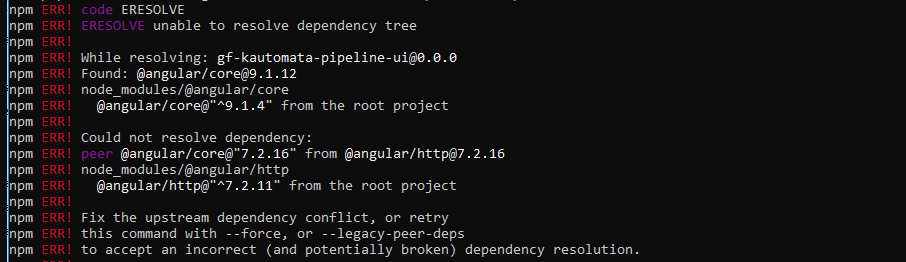
我尝试重新安装Node.js包并使用以下方法将代理设置为off:
set HTTP_PROXY=
set HTTPS_PROXY=
问题仍然存在。我做错什么了?
更新:
当我运行以下命令时:
npm install --legacy-peer-deps显示以下错误:

回答 31
Stack Overflow用户
发布于 2020-10-30 20:48:48
这与HTTP代理无关。
您有依赖冲突(不正确和可能损坏的依赖关系),因此尝试使用--force或--legacy-peer-deps运行该命令。如果它不生效,临时解决方案正在使用Node.js的早期版本(降级Node.js版本),因为它有时会导致此类错误发生。
基于OP的更新
正如您所看到的,它会触发以下错误:
没有找到与“角”/http@^9.1.4相匹配的版本。
看看页面。注意到,当您请求一个高级版本(例如,^9.1.4__)时,这个不推荐的包的最新版本是7.2.16!因此,尝试检查项目依赖项并跟踪引发的错误,以解决问题。
Stack Overflow用户
发布于 2020-12-17 21:10:19
试试这个命令-
npm install --save --legacy-peer-depsStack Overflow用户
发布于 2021-06-26 04:56:13
首先要了解问题所在。以下是我的错误:
npm ERR! ERESOLVE unable to resolve dependency tree
npm ERR!
npm ERR! While resolving: project-admin@11.0.0
npm ERR! Found: @angular/common@11.0.3
npm ERR! node_modules/@angular/common
npm ERR!   @angular/common@"11.0.3" from the root project
npm ERR!
npm ERR! Could not resolve dependency:
npm ERR! peer @angular/common@"^9.1.0 || ^10.0.0" from @agm/core@3.0.0-beta.0
npm ERR! node_modules/@agm/core
npm ERR!   @agm/core@"3.0.0-beta.0" from the root project
首先,你应该从下到上阅读这个问题。在这里,@agm/core@3.0.0-beta.0需要角公共9.1.0或10.0.0。上面的信息显示,所发现的角度公共值实际上是11.0.3。
(如果您想更好地理解依赖关系,下面是非常简单的站点:https://npm.github.io/how-npm-works-docs/npm3/how-npm3-works.html)
dependencies — these are the essential dependencies that you rely on and call in your project’s code
devDependencies — these are your development dependencies, for example, a prettier library for formatting code
peerDependencies — if you set a peer dependency in your package.json, you are telling the person who installs your package that they need that dependency with the specified version
optionalDependencies — these dependencies are optional and failing to install them will not break the installation process
bundledDependencies — it’s an array of packages that will come bundled with your package. This is useful when some 3rd party library is not on NPM, or you want to include some of your projects as modules那么,解决方案应该是什么呢?问题在于对等依赖。解决方案是降低角度的公共或,解决方案是使用遗留依赖逻辑来安装使用遗留对等设备的软件包。因此,遗留的对等程序不会尝试自动安装peerDependencies。这对你有用吗?可能是的。但是,您应该添加具体说明,说明如何这样做,或者如何使用-遗留对等点-deps自动完成项目包的安装,这些代码来自于前面的答案之一:
npm config set legacy-peer-deps true在我的例子中,我安装了这个包,并尝试运行ng serve,但是由于使用了遗留的对等程序,有些依赖程序包没有安装。我必须手动安装(因为我没有从上面的代码中设置配置)。最后,手动安装了大约五个软件包,所有这些包都是用遗留的对等程序来完成的。最后,我结束了一个无法安装的包,我没有尝试继续,因为我的项目抛出了类似疯狂的警告,还有很多包需要审核。因此,我的决定是不使用这个方案,并找到一个替代方案。
我在路上读到的其他解决方案:
- 将Node.js降级为v14。这将降低国家预防机制的评级。它可能不是v14,但这是被降级为最广泛的版本。
- 有些人使用纱线来强制安装包--我个人不明白这是如何工作的,因为我还没有使用过Yarn。
- 将角和全局角CLI版本降级为满足要求的版本。在我的例子中,它是角/共同的,在问题中它是角/核,但两者都需要降低整个角度右(我在这里不确定)。
- 您安装的软件包可能有更高的版本,不需要降级角。您可能尝试使用https://updatepackagejson.com/将您的包升级到最新版本,但这是为了防止您的项目非常新。
https://stackoverflow.com/questions/64573177
复制相似问题
腾讯云开发者

Copyright © 2013 - 2026 Tencent Cloud. All Rights Reserved. 腾讯云 版权所有
深圳市腾讯计算机系统有限公司 ICP备案/许可证号:粤B2-20090059  粤公网安备44030502008569号
腾讯云计算(北京)有限责任公司 京ICP证150476号 | 京ICP备11018762号