
SwiftUI中Shazam按钮的动画制作
SwiftUI中Shazam按钮的动画制作
提问于 2020-11-04 20:17:20
我想制作一个像Shazam‘animation这样的动画,但我做不到.
有人知道如何在SwiftUI中制作这个动画吗?
以下是代码:
import SwiftUI
import Foundation

struct SpeechButton: View {

    @State var isPressed:Bool = false

    var body: some View {

        Button(action:{

        }){
            ZStack {

    //-->       // if self.isPressed { RoundAnimation() }

                Image(systemName: "waveform")// Button Image
                    .resizable()
                    .frame(width: 40, height: 40)
                    .foregroundColor(.white)

            }
        )
    }
}
预先感谢你的帮助,人们:)
回答 1
Stack Overflow用户
回答已采纳
发布于 2020-11-04 20:28:21
在你的代码更新有更多的问题之后,它是无法运行的,你怎么会给我一个空按钮来处理它呢!
我有些东西要给你:
    import SwiftUI


struct ContentView: View {

    @State var startAnimation: Bool = false
    @State var random: CGFloat = 0

    var timer = Timer.publish (every: 0.1, on: .main, in: .common).autoconnect()

    var body: some View {


        Button(action: {

            // your logic!

        }){

            ZStack
            {
                Circle()
                    .fill(Color(UIColor.systemTeal))


                Image(systemName: "waveform")
                    .resizable()
                    .frame(width: 100, height: 100)


            }
            .frame(width: 200, height: 200)
            .scaleEffect(startAnimation ? CGFloat(1*random) : 1 )
            .animation(.easeInOut)
            .onTapGesture {
                startAnimation.toggle()

                if startAnimation == false
                {
                    timer.upstream.connect().cancel()

                }

            }


        }
        .onReceive(timer) { _ in

            random = CGFloat.random(in: 0.5...1)

        }


    }

}
更新代码: 2.0.0版本
import SwiftUI


struct ContentView: View {

    @State var startAnimation: Bool = false
    @State var random: CGFloat = 0


    @State var timer = Timer.publish(every: 0.1, on: .main, in: .common).autoconnect()


    func stopTimer() {
        timer.upstream.connect().cancel()
    }

    func startTimer() {
        timer = Timer.publish(every: 0.1, on: .main, in: .common).autoconnect()
    }


    var body: some View {


        Button(action: {

            // your logic!

        }){

            ZStack
            {
                Circle()
                    .fill(RadialGradient(gradient: Gradient(colors: [Color(UIColor.systemTeal), Color.white.opacity(0.1)]), center: .center, startRadius: 0, endRadius: 180))


                Image(systemName: "waveform")
                    .resizable()
                    .frame(width: 100, height: 100)


            }
            .frame(width: 200, height: 200)
            .scaleEffect(startAnimation ? random : 1 )
            .animation(.easeInOut)
            .onTapGesture {
                startAnimation.toggle()

                if startAnimation == false
                {
                    stopTimer()

                }
                else
                {
                    startTimer()
                }

            }


        }
        .onReceive(timer) { _ in
            random = CGFloat.random(in: 0.5...1)
        }
        .onAppear()
        {
            stopTimer()
        }


    }

}
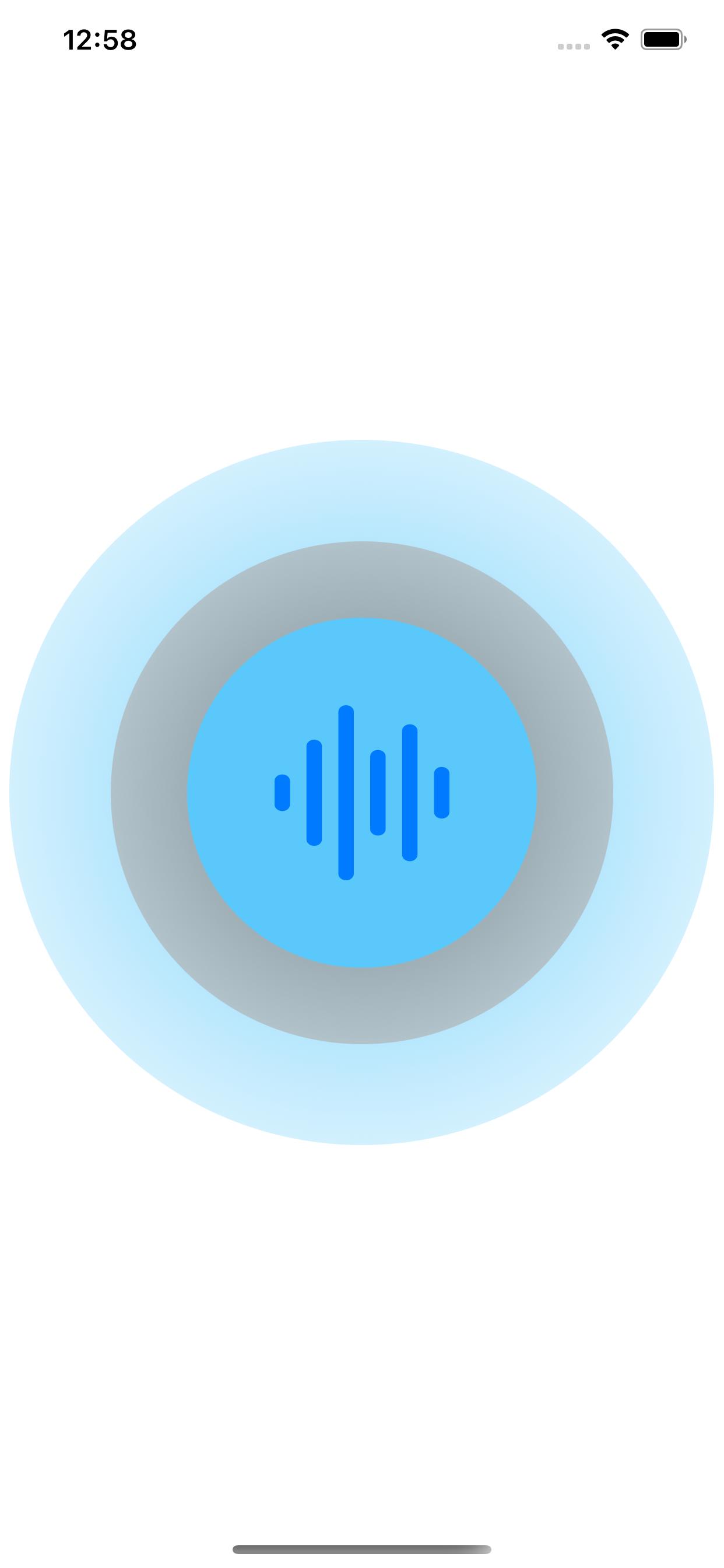
更新代码:版本3.0.0更多更好的动画
    import SwiftUI


struct ContentView: View {

    @State var startAnimation: Bool = false
    @State var random1: CGFloat = 0.5
    @State var random2: CGFloat = 0.5


    @State var timer = Timer.publish(every: 0.3, on: .main, in: .common).autoconnect()


    func stopTimer() {
        timer.upstream.connect().cancel()
    }

    func startTimer() {
        timer = Timer.publish(every: 0.3, on: .main, in: .common).autoconnect()
    }


    var body: some View {


        Button(action: {

            // your logic!

        }){

            ZStack
            {


                Circle()
                    .fill(RadialGradient(gradient: Gradient(colors: [Color(UIColor.systemTeal), Color.white.opacity(0.1)]), center: .center, startRadius: 0, endRadius: 400))
                    .frame(width: random2*500, height: random2*500)

                Circle()
                    .fill(RadialGradient(gradient: Gradient(colors: [Color(UIColor.gray), Color.white.opacity(0.01)]), center: .center, startRadius: 0, endRadius: 400))
                    .frame(width: random1*400, height: random1*400)


                Circle()
                    .fill(RadialGradient(gradient: Gradient(colors: [Color(UIColor.systemTeal), Color.white.opacity(0.1)]), center: .center, startRadius: 150, endRadius: 190))
                    .frame(width: 200, height: 200)

                Image(systemName: "waveform")
                    .resizable()
                    .frame(width: 100, height: 100)


            }

            .scaleEffect(startAnimation ? random1 : 1 )
            .animation(.easeInOut)
            .onTapGesture {
                startAnimation.toggle()

                if startAnimation == false
                {
                    stopTimer()

                }
                else
                {
                    startTimer()
                }

            }


        }
        .onReceive(timer) { _ in
            random1 = CGFloat.random(in: 0.5...1)
            random2 = CGFloat.random(in: 0.5...1)
            print(random1, random2)
        }
        .onAppear()
        {
            stopTimer()
        }


    }

}
页面原文内容由Stack Overflow提供。腾讯云小微IT领域专用引擎提供翻译支持
原文链接:
https://stackoverflow.com/questions/64687144
复制相关文章
相似问题
腾讯云开发者

Copyright © 2013 - 2026 Tencent Cloud. All Rights Reserved. 腾讯云 版权所有
深圳市腾讯计算机系统有限公司 ICP备案/许可证号:粤B2-20090059  粤公网安备44030502008569号
腾讯云计算(北京)有限责任公司 京ICP证150476号 | 京ICP备11018762号