
如何在UIAction中改变UIMenu中的图标颜色?
如何在UIAction中改变UIMenu中的图标颜色?
提问于 2020-11-06 12:44:54
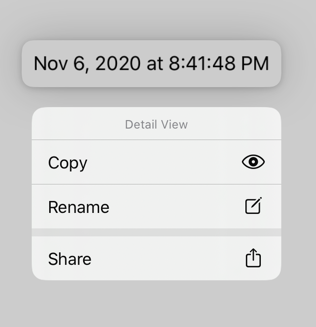
尝试改变UIAction中的图标颜色,但改变色调似乎根本不起作用。有什么想法吗?
let imageView = UIImage(systemName: "eye")!
.withTintColor(.red, renderingMode: .alwaysTemplate)下面的源代码来自苹果“向菜单栏和用户界面添加菜单和快捷方式”示例,只有imageView是新元素。
    func contextMenuActions() -> [UIMenuElement] {
        let imageView = UIImage(systemName: "eye")?.withTintColor(.red, renderingMode: .alwaysTemplate)

        // Actions for the contextual menu, here you apply two actions.
        let copyAction = UIAction(title: NSLocalizedString("CopyTitle", comment: ""),
                                   image: imageView,
                                   identifier: UIAction.Identifier(rawValue: "com.example.apple-samplecode.menus.copy")) { action in
                                         // Perform the "Copy" action, by copying the detail label string.
                                         if let content = self.detailItem?.description {
                                             UIPasteboard.general.string = content
                                         }
        }
回答 1
Stack Overflow用户
回答已采纳
发布于 2020-11-07 12:30:52
您需要使用呈现模式.alwaysOriginal,因为在内部它们使用UIImageView,它为所有模板映像应用自己的tintColor。
所以制造
func contextMenuActions() -> [UIMenuElement] {
    let imageView = UIImage(systemName: "eye")?.withTintColor(.red,
          renderingMode: .alwaysOriginal)                            // << here !!
给出

用Xcode 12.1测试
页面原文内容由Stack Overflow提供。腾讯云小微IT领域专用引擎提供翻译支持
原文链接:
https://stackoverflow.com/questions/64714923
复制相关文章
相似问题
腾讯云开发者

Copyright © 2013 - 2026 Tencent Cloud. All Rights Reserved. 腾讯云 版权所有
深圳市腾讯计算机系统有限公司 ICP备案/许可证号:粤B2-20090059  粤公网安备44030502008569号
腾讯云计算(北京)有限责任公司 京ICP证150476号 | 京ICP备11018762号