
约束鼠标daw到45度处理
如何约束交互地将一条线画到45度?想象一下,在45度的下划线网格中,鼠标所画的部分也被磁化了。也许鼠标向下键决定你的起始位置是哪个,在那之后,你的Mouse.X和Mouse.Y位置只在45度内更新,从那开始点击?
float dif = 10;
float easing = 0.05;
boolean current = false;
boolean started = false;
float rainbow, x, y;
float colbase;
PVector pos, prev_pos, update_pos;
float step = 25;

void setup(){
  size(400, 400);
  background(100);
  colorMode(HSB);
}

void draw(){

  if (rainbow >= 255)  rainbow=0;  else  rainbow+=5;
  if (frameCount % dif == 0) {
   colbase = rainbow;
  }
  if(mousePressed){

    update_pos();

        if(current){
          started =  true;//start drawing
          pos =      update_pos;
        }else{
          prev_pos = update_pos;
        }
       current = !current;

  }else{
      update_pos();
      started   = false;
      pos       = update_pos;
      prev_pos  = update_pos;
  }

  if(started){
      //style for lines
      strokeWeight(step);
      stroke(colbase,255,255);
      noFill();
      line(prev_pos.x, prev_pos.y, pos.x, pos.y);
   }

 }

PVector update_pos(){
  x = lerp(x, mouseX, easing);
  y = lerp(y, mouseY, easing);
  update_pos = new PVector(x, y);
  return update_pos;
}回答 1
Stack Overflow用户
发布于 2020-11-11 19:11:48
我想说我喜欢这个。而且,这个问题最终要比我想的更难回答。
结果如下:
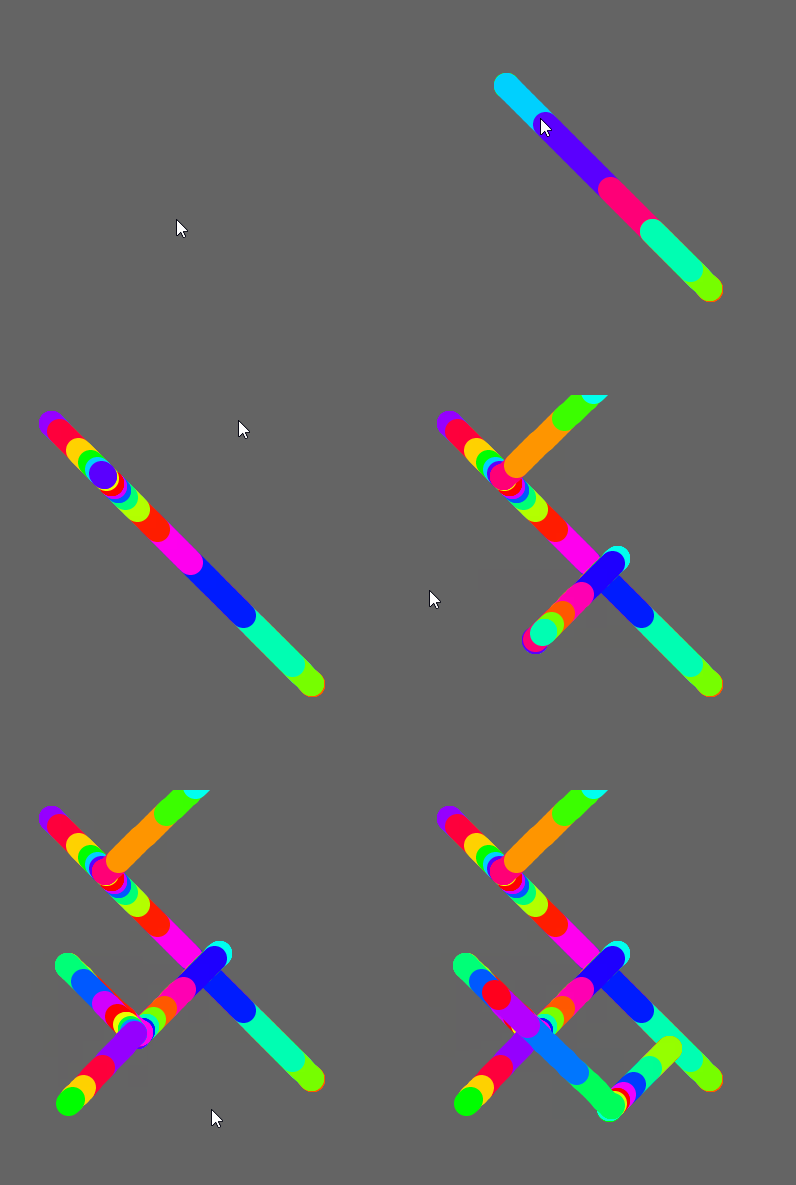
首先,我冒昧地重新组织了示例代码。我不知道你有多有经验,也许我修改的一些东西是故意的,但在我看来,你的例子有很多奇怪的代码片段在晃动。下面是包含我的更改的示例代码(请查看下一个代码块以获得答案,这个代码块更像是一个代码评审,通常可以帮助您):
float dif = 10;
float easing = 0.05;
boolean current, started; // automatically initializing as false unless stated otherwise
float rainbow;
float colbase;
PVector pos, prev_pos;
float step = 25;

void setup() {
  size(400, 400);
  background(100);
  colorMode(HSB); // clever!

  pos = prev_pos = new PVector(); // instanciating some non-null PVectors
}

void draw() {
  pos = prev_pos = update_pos(); // cascade attribution: it starts by the last one and goes back toward 'pos'

  if (mousePressed) {
    if (!started) {
      // initializing variables needed for drawing
      started = true;
      pos = prev_pos = new PVector(mouseX, mouseY);
    }
  } else {
    started = false;
  }

  if (started) {
    updateColor();
    strokeWeight(step);
    stroke(colbase, 255, 255);
    noFill();
    line(prev_pos.x, prev_pos.y, pos.x, pos.y);
  }
}

void updateColor() {
  if (rainbow >= 255) {
    rainbow=0;
  } else {
    rainbow+=5;
  }

  if (frameCount % dif == 0) {
    colbase = rainbow;
  }
}

PVector update_pos() {
  float x = lerp(pos.x, mouseX, easing);
  float y = lerp(pos.y, mouseY, easing);

  return new PVector(x, y);
}
注意我是如何更改了两个变量的名称。通常情况下,你应该把你的变量命名为维护你的代码的人是一个愤怒的骑车人,他知道你住在哪里。
现在要解决你的实际问题:
boolean isDrawing;
float rainbow, colbase, dif, easing, step, centerZone;
PVector pos, prev_pos, origin, quadrant;

void setup() {
  size(400, 400);
  background(100);
  colorMode(HSB); // clever!

  centerZone = 5; // determine how close to the original click you must be to change quadrant
  dif = 10;
  easing = 0.05;
  step = 25;

  origin = pos = prev_pos = new PVector();
}

void draw() {
  updatePosition();

  if (mousePressed) {
    if (!isDrawing) {
      // setting variables needed for drawing
      isDrawing = true;
      origin = pos = prev_pos = new PVector(mouseX, mouseY); // drawing should always start where the mouse currently is
    }
  } else {
    isDrawing = false;
  }

  if (isDrawing) {
    updateColor();
    strokeWeight(step);
    stroke(colbase, 255, 255);
    noFill();
    line(prev_pos.x, prev_pos.y, pos.x, pos.y);
  }
}

void updateColor() {
  if (rainbow >= 255) {
    rainbow=0;
  } else {
    rainbow+=5;
  }

  if (frameCount % dif == 0) {
    colbase = rainbow;
  }
}

void updatePosition() {
  float relativeX = pos.x - origin.x;
  float relativeY = pos.y - origin.y;
  float diffX = mouseX - origin.x;
  float diffY = mouseY - origin.y;
  float distance = abs(diffX) > abs(diffY) ? abs(diffX) : abs(diffY); // this is just inline if, the syntax being " condition ? return if true : return if false; "
  prev_pos = pos;

  // validating if the mouse is in the same quadrant as the pencil
  PVector mouseQuadrant = new PVector(diffX > 0 ? 1 : -1, diffY > 0 ? 1 : -1);

  // we can only change quadrant when near the center
  float distanceFromTheCenter = abs(relativeX) + abs(relativeY);
  if (quadrant == null || distanceFromTheCenter < centerZone) {
    quadrant = new PVector(diffX > 0 ? 1 : -1, diffY > 0 ? 1 : -1);
  }

  // if the mouse left it's quadrant, then draw toward the center until close enough to change direction
  // ^ is the XOR operator, which returns true only when one of the sides is different than the other (one true, one false)
  // if the quadrant info is positive and the diff coordinate is negative (or the other way around) we know the mouse has changed quadrant
  if (distanceFromTheCenter > centerZone && (relativeX > 0 ^ mouseQuadrant.x > 0 || relativeY > 0 ^ mouseQuadrant.y > 0)) {
    // going toward origin
    pos = new PVector(lerp(prev_pos.x, origin.x, easing), lerp(prev_pos.y, origin.y, easing));
  } else {
    // drawing normally
    pos = new PVector(lerp(prev_pos.x, origin.x + (distance * quadrant.x), easing), lerp(prev_pos.y, origin.y + (distance * quadrant.y), easing));
  }
}
如果你有这段代码,我会回答你的问题。玩得开心!
编辑:
这个部分可以使用更多的解释,所以让我们再详细阐述一下:
  if (distanceFromTheCenter > centerZone && (relativeX > 0 ^ mouseQuadrant.x > 0 || relativeY > 0 ^ mouseQuadrant.y > 0)) {
    // going toward origin
  } else {
    // drawing normally
  }
这个检查的目的是要知道鼠标是否仍然在同一象限中,而不是“铅笔”,我指的是我们画的那个点。
但是“象限”是什么呢?记住,用户只能画45度的线。这些行的定义与用户单击绘图的点有关,我称之为“原产地”:
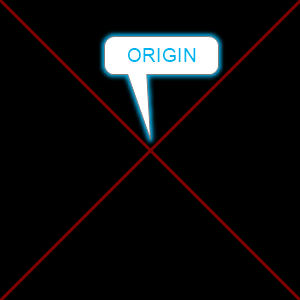
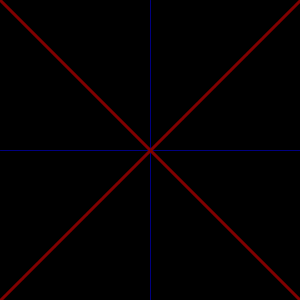
这意味着屏幕总是分为四个不同的“象限”。为什么?因为有四个不同的方向我们可以画。但我们不希望用户必须坚持这些准确的像素才能绘制,对吗?我们可以,但这不是algo的工作原理:它在页面上摆出一支铅笔,然后跟随鼠标。所以在这里,如果鼠标从原点向左向上移动,铅笔就会在45度X线的左上角分支上画。这些想象中的每一条线都有自己的“屏幕的一部分”,它们控制铅笔有权画的地方,我称之为“象限”:
现在使用这个算法,我们可以强迫铅笔超过45度线,但是如果鼠标从一个象限转到另一个象限会发生什么呢?我认为铅笔应该遵循,但不违反“只画45度线”的规则,所以在改变象限之前,它必须穿过中心:
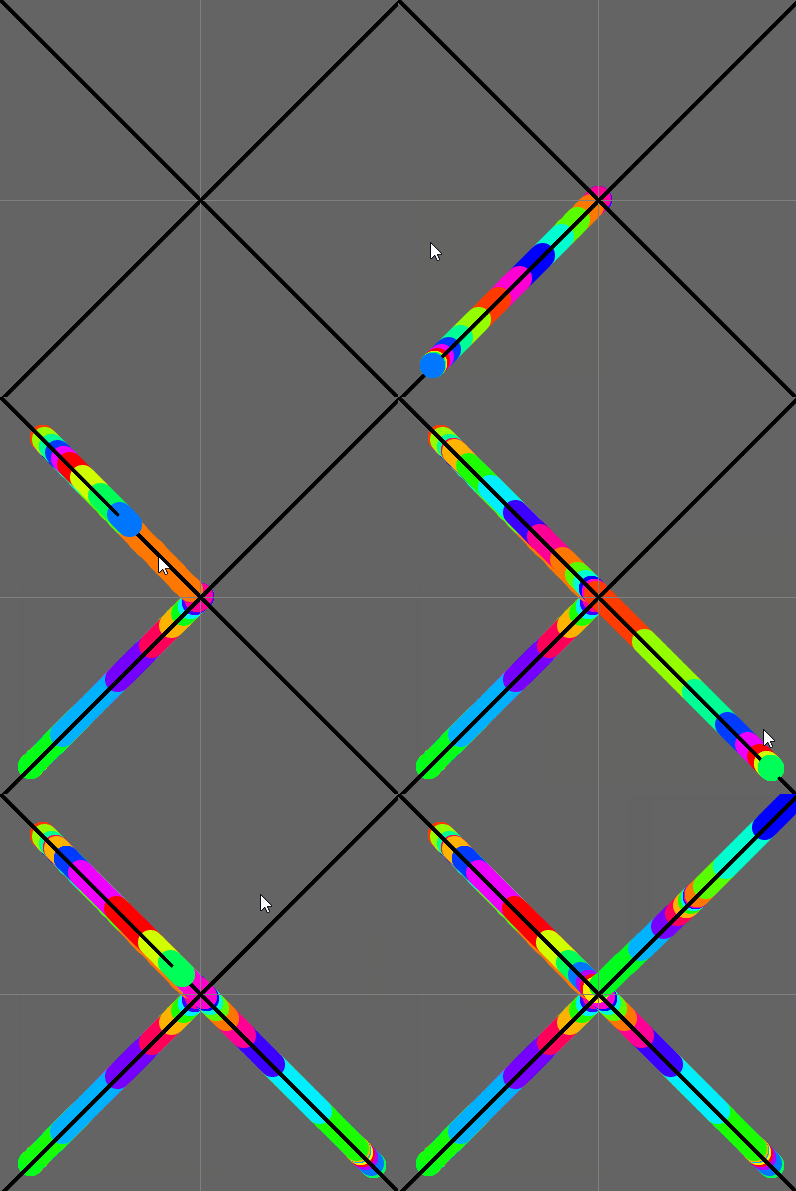
这里没有什么大秘密。很容易理解我们想要应用的业务规则:
- 当鼠标和铅笔处于同一象限时,按照鼠标的位置画(但只画在线上)。
- 如果鼠标处于与铅笔不同的象限,则向中心画,然后向鼠标正常地画。
这正是我们在这里要做的
if (mouse and pencil are in different quadrants) {
  // draw toward origin
} else {
  // draw toward the mouse
}
然后..。既然这么简单,为什么会有这个复杂的代码呢?
(distanceFromTheCenter > centerZone && (relativeX > 0 ^ mouseQuadrant.x > 0 || relativeY > 0 ^ mouseQuadrant.y > 0))嗯,真的,它可以用一种容易读的方式写出来,但是它会更长。让我们来分解它,看看为什么它是这样写的:
我的操作逻辑如下:
正如您可能知道的那样,(0,0)点位于草图的左上角。计算机科学中的大多数绘图都是这样计算坐标的。
- 象限存在于原点(用户单击此处开始绘图)。
每个象限中的
- 相对坐标要么是正的,要么是负的。如果是在原产地,X将是正数。如果屏幕上的y值低于原点:
,则y为正。
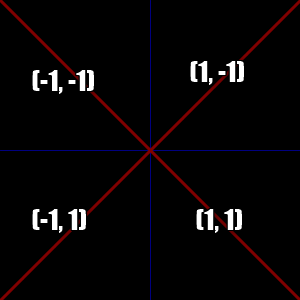
- ,如果你遵循我的逻辑,当鼠标和铅笔的相对坐标不是正的,也不是负的,那就意味着它们不在同一象限中。
所以:
distanceFromTheCenter > centerZone,=>,当我们离中心足够近时,我们可以让铅笔切换方向。如果铅笔不在中心附近,就不用计算其余的了。
relativeX > 0 ^ mouseQuadrant.x > 0 => relativeX真的就是pos.x - origin.x。这是铅笔相对于原产的地方。mouseQuadrant“知道”鼠标与原点之间的关系(这只是diffX和diffY的解释,供以后使用,实际上我们完全可以使用diffX和diffY,因为我们只是比较它们是正数还是负数)。
既然这么简单,为什么要用XOR操作符呢?正因如此:
relativeX > 0 ^ mouseQuadrant.x > 0
// is the same thing than this pseudocode:
if (relativeX sign is different than mousequadrant.x's sign)
// and the same thing than this more elaborated code:
!(relativeX > 0 && mouseQuadrant.x > 0) || !(relativeX < 0 && mouseQuadrant.x < 0)
// or, in a better writing:
(relativeX > 0 && mouseQuadrant.x < 0) || (relativeX < 0 && mouseQuadrant.x > 0)...which也是复杂的,也是丑陋的。所以,真的,(relativeX > 0 ^ mouseQuadrant.x > 0 || relativeY > 0 ^ mouseQuadrant.y > 0)只是一个简短的手:
(!(relativeX > 0 && mouseQuadrant.x > 0) || !(relativeX < 0 && mouseQuadrant.x < 0) || !(relativeY > 0 && mouseQuadrant.y > 0) || !(relativeY < 0 && mouseQuadrant.y < 0))我希望这是有道理的!玩得开心!
https://stackoverflow.com/questions/64745853
复制相似问题
腾讯云开发者

Copyright © 2013 - 2026 Tencent Cloud. All Rights Reserved. 腾讯云 版权所有
深圳市腾讯计算机系统有限公司 ICP备案/许可证号:粤B2-20090059  粤公网安备44030502008569号
腾讯云计算(北京)有限责任公司 京ICP证150476号 | 京ICP备11018762号