
无法使用FormData从表单中获取数据
无法使用FormData从表单中获取数据
提问于 2020-11-09 17:57:52
我正在为仪表板创建一个“编辑配置文件”页面,我所使用的技术同样是Next.js、Node.js和MongoDB。
注意:如果您只想知道问题,请跳到后端部分。
前部
,首先,,让我解释一下Frontend part。
- 我使用useRef()来引用输入字段中的数据(名称、bio)。效果很好。
- 一切都很好,问题在
handlesbumit()event_handler中。- 我使用
FormData将我的表单数据发送到后端API - 如果你在想我为什么不用一个普通的身体物体来发送数据,原因是我必须在以后添加个人资料图片更新,然后我必须发送文件,据我所知,我们不能用一个对象,而且只是为了告诉你,如果我使用对象部分,但不能使用这个对象部分,它可以正常工作。
- 我为引用提供的值都是很好的,处理程序的其他部分就像它编写的一样,在其中找不到任何奇怪的地方。
- 我使用
    import { useUser } from '../../../lib/hooks';
import React, { useState, useEffect, useRef } from 'react';
import Head from 'next/head';
import { ImBook, ImListNumbered } from 'react-icons/im';
import { AiFillGithub, AiOutlineTwitter, AiFillFacebook, AiFillInstagram, AiFillLinkedin } from 'react-icons/ai'
import { FaFacebook, FaStackOverflow } from 'react-icons/fa';

const ProfileSection = () => {
    const [user, { mutate }] = useUser();
    const [isUpdating, setIsUpdating] = useState(false);
    const nameRef = useRef();
    const profilePictureRef = useRef();
    const bioRef = useRef();
    const [msg, setMsg] = useState({ message: '', isError: false });

    useEffect(() => {
        nameRef.current.value = user.name;
        bioRef.current.value = user.Bio;
    }, [user]);


    const handleSubmit = async (event) => {
        event.preventDefault();
        if (isUpdating) return;
        setIsUpdating(true);

        console.log(nameRef.current.value); //Testing
        console.log(bioRef.current.value);  //Testing

        const formData = new FormData();
        formData.append('name', nameRef.current.value);
        formData.append('Bio', bioRef.current.value);
        console.log(formData.get('name'));
        const res = await fetch('/api/user', {
            method: 'PATCH',
            body: formData,
        });
        if (res.status === 200) {
            const userData = await res.json();
            mutate({
                user: {
                    ...user,
                    ...userData.user,
                },
            });
            setMsg({ message: 'Profile updated' });
        } else {
            setMsg({ message: await res.text(), isError: true });
        }
    };


    return (
        <>
            <Head>
                <title>Settings</title>
            </Head>
            <main>
                <div class="row">
                    <div class="col s12 m12">
                        <div className="card-panel br-10">
                            {msg.message ? <p style={{ color: msg.isError ? 'red' : '#0070f3', textAlign: 'center' }}>{msg.message}</p> : null}
                            <form onSubmit={handleSubmit}>
                                <div className="row">
                                    <div className="col s12 m6 l6">
                                        <label htmlFor="name">
                                            Name
                                         <input
                                                required
                                                id="name"
                                                name="name"
                                                type="text"
                                                ref={nameRef}
                                            />
                                        </label>
                                    </div>
                                    <div className="col s12 m6 l6">
                                        <label htmlFor="bio">
                                            Bio
                                            <textarea
                                                id="bio"
                                                name="bio"
                                                type="text"
                                                ref={bioRef}
                                            />
                                        </label>
                                    </div>
                                </div>

                                <div className="center-align">
                                    <button disabled={isUpdating} className="btn" type="submit" >Save</button>
                                </div>
                            </form>
                        </div>
                    </div>
                </div>
            </main>
        </>
    );
};

const SettingPage = () => {
    const [user] = useUser();

    if (!user) {
        return (
            <>
                <p>Please sign in</p>
            </>
        );
    }
    return (
        <>
            <ProfileSection />
        </>
    );
};

export default SettingPage;

<!-- begin snippet: js hide: false console: true babel: false -->

<!-- language: lang-js -->

    import { useUser } from '../../../lib/hooks';
    import React, { useState, useEffect, useRef } from 'react';
    import Head from 'next/head';
    import { ImBook, ImListNumbered } from 'react-icons/im';
    import { AiFillGithub, AiOutlineTwitter, AiFillFacebook, AiFillInstagram, AiFillLinkedin } from 'react-icons/ai'
    import { FaFacebook, FaStackOverflow } from 'react-icons/fa';

    const ProfileSection = () => {
        const [user, { mutate }] = useUser();
        const [isUpdating, setIsUpdating] = useState(false);
        const nameRef = useRef();
        const profilePictureRef = useRef();
        const bioRef = useRef();
        const [msg, setMsg] = useState({ message: '', isError: false });

        useEffect(() => {
            nameRef.current.value = user.name;
            bioRef.current.value = user.Bio;
        }, [user]);


        const handleSubmit = async (event) => {
            event.preventDefault();
            if (isUpdating) return;
            setIsUpdating(true);

            console.log(nameRef.current.value);
            console.log(bioRef.current.value);

            const formData = new FormData();
            formData.append('name', nameRef.current.value);
            formData.append('Bio', bioRef.current.value);
            console.log(formData.get('name'));
            const res = await fetch('/api/user', {
                method: 'PATCH',
                body: formData,
            });
            if (res.status === 200) {
                const userData = await res.json();
                mutate({
                    user: {
                        ...user,
                        ...userData.user,
                    },
                });
                setMsg({ message: 'Profile updated' });
            } else {
                setMsg({ message: await res.text(), isError: true });
            }
        };


        return (
            <>
                <Head>
                    <title>Settings</title>
                </Head>
                <main>
                    <div class="row">
                        <div class="col s12 m12">
                            <div className="card-panel br-10">
                                {msg.message ? <p style={{ color: msg.isError ? 'red' : '#0070f3', textAlign: 'center' }}>{msg.message}</p> : null}
                                <form onSubmit={handleSubmit}>
                                    <div className="row">
                                        <div className="col s12 m6 l6">
                                            <label htmlFor="name">
                                                Name
                                             <input
                                                    required
                                                    id="name"
                                                    name="name"
                                                    type="text"
                                                    ref={nameRef}
                                                />
                                            </label>
                                        </div>
                                        <div className="col s12 m6 l6">
                                            <label htmlFor="bio">
                                                Bio
                                                <textarea
                                                    id="bio"
                                                    name="bio"
                                                    type="text"
                                                    ref={bioRef}
                                                />
                                            </label>
                                        </div>
                                    </div>

                                    <div className="center-align">
                                        <button disabled={isUpdating} className="btn" type="submit" >Save</button>
                                    </div>
                                </form>
                            </div>
                        </div>
                    </div>
                </main>
            </>
        );
    };

    const SettingPage = () => {
        const [user] = useUser();

        if (!user) {
            return (
                <>
                    <p>Please sign in</p>
                </>
            );
        }
        return (
            <>
                <ProfileSection />
            </>
        );
    };

    export default SettingPage;
后端
Now,backend API for handlesubmit() event_handler,即'api/user'
- --请忽略--
handler,它只是一个预定义的中间件npm next-connect,它本身检查如果它的“修补程序”将运行handler.patch,将出现哪种类型的请求。 - 问题是
name的值&Bio是未定义的,这意味着它没有从req.body获得值; - 为了检查一下,我还安慰了req.body,它给出了这个
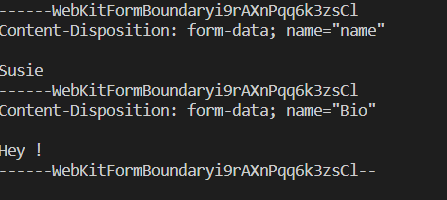
- 数据是正确的,但是
req.body不是一个对象--它现在是一个String,我得到了它,因为我使用的是格式数据,那么如何从这个req.body中获取name&Bio的值呢?
    import nextConnect from 'next-connect';
import middleware from '../../../middlewares/middleware';
import { extractUser } from '../../../lib/api-helpers';

const handler = nextConnect();
handler.use(middleware);
handler.get(async (req, res) => res.json({ user: extractUser(req) }));

handler.patch(async (req, res) => {
    if (!req.user) {
        req.status(401).end();
        return;
    }

    const { name, Bio } = req.body;

    await req.db.collection('users').updateOne(
        { _id: req.user._id },
        {
            $set: {
                name:name,
                Bio: Bio,
            },
        },
    );
    res.json({ user: { name, Bio } });
});

export default handler;回答 1
Stack Overflow用户
发布于 2020-11-09 22:51:47
我遇到过这个问题。我是通过使用2表单解决它,一个表单用于获取用户的信息,如电子邮件,密码和另一个用于发送用户的图片。也许对这个案子有最好的做法。
页面原文内容由Stack Overflow提供。腾讯云小微IT领域专用引擎提供翻译支持
原文链接:
https://stackoverflow.com/questions/64756831
复制相关文章
相似问题
腾讯云开发者

Copyright © 2013 - 2026 Tencent Cloud. All Rights Reserved. 腾讯云 版权所有
深圳市腾讯计算机系统有限公司 ICP备案/许可证号:粤B2-20090059  粤公网安备44030502008569号
腾讯云计算(北京)有限责任公司 京ICP证150476号 | 京ICP备11018762号