
如何制作定制化和单选芯片或无线电按钮
如何制作定制化和单选芯片或无线电按钮
提问于 2020-11-09 14:32:57
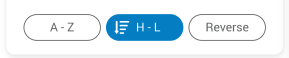
我必须使过滤器的单一选择,未经检查的芯片只显示文本,而选择芯片显示图像与文字,显示在图片中。
回答 1
Stack Overflow用户
回答已采纳
发布于 2020-11-09 18:07:36
您必须使用StatefulWidget来跟踪当前选定的索引。我已经编写了一个完整的演示程序(您必须改进UI,但它是功能性的):
import 'package:flutter/material.dart';

void main() => runApp(MyApp());

class MyApp extends StatelessWidget {
  // This widget is the root of your application.
  @override
  Widget build(BuildContext context) {
    return MaterialApp(
      title: 'Flutter Hello World',
      home: MyHomePage(),
    );
  }
}

class MyHomePage extends StatelessWidget {
  @override
  Widget build(BuildContext context) {
    return Scaffold(
      appBar: AppBar(
        // The title text which will be shown on the action bar
        title: Text("Chips Demo"),
      ),
      body: Container(
        margin: EdgeInsets.symmetric(horizontal: 20, vertical: 40),
        height: 40,
        child: ChipsFilter(
          selected: 1, // Select the second filter as default
          filters: [
            Filter(label: "A - Z", icon: Icons.assessment),
            Filter(label: "H - L", icon: Icons.ac_unit),
            Filter(label: "Reverse", icon: Icons.all_inclusive),
          ],
        ),
      ),
    );
  }
}

// =============================================================================

///
/// Filter entity
///
class Filter {
  ///
  /// Displayed label
  ///
  final String label;

  ///
  /// The displayed icon when selected
  ///
  final IconData icon;

  const Filter({this.label, this.icon});
}

// =============================================================================

///
/// The filter widget
///
class ChipsFilter extends StatefulWidget {
  ///
  /// The list of the filters
  ///
  final List<Filter> filters;

  ///
  /// The default selected index starting with 0
  ///
  final int selected;

  ChipsFilter({Key key, this.filters, this.selected}) : super(key: key);

  @override
  _ChipsFilterState createState() => _ChipsFilterState();
}

class _ChipsFilterState extends State<ChipsFilter> {
  ///
  /// Currently selected index
  ///
  int selectedIndex;

  @override
  void initState() {
    // When [widget.selected] is defined, check the value and set it as
    // [selectedIndex]
    if (widget.selected != null &&
        widget.selected >= 0 &&
        widget.selected < widget.filters.length) {
      this.selectedIndex = widget.selected;
    }

    super.initState();
  }

  @override
  Widget build(BuildContext context) {
    return Container(
      child: ListView.builder(
        itemBuilder: this.chipBuilder,
        itemCount: widget.filters.length,
        scrollDirection: Axis.horizontal,
      ),
    );
  }

  ///
  /// Build a single chip
  ///
  Widget chipBuilder(context, currentIndex) {
    Filter filter = widget.filters[currentIndex];
    bool isActive = this.selectedIndex == currentIndex;

    return GestureDetector(
      onTap: () {
        setState(() {
          selectedIndex = currentIndex;
        });
      },
      child: Container(
        padding: EdgeInsets.symmetric(horizontal: 20),
        margin: EdgeInsets.only(right: 10),
        decoration: BoxDecoration(
          color: isActive ? Colors.blueAccent : Colors.white,
          border: Border.all(color: Colors.black),
          borderRadius: BorderRadius.circular(30),
        ),
        child: Row(
          crossAxisAlignment: CrossAxisAlignment.center,
          children: [
            if (isActive)
              Container(
                margin: EdgeInsets.only(right: 10),
                child: Icon(filter.icon),
              ),
            Text(
              filter.label,
              style: TextStyle(
                fontSize: 12,
              ),
            ),
          ],
        ),
      ),
    );
  }
}页面原文内容由Stack Overflow提供。腾讯云小微IT领域专用引擎提供翻译支持
原文链接:
https://stackoverflow.com/questions/64753597
复制相关文章
相似问题
腾讯云开发者

Copyright © 2013 - 2026 Tencent Cloud. All Rights Reserved. 腾讯云 版权所有
深圳市腾讯计算机系统有限公司 ICP备案/许可证号:粤B2-20090059  粤公网安备44030502008569号
腾讯云计算(北京)有限责任公司 京ICP证150476号 | 京ICP备11018762号