
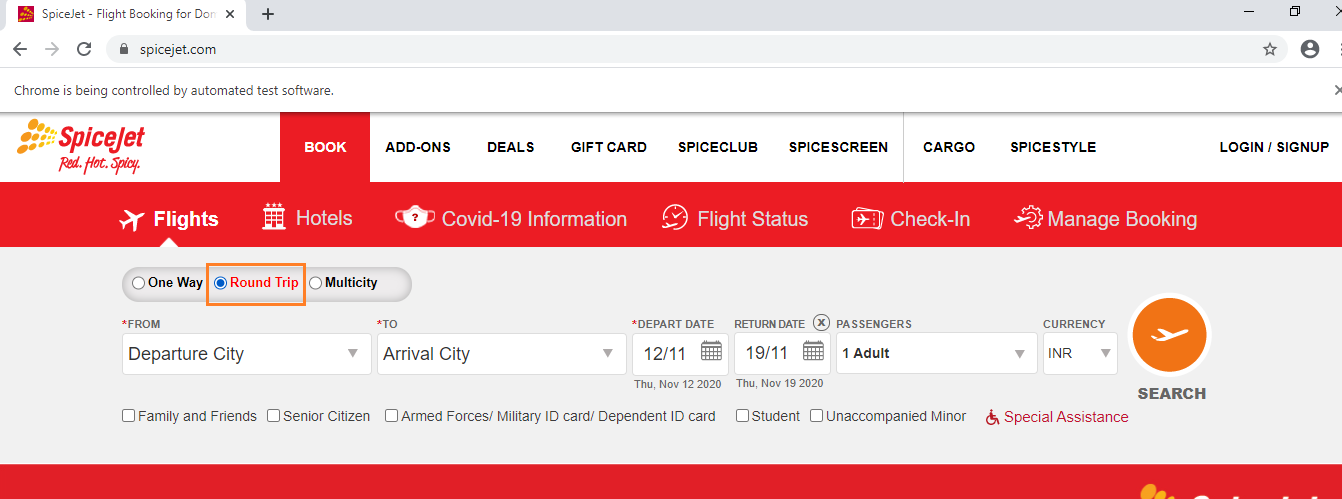
如何点击RoundTrip单选按钮内的Spicejet网站。它被选中,但在几秒钟后,单向被选中为默认值。
如何点击RoundTrip单选按钮内的Spicejet网站。它被选中,但在几秒钟后,单向被选中为默认值。
提问于 2020-11-11 19:19:31
如何点击往返单选按钮在SpiceJet网站。它被选中,但在几秒钟后,单向被选中为默认值。
下面是自2020年11月11日起spicejet网站自动化的代码。即使我单击往返单选按钮,默认情况下单向单选按钮也会被选中。我如何解决这个问题?
package practice;

import java.util.List;
import java.util.concurrent.TimeUnit;

import org.openqa.selenium.By;
import org.openqa.selenium.Keys;
import org.openqa.selenium.WebDriver;
import org.openqa.selenium.WebElement;
import org.openqa.selenium.chrome.ChromeDriver;
import org.openqa.selenium.support.ui.ExpectedCondition;
import org.openqa.selenium.support.ui.ExpectedConditions;
import org.openqa.selenium.support.ui.Select;
import org.openqa.selenium.support.ui.WebDriverWait;

public class Spicejet {

    public static void main(String[] args) throws InterruptedException {

        System.setProperty("webdriver.chrome.driver",
                "C:\\Users\\User\\Desktop\\selenium\\chromedriver_win32 (1)\\chromedriver.exe");
        WebDriver driver = new ChromeDriver();
        driver.get("https://www.spicejet.com/");
        driver.manage().window().maximize();
        driver.findElement(By.xpath("//input[@value='RoundTrip']")).click();
        new WebDriverWait(driver, 20).until(ExpectedConditions
                .visibilityOfElementLocated(By.xpath("//input[@id='ctl00_mainContent_ddl_originStation1_CTXT']")))
                .click();

        driver.findElement(By.xpath(
                "//div[@id='glsctl00_mainContent_ddl_originStation1_CTNR']//table[@id='citydropdown']//li/a[@value='MAA']"))
                .click();
        driver.findElement(By.xpath(
                "//div[@id='ctl00_mainContent_ddl_destinationStation1_CTNR']//table[@id='citydropdown']//li/a[@value='BLR']"))
                .click();
        driver.close();
    }
}回答 1
Stack Overflow用户
发布于 2020-11-12 19:15:21
看来,作为complete.,SpiceJet web应用程序需要更长的时间才能实现document.readyState。
因此,要在与文本click()往返相关联的无线电按钮上进行WebDriverWait,需要为elementToBeClickable()引入WebDriverWait,您可以使用以下两个定位器策略之一
cssSelector: 新WebDriverWait(驱动器,30).until(webDriver -> (JavascriptExecutor)webDriver).executeScript(“返回document.readyState”).equals(“完全”);xpath: 新WebDriverWait(驱动程序,30).until(webDriver -> (JavascriptExecutor)webDriver).executeScript(“返回document.readyState”).equals(“完全”);新WebDriverWait(驱动程序,JavascriptExecutor)- 浏览器快照:
参考文献
您可以在以下网站找到几个相关的详细讨论:
页面原文内容由Stack Overflow提供。腾讯云小微IT领域专用引擎提供翻译支持
原文链接:
https://stackoverflow.com/questions/64792821
复制相关文章
相似问题
腾讯云开发者

Copyright © 2013 - 2026 Tencent Cloud. All Rights Reserved. 腾讯云 版权所有
深圳市腾讯计算机系统有限公司 ICP备案/许可证号:粤B2-20090059  粤公网安备44030502008569号
腾讯云计算(北京)有限责任公司 京ICP证150476号 | 京ICP备11018762号