
如何在Vue 3中打印特定元素?
如何在Vue 3中打印特定元素?
提问于 2020-11-13 16:07:09
我正在进行一个项目,在这个项目中,我希望功能能够打印页面中的特定元素。有一个名为VueHtmlToPaper的mixin/plugin,它做我想做的事情,但是我很难将它导入到我的Vue 3 CLI项目中,因为它是为VueJS2创建的,全局API是不同的。任何帮助都是非常感谢的。
main.js
import { createApp } from 'vue'

import App from './App.vue'

 createApp(App).mount('#app')
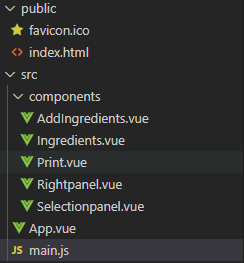
项目结构:
回答 2
Stack Overflow用户
回答已采纳
发布于 2020-11-13 16:56:38
由于这个插件与vue 3不兼容,我们可以在vue-html到纸张插件的基础上进行插件:
- 在项目根目录中创建一个名为plugins的文件夹,然后在其中添加具有以下内容的
VueHtmlToPaper.js文件:
function addStyles(win, styles) {
    styles.forEach((style) => {
      let link = win.document.createElement("link");
      link.setAttribute("rel", "stylesheet");
      link.setAttribute("type", "text/css");
      link.setAttribute("href", style);
      win.document.getElementsByTagName("head")[0].appendChild(link);
    });
  }

  const VueHtmlToPaper = {
    install(app, options = {}) {
      app.config.globalProperties.$htmlToPaper = (
        el,
        localOptions,
        cb = () => true
      ) => {
        let defaultName = "_blank",
          defaultSpecs = ["fullscreen=yes", "titlebar=yes", "scrollbars=yes"],
          defaultReplace = true,
          defaultStyles = [];
        let {
          name = defaultName,
          specs = defaultSpecs,
          replace = defaultReplace,
          styles = defaultStyles
        } = options;

        // If has localOptions
        // TODO: improve logic
        if (!!localOptions) {
          if (localOptions.name) name = localOptions.name;
          if (localOptions.specs) specs = localOptions.specs;
          if (localOptions.replace) replace = localOptions.replace;
          if (localOptions.styles) styles = localOptions.styles;
        }

        specs = !!specs.length ? specs.join(",") : "";

        const element = window.document.getElementById(el);

        if (!element) {
          alert(`Element to print #${el} not found!`);
          return;
        }

        const url = "";
        const win = window.open(url, name, specs, replace);

        win.document.write(`
          <html>
            <head>
              <title>${window.document.title}</title>
            </head>
            <body>
              ${element.innerHTML}
            </body>
          </html>
        `);

        addStyles(win, styles);

        setTimeout(() => {
          win.document.close();
          win.focus();
          win.print();
          win.close();
          cb();
        }, 1000);

        return true;
      };
    }
  };

export default VueHtmlToPaper;我只是复制/粘贴了这个代码,并将Vue替换为app,然后将其导入main.js中:
import { createApp } from 'vue'

import App from './App.vue'

 import  VueHtmlToPaper from './plugins/VueHtmlToPaper'

let app=createApp(App);

 app.use(VueHtmlToPaper)

 app.mount('#app')
然后在任何组件中使用它,如:
<template>
<div class="home">
    <img alt="Vue logo" src="../assets/logo.png">

    <!-- SOURCE -->
    <div id="printMe">
        <h1>Print me!</h1>
    </div>
    <!-- OUTPUT -->
    <button @click="print">print</button>

</div>
</template>

<script lang="ts">
import {
    defineComponent
} from 'vue';
import HelloWorld from '@/components/HelloWorld.vue'; /

export default defineComponent({
    name: 'Home',
    components: {
        HelloWorld,
    },
    methods: {
        print() {
            this.$htmlToPaper('printMe')
        }
    },
    mounted() {

    }
});
</script>Stack Overflow用户
发布于 2021-05-07 08:42:24
为了防止额外的窗口,我在VueHtmlToPaper.js中用iframe替换了窗口。
function addStyles(win, styles) {
    styles.forEach((style) => {
      let link = win.document.createElement("link");
      link.setAttribute("rel", "stylesheet");
      link.setAttribute("type", "text/css");
      link.setAttribute("href", style);
      win.document.getElementsByTagName("head")[0].appendChild(link);
    });
  }

  const VueHtmlToPaper = {
    install(app, options = {}) {
      app.config.globalProperties.$htmlToPaper = (
        el,
        localOptions,
        cb = () => true
      ) => {
        let
          defaultStyles = [];
        let {
          styles = defaultStyles
        } = options;

        // If has localOptions
        // TODO: improve logic
        if (localOptions) {
          if (localOptions.styles) styles = localOptions.styles;
        }

        const element = window.document.getElementById(el);

        if (!element) {
          alert(`Element to print #${el} not found!`);
          return;
        }

        var ifprint = document.createElement("iframe");
        document.body.appendChild(ifprint);
        ifprint.setAttribute("style","height:0;width:0;");

        const win = ifprint.contentWindow;

        win.document.write(`
          <html>
            <head>
              <title>${window.document.title}</title>
            </head>
            <body>
              ${element.innerHTML}
            </body>
          </html>
        `);

        addStyles(win, styles);


        setTimeout(() => {
          win.document.close();
          win.focus();
          win.print();
          win.close();
          document.body.removeChild(ifprint);
          cb();
        }, 1);

        return true;
      };
    }
  };

  export default VueHtmlToPaper;
页面原文内容由Stack Overflow提供。腾讯云小微IT领域专用引擎提供翻译支持
原文链接:
https://stackoverflow.com/questions/64824171
复制相关文章
相似问题
腾讯云开发者

Copyright © 2013 - 2026 Tencent Cloud. All Rights Reserved. 腾讯云 版权所有
深圳市腾讯计算机系统有限公司 ICP备案/许可证号:粤B2-20090059  粤公网安备44030502008569号
腾讯云计算(北京)有限责任公司 京ICP证150476号 | 京ICP备11018762号