
您如何使用UIEdgeInsets?
我在游乐场上尝试过不同的方法,但利润率并没有实现。我正在努力理解使用UIEdgeInsets (和NSDirectionalEdgeInsets)的正确方法。
我们的期望是超级视图应该有指定大小的边距,而子视图应该在这个边距之内,有点像一个看不见的边框。
下面没有显示superview的任何边距:
import UIKit
import PlaygroundSupport

let rootView = UIView(frame: CGRect(x: 0, y: 0, width: 500, height: 500))
rootView.layoutMargins = UIEdgeInsets(top: 100, left: 100, bottom: 100, right: 100)
let subview = UIView()

subview.translatesAutoresizingMaskIntoConstraints = false
NSLayoutConstraint.activate([
  subview.widthAnchor.constraint(equalToConstant: 100),
  subview.heightAnchor.constraint(equalToConstant: 100)
])

subview.backgroundColor = .red
rootView.addSubview(subview)

PlaygroundPage.current.needsIndefiniteExecution = true
PlaygroundPage.current.liveView = rootView
我也尝试过:
rootView.layoutMargins.top = 100或者代替Autolayout:
let subview = UIView(frame: CGRect(origin: .zero, size: .init(width: 100, height: 100)))尝试过NSDirectionEdgeInsets,但没有成功:
rootView.directionalLayoutMargins = NSDirectionalEdgeInsets(top: 100, leading: 100, bottom: 100, trailing: 100)最后,我在视图控制器中尝试了它,但仍然是徒劳的:
class MyVC: UIViewController {
  override func viewDidLoad() {
    super.viewDidLoad()

    let rootView = UIView(frame: CGRect(x: 0, y: 0, width: 500, height: 500))
    rootView.layoutMargins = UIEdgeInsets(top: 100, left: 100, bottom: 100, right: 100)
    self.view.addSubview(rootView)

    let subview = UIView()
    subview.translatesAutoresizingMaskIntoConstraints = false
    NSLayoutConstraint.activate([
      subview.widthAnchor.constraint(equalToConstant: 100),
      subview.heightAnchor.constraint(equalToConstant: 100)
    ])
    subview.backgroundColor = .red
    rootView.addSubview(subview)
  }
}回答 1
Stack Overflow用户
发布于 2020-11-13 17:08:04
布局边距不能替代否则会指定视图位置的约束,它们与这些约束一起工作。您给出的示例不包含这样的约束,因此布局边距不会产生任何影响。更重要的是,我猜想设置显式的高度和宽度约束会导致任何布局边距被忽略。
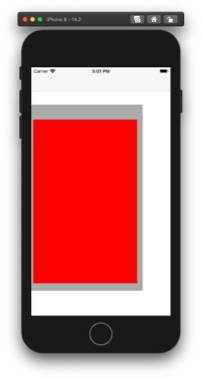
此图像中显示的布局是使用下面的代码生成的,该代码使用自动布局的视觉格式语言生成所需的约束。第一约束将红色视图的垂直边缘固定在灰度视图的垂直边缘上,而第二组则对水平边缘执行相同的操作。关键的是,格式字符串包含连字符,这些连字符向自动布局引擎发出信号,表示任何指定的布局边距也应得到尊重,因此最终的布局具有从灰色视图的边缘嵌入的红色视图的边缘。如果删除这些连字符(例如|[redView]|),则忽略自定义布局边距,只需在灰色视图的边缘上刷新红色视图。
override func viewDidLoad() {
  super.viewDidLoad()

  let grayView = UIView(frame: CGRect(x: 0, y: 100, width: 300, height: 500))
  let customInsets = NSDirectionalEdgeInsets(top: 40, leading: 5, bottom: 20, trailing: 15)
  grayView.directionalLayoutMargins = customInsets
  grayView.backgroundColor = .lightGray
  view.addSubview(grayView)

  let redView = UIView()
  redView.backgroundColor = .red
  redView.translatesAutoresizingMaskIntoConstraints = false
  grayView.addSubview(redView)
  let vrtConstraints = NSLayoutConstraint.constraints(withVisualFormat: "V:|-[redView]-|", options: [], metrics: nil, views: ["redView":redView])
  let hrzConstraints = NSLayoutConstraint.constraints(withVisualFormat: "H:|-[redView]-|", options: [], metrics: nil, views: ["redView":redView])

  NSLayoutConstraint.activate(verticalEdgeConstraints + horizontalEdgeConstraints)
}当然,您不必使用可视格式字符串来使布局边距得到尊重:您也可以通过界面构建器“选择-in”。此选项在苹果的具有布局边距的定位内容指南中进行了探讨
https://stackoverflow.com/questions/64823030
复制相似问题
腾讯云开发者

Copyright © 2013 - 2026 Tencent Cloud. All Rights Reserved. 腾讯云 版权所有
深圳市腾讯计算机系统有限公司 ICP备案/许可证号:粤B2-20090059  粤公网安备44030502008569号
腾讯云计算(北京)有限责任公司 京ICP证150476号 | 京ICP备11018762号