
Kendo并排
Kendo并排
提问于 2020-11-14 12:55:42
我使用Kendo和下面的html在一个制表带中创建一个表单:
<kendo-tabstrip>
<kendo-tabstrip-tab [title]="'Date'" [selected]="true">
    <ng-template kendoTabContent>
        <div class="SearchForm">
            <form class="k-form MySearchForm" [formGroup]="searchByTimeWindowform">
                    <kendo-formfield>
                        <kendo-label [for]="fromDate" text="Start Date:"></kendo-label>
                        <kendo-datepicker kendoTextBox #fromDate [formControlName]="'fromDate'"></kendo-datepicker>
                        <kendo-formerror>Please provide a start date</kendo-formerror>
                    </kendo-formfield>
                    <kendo-formfield>
                        <kendo-label [for]="endDate" text="End Date:"></kendo-label>
                        <kendo-datepicker kendoTextBox #endDate [formControlName]="'endDate'"></kendo-datepicker>
                        <kendo-formerror>Please provide an end date</kendo-formerror>
                    </kendo-formfield>
            </form>

            <div class="SearchFormButton">
                <button kendoButton (click)="SearchForTimeWindow()"><span span class="k-icon k-i-search"></span>Search</button>
            </div>
        </div>
    </ng-template>
</kendo-tabstrip-tab>

<kendo-tabstrip-tab [title]="'Other tab'">
    <ng-template kendoTabContent>
        <p>other tab...</p>
    </ng-template>
</kendo-tabstrip-tab>
结果如下:
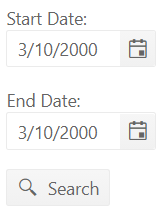
然而,我想要实现的是将日期选择器并排放置(标签仍然在顶部)。
就像这样:
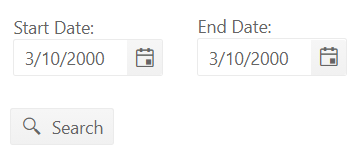
这有可能吗?
我尝试使用引导网格,但这似乎添加了一个水平滚动条到制表带。
回答 1
Stack Overflow用户
回答已采纳
发布于 2020-11-16 09:20:26
在Steve的帮助下,解决方案是使用以下css:
.wrap {
      display: flex;
      justify-content: space-between;
    }
稍后,这可以在包装表单字段的div中使用。
            <div class="wrap">
                <kendo-formfield class="arrival-date">
                  <kendo-label [for]="arrivalDate" text="Arrival Date"></kendo-label>
                  <kendo-datepicker #arrivalDate [formControlName]="'arrivalDate'"></kendo-datepicker>
                    <kendo-formerror>Error: Arrival date is required</kendo-formerror>
                </kendo-formfield>

                <kendo-formfield>
                    <kendo-label [for]="numberOfNights" text="Number of Nights"></kendo-label>
                    <kendo-numerictextbox #numberOfNights [formControlName]="'numberOfNights'" [min]="0"></kendo-numerictextbox>
                        <kendo-formerror>Error: required</kendo-formerror>
                </kendo-formfield>
            </div>
最后,我确实选择了使用Kendo MultiViewCalendar组件。
页面原文内容由Stack Overflow提供。腾讯云小微IT领域专用引擎提供翻译支持
原文链接:
https://stackoverflow.com/questions/64834119
复制相关文章
相似问题
腾讯云开发者

Copyright © 2013 - 2026 Tencent Cloud. All Rights Reserved. 腾讯云 版权所有
深圳市腾讯计算机系统有限公司 ICP备案/许可证号:粤B2-20090059  粤公网安备44030502008569号
腾讯云计算(北京)有限责任公司 京ICP证150476号 | 京ICP备11018762号