
为什么我得到一个错误,有未解决的VPC依赖关系?
我正在尝试实现符合以下辅助条件的配置管理:
https://s3.amazonaws.com/seis615/AnsiblePress.json
快速查看文本编辑器中的模板。注意如何配置UserData实例的mgmt1属性。当CloudFormation启动这个堆栈时,它将在管理服务器上自动安装和配置Ansible软件。使用少量脚本代码将配置管理软件引导到新系统上是非常常见的。一旦安装了Ansible,它就可以用于安装和配置环境中的其他服务器。
CloudFormation模板缺少需要添加的几个资源:
一个逻辑名称为webserverlb的应用程序负载平衡器,它将HTTP (端口80)请求分发给web1和web2实例。负载均衡器的健康检查端点应该是根(/)目录。
一个db.t2.micrords数据库实例(而不是集群)运行位于私有VPC子网中的名为wordpress的MariaDB 10.2.21数据库。对CloudFormation RDS资源使用逻辑名称wordpressdb。RDS和EC2实例实际上早于VPCs进入AWS的日期,因此令人困惑的是,有两种不同的方法来配置这些资源。您需要确保此数据库实例设计为在VPC中运行,并定义了正确的数据库子网组和安全组资源。
一个名为WebserverLbSecurityGroup的安全组允许从互联网进入http访问。
一个名为WordpressDbSecurityGroup的安全组,它允许从WebServerSecurityGroup进入标准MySQL端口。
一个名为DBName的输入参数,它将定义要创建的数据库名(默认为wordpress)
一个名为DBUser的输入参数,将用于数据库服务器用户名。
一个名为DBPassword的输入参数,将用于数据库服务器密码。
一个名为wordpressDbEndpoint的堆栈输出,它显示MariaDB实例端点地址。
一个名为wordpressLbEndpoint的堆栈输出,它显示应用程序负载均衡器URL。
我配置的JSON (下面)给出了以下模板格式错误,我不知道为什么:
模板格式错误:模板的参考资料块中未解析的资源依赖项wordpressVPC
{"AWSTemplateFormatVersion": "2010-09-09",
"Resources": {
"SSMAccessRole": {
"Type": "AWS::IAM::Role",
"Properties": {
"AssumeRolePolicyDocument": {
"Version" : "2012-10-17",
"Statement": [ {
"Effect": "Allow",
"Principal": {
"Service": [ "ec2.amazonaws.com" ]
},
"Action": [ "sts:AssumeRole" ]
} ]
},
"Path": "/"
}
},
"SSMRolePolicies": {
"Type": "AWS::IAM::Policy",
"Properties": {
"PolicyName": "ssmProperties",
"PolicyDocument": {
"Version" : "2012-10-17",
"Statement": [
{
"Effect": "Allow",
"Action": [
"ssm:DescribeParameters",
"ssm:PutParameter",
"ssm:GetParameters",
"ssm:DeleteParameter"
],
"Resource": {
"Fn::Join" : [
"",
[
"arn:aws:ssm:",
{ "Ref" : "AWS::Region" },
":",
{ "Ref" : "AWS::AccountId"},
{
"Fn::Join" : [
"",
[ ":parameter/", { "Ref": "AWS::StackName" }, ".*" ]
]
}
]
]
}
}
]
},
"Roles": [ { "Ref": "SSMAccessRole" } ]
}
},
"SSMInstanceProfile": {
"Type": "AWS::IAM::InstanceProfile",
"Properties": {
"Path": "/",
"Roles": [ { "Ref": "SSMAccessRole" } ]
}
},
"web1pem" : {
"Type" : "AWS::SSM::Parameter",
"Properties" : {
"Name" : {
"Fn::Join" : [
"",
[ { "Ref": "AWS::StackName" }, ".web1pem" ]
]
},
"Type" : "String",
"Value" : "0",
"Description": "web1 instance private key."
}
},
"web2pem" : {
"Type" : "AWS::SSM::Parameter",
"Properties" : {
"Name" : {
"Fn::Join" : [
"",
[ { "Ref": "AWS::StackName" }, ".web2pem" ]
]
},
"Type" : "String",
"Value" : "0",
"Description": "web2 instance private key."
}
},
"wordpressVpc": {
"Type": "AWS::EC2::VPC",
"Properties": {
"EnableDnsSupport": "true",
"EnableDnsHostnames": "true",
"CidrBlock": "10.0.0.0/16",
"Tags": [
{
"Key": "Environment",
"Value": "Test"
}
]
}
},
"publicSubnet1": {
"Type": "AWS::EC2::Subnet",
"Properties": {
"VpcId": {
"Ref": "wordpressVpc"
},
"CidrBlock": "10.0.0.0/24",
"AvailabilityZone" : {
"Fn::Select" : [ "0", { "Fn::GetAZs" : { "Ref" : "AWS::Region" }}]
}
}
},
"publicSubnet2": {
"Type": "AWS::EC2::Subnet",
"Properties": {
"VpcId": {
"Ref": "wordpressVpc"
},
"CidrBlock": "10.0.1.0/24",
"AvailabilityZone" : {
"Fn::Select" : [ "1", { "Fn::GetAZs" : { "Ref" : "AWS::Region" }}]
}
}
},
"privateSubnet1": {
"Type": "AWS::EC2::Subnet",
"Properties": {
"VpcId": {
"Ref": "wordpressVpc"
},
"CidrBlock": "10.0.2.0/24",
"AvailabilityZone" : {
"Fn::Select" : [ "0", { "Fn::GetAZs" : { "Ref" : "AWS::Region" }}]
}
}
},
"privateSubnet2": {
"Type": "AWS::EC2::Subnet",
"Properties": {
"VpcId": {
"Ref": "wordpressVpc"
},
"CidrBlock": "10.0.3.0/24",
"AvailabilityZone" : {
"Fn::Select" : [ "1", { "Fn::GetAZs" : { "Ref" : "AWS::Region" }}]
}
}
},
"web1": {
"Type": "AWS::EC2::Instance",
"DependsOn": [
"web1pem"
],
"Properties": {
"InstanceType": "t2.micro",
"ImageId": {"Ref": "AMI"},
"IamInstanceProfile": {
"Ref": "SSMInstanceProfile"
},
"KeyName": {
"Ref": "KeyName"
},
"NetworkInterfaces": [
{
"GroupSet": [
{
"Ref": "WebServerSecurityGroup"
}
],
"AssociatePublicIpAddress": "true",
"DeviceIndex": "0",
"DeleteOnTermination": "true",
"SubnetId": {
"Ref": "publicSubnet1"
}
}
],
"Tags": [
{
"Key": "Name",
"Value": "web1"
}
],
"UserData" : {
"Fn::Base64" : {
"Fn::Join" : [
"", [
"#!/bin/bash -xe\n",
"ssh-keygen -f /home/ec2-user/.ssh/web1-key.pem -q -N \"\"\n",
"chown ec2-user:ec2-user /home/ec2-user/.ssh/web1-key.pem\n",
"chown ec2-user:ec2-user /home/ec2-user/.ssh/web1-key.pem.pub\n",
"PEMFILE=`cat /home/ec2-user/.ssh/web1-key.pem`\n",
"aws ssm put-parameter --name ", { "Ref" : "web1pem" }, " --type String --value \"${PEMFILE}\" --overwrite --region ", { "Ref" : "AWS::Region" },"\n",
"cat /home/ec2-user/.ssh/web1-key.pem.pub >> /home/ec2-user/.ssh/authorized_keys\n",
"# Signal the status from cfn-init\n",
"/opt/aws/bin/cfn-signal -e $? ",
" --stack ",
{
"Ref": "AWS::StackName"
},
" --resource web1 ",
" --region ",
{
"Ref": "AWS::Region"
},
"\n"
]
]
}
}
},
"CreationPolicy": {
"ResourceSignal": {
"Timeout": "PT5M"
}
}
},
"web2": {
"Type": "AWS::EC2::Instance",
"DependsOn": [
"web1pem"
],
"Properties": {
"InstanceType": "t2.micro",
"ImageId": {"Ref": "AMI"},
"IamInstanceProfile": {
"Ref": "SSMInstanceProfile"
},
"KeyName": {
"Ref": "KeyName"
},
"NetworkInterfaces": [
{
"GroupSet": [
{
"Ref": "WebServerSecurityGroup"
}
],
"AssociatePublicIpAddress": "true",
"DeviceIndex": "0",
"DeleteOnTermination": "true",
"SubnetId": {
"Ref": "publicSubnet2"
}
}
],
"Tags": [
{
"Key": "Name",
"Value": "web2"
}
],
"UserData" : {
"Fn::Base64" : {
"Fn::Join" : [
"", [
"#!/bin/bash -xe\n",
"ssh-keygen -f /home/ec2-user/.ssh/web2-key.pem -q -N \"\"\n",
"chown ec2-user:ec2-user /home/ec2-user/.ssh/web2-key.pem\n",
"chown ec2-user:ec2-user /home/ec2-user/.ssh/web2-key.pem.pub\n",
"PEMFILE=`cat /home/ec2-user/.ssh/web2-key.pem`\n",
"aws ssm put-parameter --name ", { "Ref" : "web2pem" }, " --type String --value \"${PEMFILE}\" --overwrite --region ", { "Ref" : "AWS::Region" },"\n",
"cat /home/ec2-user/.ssh/web2-key.pem.pub >> /home/ec2-user/.ssh/authorized_keys\n",
"# Signal the status from cfn-init\n",
"/opt/aws/bin/cfn-signal -e $? ",
" --stack ",
{
"Ref": "AWS::StackName"
},
" --resource web2 ",
" --region ",
{
"Ref": "AWS::Region"
},
"\n"
]
]
}
}
},
"CreationPolicy": {
"ResourceSignal": {
"Timeout": "PT5M"
}
}
},
"WebServerSecurityGroup": {
"Type": "AWS::EC2::SecurityGroup",
"Properties": {
"VpcId": {
"Ref": "wordpressVpc"
},
"GroupDescription": "Allow access from HTTP and SSH traffic",
"SecurityGroupIngress": [
{
"IpProtocol": "tcp",
"FromPort": "80",
"ToPort": "80",
"CidrIp": "0.0.0.0/0"
},
{
"IpProtocol": "tcp",
"FromPort": "22",
"ToPort": "22",
"CidrIp": {"Ref": "YourIp"}
}
]
}
},
"WebServerSGIngressTCP22": {
"Type": "AWS::EC2::SecurityGroupIngress",
"Metadata": {
"Comment": "SSH ingress security rule"
},
"Properties" : {
"IpProtocol": "tcp",
"FromPort": "22",
"ToPort": "22",
"SourceSecurityGroupId": { "Ref": "WebServerSecurityGroup" },
"GroupId": { "Fn::GetAtt": ["WebServerSecurityGroup", "GroupId"]}
}
},
"InternetGateway": {
"Type": "AWS::EC2::InternetGateway",
"Properties": {}
},
"AttachGateway": {
"Type": "AWS::EC2::VPCGatewayAttachment",
"Properties": {
"InternetGatewayId": {
"Ref": "InternetGateway"
},
"VpcId": {
"Ref": "wordpressVpc"
}
}
},
"PublicRouteTable": {
"Type": "AWS::EC2::RouteTable",
"Properties": {
"VpcId": {
"Ref": "wordpressVpc"
}
}
},
"PublicRoute": {
"Type": "AWS::EC2::Route",
"Properties": {
"DestinationCidrBlock": "0.0.0.0/0",
"RouteTableId": {
"Ref": "PublicRouteTable"
},
"GatewayId": {
"Ref": "InternetGateway"
}
},
"DependsOn": [
"InternetGateway", "AttachGateway"
]
},
"Public1RouteTableAssociation": {
"Type": "AWS::EC2::SubnetRouteTableAssociation",
"Properties": {
"RouteTableId": {
"Ref": "PublicRouteTable"
},
"SubnetId": {
"Ref": "publicSubnet1"
}
}
},
"Public2RouteTableAssociation": {
"Type": "AWS::EC2::SubnetRouteTableAssociation",
"Properties": {
"RouteTableId": {
"Ref": "PublicRouteTable"
},
"SubnetId": {
"Ref": "publicSubnet2"
}
}
},
"webserverlb": {
"Type": "AWS::ElasticLoadBalancingV2::LoadBalancer",
"Properties": {
"IpAddressType": "ipv4",
"SecurityGroups": [
{
"Ref": "webserverlbSecurityGroup"
}
],
"Subnets": [
{
"Ref": "publicSubnet1"
},
{
"Ref": "publicSubnet2"
}
],
"Tags": [
{
"Key": "Name",
"Value": "webserverlb"
}
]
},
"DependsOn": [
"webserversSecurityGroup"
]
},
"webserverlbSecurityGroup": {
"Type": "AWS::EC2::SecurityGroup",
"Properties": {
"VpcId": {
"Ref": "wordpressVPC"
},
"GroupDescription": "Allows incoming requests from port 80 via HTTP.",
"SecurityGroupIngress": [
{
"IpProtocol": "TCP",
"FromPort": "80",
"ToPort": "80",
"CidrIp": "0.0.0.0/0",
"Description": "Allows 80 from Internet"
}
]
}
},
"wordpressdb": {
"Type": "AWS::RDS::DBInstance",
"Properties": {
"VpcId": {
"Ref": "wordpressVPC"
},
"AvailabilityZone": "us-east-1a",
"DBInstanceClass": "db.t2.micro",
"DBName": "wordpress",
"Engine": "mariadb",
"EngineVersion": "10.2.21",
"MultiAZ": 1,
"Tags": [
{
"Key": "Name",
"Value": "wordpressdb"
}
]
},
"DependsOn": [
"wordpressdbSecurityGroup"
]
},
"wordpressdbSecurityGroup": {
"Type": "AWS::RDS::DBSecurityGroup",
"Properties": {
"VpcId": {
"Ref": "wordpressVPC"
},
"GroupDescription": "Enable access to the db via port 3306.",
"Tags": [
{
"Key": "Name",
"Value": "wordpressdbSecurityGroup"
}
],
"SecurityGroupIngress": [
{
"IpProtocol": "TCP",
"FromPort": "3306",
"ToPort": "3306",
"Description": "Enable HTTP access."
}
]
}
}
},
"Parameters": {
"KeyName": {
"Description": "Name of your EC2 KeyPair to enable SSH access to the instances.",
"Type": "AWS::EC2::KeyPair::KeyName",
"ConstraintDescription": "must be the name of an existing EC2 KeyPair."
},
"YourIp": {
"Description": "The current CIDR IP address of your workstation (x.x.x.x/32). http://checkip.amazonaws.com/",
"Type": "String",
"AllowedPattern": "^(([0-9]|[1-9][0-9]|1[0-9]{2}|2[0-4][0-9]|25[0-5])\\.){3}([0-9]|[1-9][0-9]|1[0-9]{2}|2[0-4][0-9]|25[0-5])(\\/(1[6-9]|2[0-9]|3[0-2]))$",
"ConstraintDescription": "Must be a valid IP CIDR range of the form x.x.x.x/x."
},
"AMI": {
"Description": "The EC2 instance AMI",
"Type": "String",
"Default": "ami-00dc79254d0461090"
},
"DBName": {
"Description": "Name of the database",
"Type" : "String",
"Default": "wordpress"
},
"DBUser": {
"Default": "admin",
"NoEcho": "false",
"Description" : "The WordPress database admin account user name",
"Type": "String",
"MinLength": "1",
"MaxLength": "16",
"AllowedPattern" : "[a-zA-Z][a-zA-Z0-9]*"
},
"DBPassword": {
"NoEcho": "true",
"Description" : "The password of the database.",
"Type": "String",
"MinLength": "1",
"MaxLength": "16",
"AllowedPattern" : "[a-zA-Z][a-zA-Z0-9]*"
}
},
"Outputs": {
"web1PublicIp": {
"Value": {"Fn::GetAtt": ["web1","PublicIp"]},
"Description": "web1 public IP"
},
"we2PublicIp": {
"Value": {"Fn::GetAtt": ["web2","PublicIp"]},
"Description": "web2 public IP"
},
"mgmt1PublicIp": {
"Value": {"Fn::GetAtt": ["mgmt1","PublicIp"]},
"Description": "mgmt1 public IP"
}
}
}回答 2
Stack Overflow用户
发布于 2020-11-14 05:18:50
因为CloudFormation是区分大小写的。您的vpc资源称为wordpressVpc,但在某些地方您使用的是wordpressVPC。
Stack Overflow用户
发布于 2020-11-14 05:34:27
建议在编写模板以及自动完成和文档链接时,尝试CloudFormation连接器中的VSCode以内联方式查看其中的一些错误:
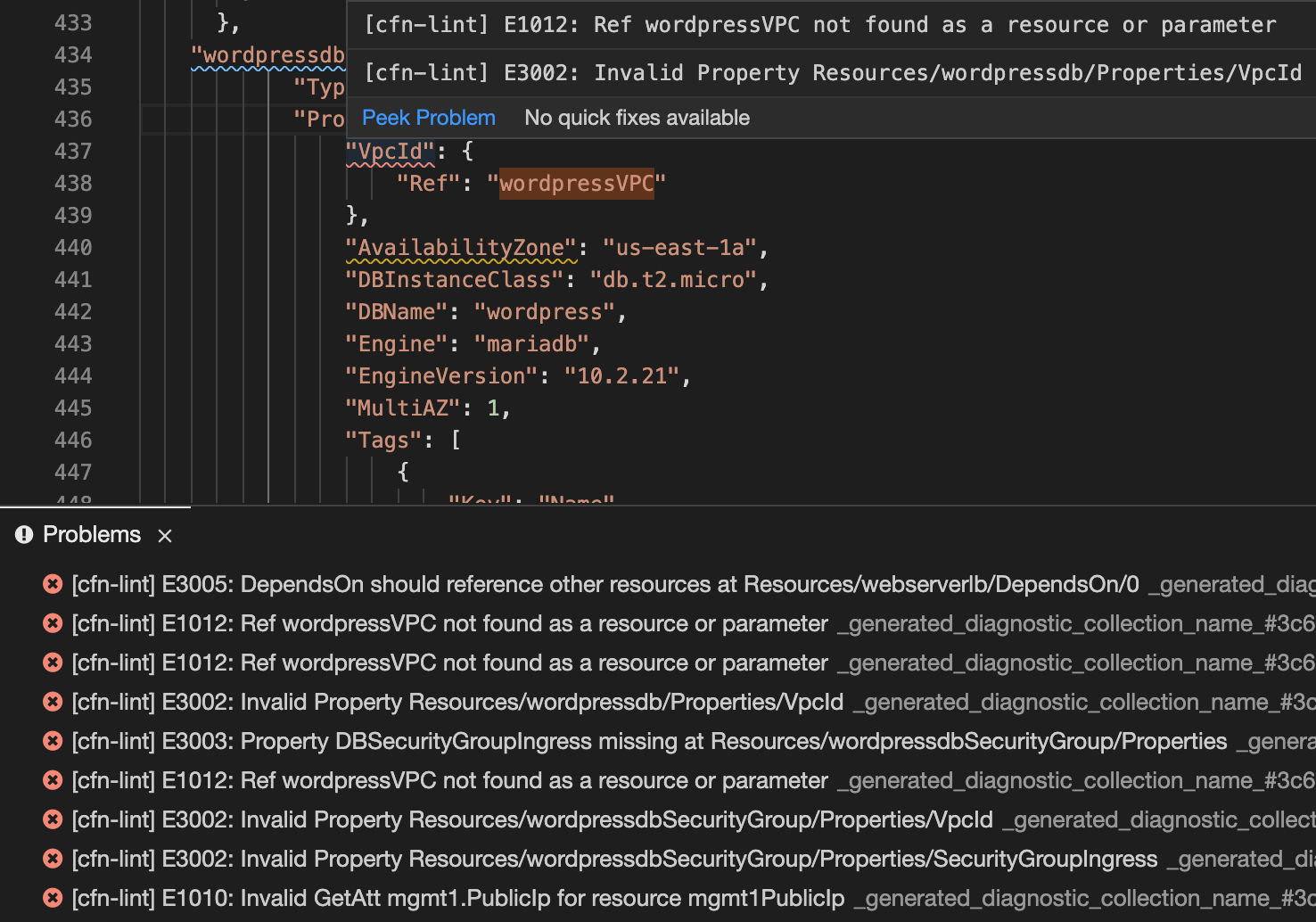
E3005 DependsOn should reference other resources at Resources/webserverlb/DependsOn/0
E1012 Ref wordpressVPC not found as a resource or parameter
E1012 Ref wordpressVPC not found as a resource or parameter
E3002 Invalid Property Resources/wordpressdb/Properties/VpcId
E3003 Property DBSecurityGroupIngress missing at Resources/wordpressdbSecurityGroup/Properties
E1012 Ref wordpressVPC not found as a resource or parameter
E3002 Invalid Property Resources/wordpressdbSecurityGroup/Properties/VpcId
E3002 Invalid Property Resources/wordpressdbSecurityGroup/Properties/SecurityGroupIngress
E1010 Invalid GetAtt mgmt1.PublicIp for resource mgmt1PublicIphttps://stackoverflow.com/questions/64830970
复制相似问题
腾讯云开发者

Copyright © 2013 - 2026 Tencent Cloud. All Rights Reserved. 腾讯云 版权所有
深圳市腾讯计算机系统有限公司 ICP备案/许可证号:粤B2-20090059  粤公网安备44030502008569号
腾讯云计算(北京)有限责任公司 京ICP证150476号 | 京ICP备11018762号