
运行时错误集成使用@vue/复合-api的组件库:‘您必须在"setup()“方法中使用此函数
对以下问题的任何帮助都将不胜感激!
情况:
我的项目包含两个包
- child-component-lib
- contains a single view `About.vue` written in composition-API-style (with vue2 helper libraries `@vue/composition-api` and `vuex-composition-helpers`)
- exports a single `RouteConfig`
- build as a lib
views/About.vue (儿童)
这是一个关于页面(作为组件库)从“@vue/复合-api”导入{ defineComponent };从“vuex-复合-帮助程序”导入{ createNamespacedHelpers };导出默认的defineComponent({ components:{},defineComponent(_,{ root }) ){ const { useGetters,useActions }=createNamespacedHelpers(“account”;// error!});
router/index.ts (儿童)
导出const路由: Array ={ path:"/",名称:"About",组件:() => import(/* webpackChunkName:“约”*/“../视图/About.vue”) };
lib.ts (儿童)
导出连接路由=require(“@/路由器”).routes;
package.json (儿童)
“脚本”:{“构建”:"vue-cli-service构建-目标库-名称子组件- lib src/lib.ts“.
- 父应用程序
- imports the route from `child-component-lib` into its router
- contains a simple view that displays one line of text and a `<router-view />`
package.json (父)
“依赖项”:{“@tholst/子组件-lib”:"file:../child-component-lib",
router/index.ts (父)
从“@tholst/子组件-lib”导入{ childComponentRoutes };
App.vue (父)
从“@vue/复合-api”导入{ defineComponent };从“@/view/Home.vue”导入主页;导出默认defineComponent({ components:{ Home },setup(_,{ root }) {. });
预期行为
它没有问题。
实际行为
我在控制台中看到一个错误输出。[Vue warn]: Error in data(): "Error: You must use this function within the "setup()" method, or insert the store as first argument."错误消息具有误导性,因为错误实际上是在setup()方法中抛出的。它可以追溯到getCurrentInstance()返回undefined (在@vue/composition-api中)。
调查:
- 结果发现,当i在父应用程序本身中包含相同的
About.vue时,错误就消失了(只需切换路由,尝试一下),也就是说,当我们避免从构建的库导入时,它就能工作。 - 因此,看起来是构建设置(
vue.config.js,webpack,babel,typescript,.)中的一个问题。
复制错误:
1.克隆、安装、运行
git clone git@github.com:tholst/vue-composition-api-comp-lib.git && cd vue-composition-api-comp-lib/child-component-lib && npm install && npm run build && cd ../parent-app/ && npm install && npm run serve或者一个接一个
git clone git@github.com:tholst/vue-composition-api-comp-lib.git
cd vue-composition-api-comp-lib/child-component-lib
npm install
npm run build
cd ../parent-app/
npm install
npm run serve
2.开放浏览器
- 转到http://localhost:8080/
3.打开开发工具以查看错误
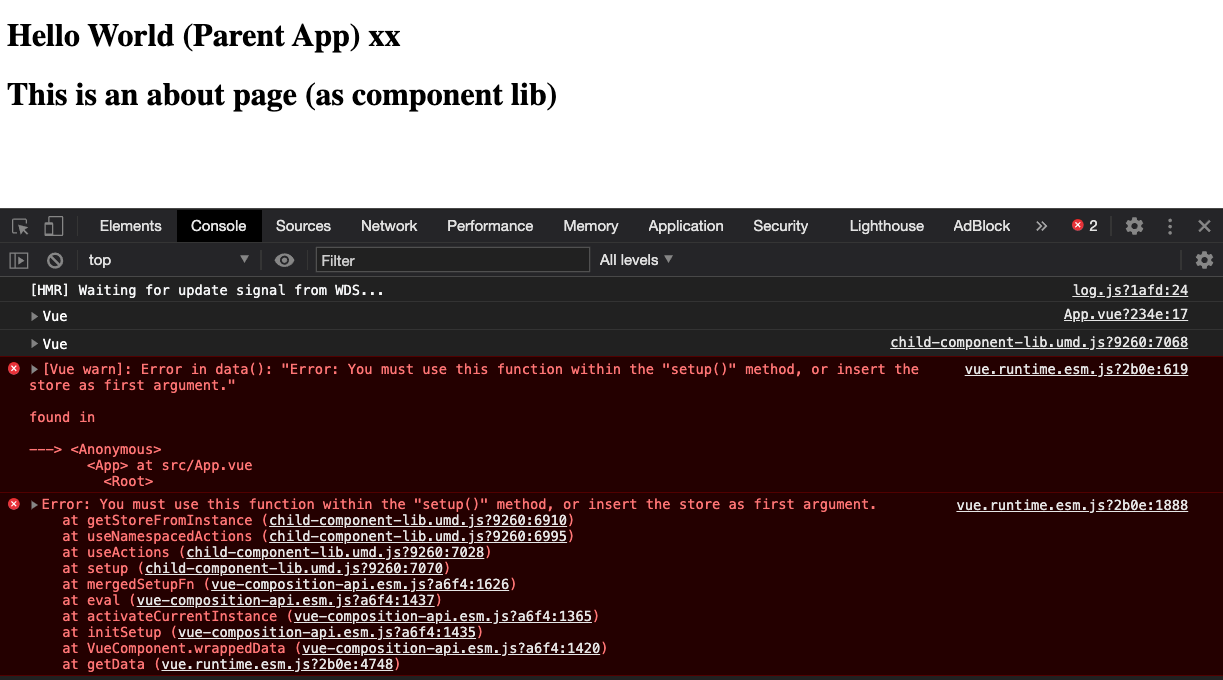
[Vue warn]: Error in data(): "Error: You must use this function within the "setup()" method, or insert the store as first argument."

found in

---> <Anonymous>
       <App> at src/App.vue
         <Root>
误差截图
环境信息:
Node: 14.2.0
npm: 6.14.8
Chrome: 86.0.4240.198

npmPackages:
    @vue/babel-sugar-composition-api-inject-h:  1.2.1
    @vue/babel-sugar-composition-api-render-instance:  1.2.4
    ...
    @vue/cli-overlay:  4.5.8
    @vue/cli-plugin-babel: 4.5.8
    @vue/cli-plugin-router: 4.5.8
    @vue/cli-plugin-typescript: 4.5.8
    @vue/cli-plugin-vuex:4.5.8
    @vue/cli-service: 4.5.8
    @vue/cli-shared-utils:  4.5.8
    @vue/component-compiler-utils:  3.2.0
    @vue/composition-api: 1.0.0-beta.19
    @vue/preload-webpack-plugin:  1.1.2
    typescript: 3.9.7
    vue: 2.6.12
    vue-loader:  15.9.5 (16.0.0-rc.1)
    vue-router: 3.4.9
    vue-template-compiler: 2.6.12
    vue-template-es2015-compiler:  1.9.1
    vuex: 3.5.1
    vuex-composition-helpers: 1.0.21

npmGlobalPackages:
@vue/cli: 4.5.8回答 1
Stack Overflow用户
发布于 2020-11-17 20:27:23
我终于明白了问题的所在。首先是实际的问题。第二,在本地开发设置中存在一个问题,使实际问题的解决方案看起来不起作用。
实际问题+解决方案
子组件库正在捆绑他们自己版本的npm包@vue/composition-api和vuex-composition-helpers。这产生了以下效果:当我运行父应用程序时,这些库实际上有两个实例,来自子组件的vue组件-lib访问的对象没有被正确初始化。
解决方案是防止将这些库捆绑在子组件-lib中,通过
- 让他们成为
devDependencies和peerDependencies。 - 指示webpack不要在
npm run build上捆绑。package.json“依赖项”:{. },"devDependencies":{“@vue/复合-api”:"^1.0.0-beta.19",“vuex-复合-帮助”:"^1.0.21",…},"peerDependencies":{“@vue/复合-api”:"^1.0.0-beta.19",“vuex-复合-帮助”:"^1.0.21“},vue.config.jsconfigureWebpack:{外部:{“@vue/复合-api”:“@vue/复合-api”,“vuex-复合-帮助”:“vuex-复合-帮助”},.}
使事情变得困难的棘手问题
我试图在本地解决这个问题,但实际上并没有发布软件包。这似乎是可行的,因为我在本地看到的问题和我在已发表的软件包中看到的一样。
我通过直接链接父应用程序和子组件库来进行本地开发。我都试过了
- 直接文件夹依赖项
package.json“依赖项”:{“@tholst/子组件-lib”:"file:../child-component-lib",}, npm linkcd子组件-lib npm链接cd ./父-app npm链接@tholst/子组件-lib
这两种方法的效果都是将子组件-lib的文件夹与所有文件和文件夹(而不是仅在npm包中发布的文件)实际导入(=symlink )。
这意味着:尽管I从包中排除了两个复合API库,并使它们成为dev/对等依赖项(请参阅实际问题的解决方案),但仍然安装了,并出现在子组件库的node_modules中。node_modules文件夹被符号链接到父应用程序包中。通过这种方式,子组件库库仍然可以访问我们希望从构建中排除的库的副本(参见实际问题)。我还是像以前一样看到了错误。
通过这种方式,我的本地开发方法掩盖了一个事实,即解决实际问题的方法实际上是有效的。
https://stackoverflow.com/questions/64864935
复制相似问题
腾讯云开发者

Copyright © 2013 - 2026 Tencent Cloud. All Rights Reserved. 腾讯云 版权所有
深圳市腾讯计算机系统有限公司 ICP备案/许可证号:粤B2-20090059  粤公网安备44030502008569号
腾讯云计算(北京)有限责任公司 京ICP证150476号 | 京ICP备11018762号