
Xamarin.Forms.Shell:如何获得TabBar的底部高度?
我在一个Xamarin.Forms.Shell应用程序上使用默认的底部TabBar,我需要知道TabBar 来调整一些项目。
我已经找到了在两个平台上获得StatusBar for 的方法,但是没有找到TabBar的解决方案。
有可能吗?我只找到了更改堆栈上的TabBar高度的请求.
回答 2
Stack Overflow用户
发布于 2020-11-18 13:15:53
我们可以使用自定义渲染器获得高度
在AppShell中
public partial class AppShell : Xamarin.Forms.Shell
{
   public static double TabHeight { get; set; }

  //...
}
在iOS项目中
选项1:
using App33;
using App33.iOS;
using Foundation;
using UIKit;
using Xamarin.Forms;
using Xamarin.Forms.Platform.iOS;

[assembly: ExportRenderer(typeof(AppShell), typeof(ShellCustomRenderer))]
namespace App33.iOS
{
    public class ShellCustomRenderer : ShellRenderer
    {
        protected override IShellTabBarAppearanceTracker CreateTabBarAppearanceTracker()
        {
            return new TabBarAppearance();
        }

    }

    public class TabBarAppearance : IShellTabBarAppearanceTracker
    {
        public void Dispose()
        {

        }

        public void ResetAppearance(UITabBarController controller)
        {


        }

        public void SetAppearance(UITabBarController controller, ShellAppearance appearance)
        {
            base.ViewWillAppear(animated);

            UITabBar myTabBar = this.TabBarController.TabBar;

            myTabBar.TintColor = UIColor.Red;
            myTabBar.BarTintColor = UIColor.LightGray;
            //... you can set style like above in iOS

            AppShell.TabHeight  = myTabBar.Bounds.Height;

        }

        public void UpdateLayout(UITabBarController controller)
        {

        }
    }
}
备选方案2:
实际上,UITabbar在iOS上的高度是一个固定值。在iPhone 8和之前是49和iPhone X和之后(全屏)将有一个额外的safeArea底部高度。因此,如果您只想得到它(不需要设置高度),可以使用DependencyService直接获得它,如下所示
AppShell.TabHeight = 49 + UIApplication.SharedApplication.Delegate.GetWindow().SafeAreaInsets.Bottom;在Android中
 public class MainActivity : global::Xamarin.Forms.Platform.Android.FormsAppCompatActivity
    {
        protected override void OnCreate(Bundle savedInstanceState)
        {
            TabLayoutResource = Resource.Layout.Tabbar;
            ToolbarResource = Resource.Layout.Toolbar;

            base.OnCreate(savedInstanceState);
    //        var hei=SupportActionBar.Height;
            Xamarin.Essentials.Platform.Init(this, savedInstanceState);
            global::Xamarin.Forms.Forms.Init(this, savedInstanceState);
            LoadApplication(new App());


            int resourceId =Resources.GetIdentifier("design_bottom_navigation_height", "dimen", this.PackageName);
            int height = 0;
            if (resourceId > 0)
            {
                height = Resources.GetDimensionPixelSize(resourceId);
                AppShell.TabHeight = height;
            }


        }
        public override void OnRequestPermissionsResult(int requestCode, string[] permissions, [GeneratedEnum] Android.Content.PM.Permission[] grantResults)
        {
            Xamarin.Essentials.Platform.OnRequestPermissionsResult(requestCode, permissions, grantResults);

            base.OnRequestPermissionsResult(requestCode, permissions, grantResults);
        }
    }
}Stack Overflow用户
发布于 2020-11-18 13:14:07
据我所知,在Xamarin.Forms中还没有(?)可以检索TabBar Height,因此您可能必须按照Platform收集该信息。然后,利用DependencyService,您可以从Xamarin.Forms共享代码中获得这些信息。那么,让我们看看如何做到这一点:
iOS
对于iOS,已经发布了像this这样的答案来解释如何做到这一点。
安卓
对于Android,您可以按以下方式检索TabBar高度
- 为依赖项
创建接口
注意:这个接口也应该用于iOS部件;)
namespace Tabbarheight
{
    public interface IDisplayHeights
    {
        float GetTabBarHeight();
    }
}- 在Android中创建一个类,该类实现该接口并返回所需的值
。
(感谢@LucasZhang-MSFT的标识符字符串!)
using Android.App;
using Tabbarheight.Droid;
using Xamarin.Forms;

[assembly: Dependency(typeof(AndroidDisplayHeights))]
namespace Tabbarheight.Droid
{
    class AndroidDisplayHeights : IDisplayHeights
    {
        public static Activity Activity { get; set; }

        public float GetTabBarHeight()
        {
            int resourceId = Activity.Resources.GetIdentifier("design_bottom_navigation_height", "dimen", Activity.PackageName);
            int height = 0;
            if (resourceId > 0)
            {
                height = (int)(Activity.Resources.GetDimensionPixelSize(resourceId) / Xamarin.Essentials.DeviceDisplay.MainDisplayInfo.Density);
            }

            return height;

        }
    }
}其中,MainActivity.cs设置Activity,如下所示
protected override void OnCreate(Bundle savedInstanceState)
{
    TabLayoutResource = Resource.Layout.Tabbar;
    ToolbarResource = Resource.Layout.Toolbar;

    base.OnCreate(savedInstanceState);

    Xamarin.Essentials.Platform.Init(this, savedInstanceState);
    global::Xamarin.Forms.Forms.Init(this, savedInstanceState);

    AndroidDisplayHeights.Activity = this;

    LoadApplication(new App());
}- ,最后,您可以使用如下
public AboutPage()
{
    InitializeComponent();

    SizeChanged += (s, a) =>
    {
        label.HeightRequest = DependencyService.Get<IDisplayHeights>().GetTabBarHeight();
        label.BackgroundColor = Color.Red;

    };

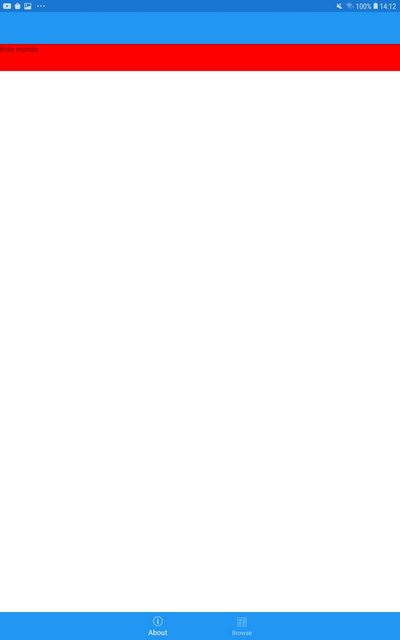
}在上面的解决方案中,我定义了一个Label (标签),它只是试图通过设置TabBar的高度来演示获取的Label的Height值的准确性。
<?xml version="1.0" encoding="utf-8" ?>
<ContentPage xmlns="http://xamarin.com/schemas/2014/forms"
             xmlns:x="http://schemas.microsoft.com/winfx/2009/xaml"
             x:Class="Tabbarheight.Views.AboutPage"
             xmlns:vm="clr-namespace:Tabbarheight.ViewModels"
             Title="{Binding Title}">

    <StackLayout>
        <Label x:Name="label">
            <Label.Text>
                <x:String>
                    Hola mundo
                </x:String>
            </Label.Text>
        </Label>
    </StackLayout>

</ContentPage>
我这边的标签是这样的:
https://stackoverflow.com/questions/64892392
复制相似问题
腾讯云开发者

Copyright © 2013 - 2026 Tencent Cloud. All Rights Reserved. 腾讯云 版权所有
深圳市腾讯计算机系统有限公司 ICP备案/许可证号:粤B2-20090059  粤公网安备44030502008569号
腾讯云计算(北京)有限责任公司 京ICP证150476号 | 京ICP备11018762号