
野生蝇-无法获得大于256的最大连接
我正在使用JMeter加载一个部署在Wildfly 20上的应用程序。可以观察到,在加载300 requests/sec和更多的下,Wildfly服务器不会响应很少的请求,而这些请求会使超时。在分析服务器日志(系统和应用程序)和线程转储时,没有发现与此相关的内容,内存利用率也是正常的。
在调优一些参数(如Open File Descriptors、Wildfly IO threads/Task Max Threads、Max Connections和Apache配置细节)时,被超时的请求数量明显减少,但仍有很多请求超时。
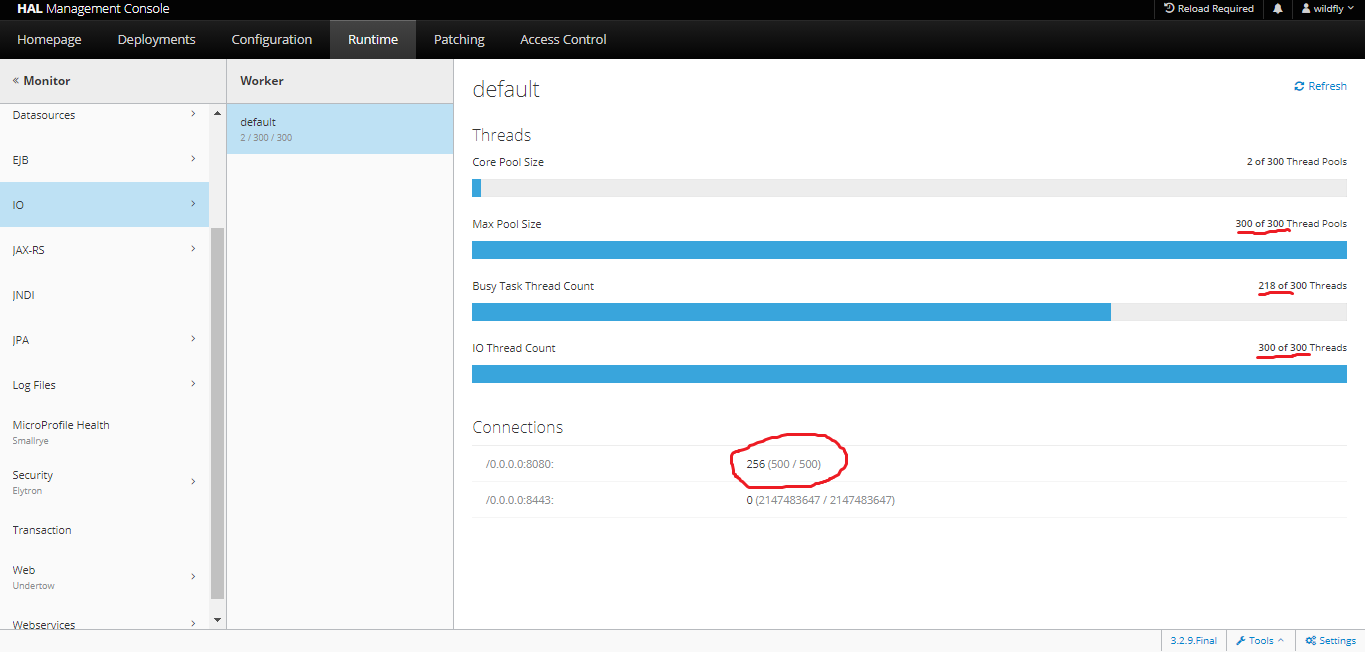
在负载测试期间使用Wildfly进行监视时,有一件事引起了我的注意:即使在将安德托的Http Max Connections参数设置为值时,也可以假设1000,Connection Count值(在下面的屏幕快照中圈起来)永远不会超过256个。在播放此参数时,我看到Http Max Connections参数设置为任何小于256个但从未超过的值。看起来,一旦达到这个限制,就不会有新的请求作为gets超时服务,直到某些连接被释放为止。
是否有其他配置(Apache或OS)将此限制或任何其他野生苍蝇配置负责?我遗漏了什么吗?使用了野生苍蝇管理控制台进行所有配置,
来自standalone.xml
<subsystem xmlns="urn:jboss:domain:io:3.0">
    <worker name="default" io-threads="300" task-max-threads="300"/>
    <buffer-pool name="default"/>
</subsystem>
..。
<subsystem xmlns="urn:jboss:domain:undertow:11.0" default-server="default-server" default-virtual-host="default-host" default-servlet-container="default" default-security-domain="other" statistics-enabled="true">
            <buffer-cache name="default"/>
            <server name="default-server">
                <http-listener name="default" max-connections="500" socket-binding="http" max-cookies="100" record-request-start-time="true" redirect-socket="https" enable-http2="true"/>
                <https-listener name="https" socket-binding="https" max-cookies="100" record-request-start-time="true" security-realm="ApplicationRealm" enable-http2="true"/>
                <host name="default-host">
                    <location name="/" handler="welcome-content"/>
                    <filter-ref name="limit-connections"/>
                    <http-invoker security-realm="ApplicationRealm"/>
                </host>
            </server>
            <servlet-container name="default">
                <jsp-config/>
                <websockets/>
            </servlet-container>
            <handlers>
                <file name="welcome-content" path="${jboss.home.dir}/welcome-content"/>
            </handlers>
            <filters>
                <request-limit name="limit-connections" max-concurrent-requests="10000" queue-size="10000"/>
            </filters>
        </subsystem>
Apache配置
<IfModule mpm_worker_module>
    ServerLimit          40
    StartServers          2
    MaxClients          1000
    MinSpareThreads      25
    MaxSpareThreads      75
    ThreadsPerChild      25
    MaxRequestsPerChild   0
</IfModule>
野生蝇运行时监控控制台在测试期间
回答 1
Stack Overflow用户
发布于 2021-11-01 08:28:26
也许您的服务器没有调优以满足进程的最大数量?将以下内容添加到/etc/security/limits.conf文件中:
jboss soft nproc 8000
jboss hard nproc 12000
jboss soft nofile 9999
jboss hard nofile 9999https://stackoverflow.com/questions/64888343
复制相似问题
腾讯云开发者

Copyright © 2013 - 2026 Tencent Cloud. All Rights Reserved. 腾讯云 版权所有
深圳市腾讯计算机系统有限公司 ICP备案/许可证号:粤B2-20090059  粤公网安备44030502008569号
腾讯云计算(北京)有限责任公司 京ICP证150476号 | 京ICP备11018762号