
用于Sendgrid -Python的QueueTrigger绑定
在此帖子的指导下,我编写了以下队列触发器代码,用于在邮件排队时发送电子邮件。
import logging
import sendgrid
import azure.functions as func
import os
def main(msg: func.QueueMessage) -> None:
    logging.info('Python queue trigger function processed a queue item: %s',
                 msg.get_body().decode('utf-8'))


    data = {
        "personalizations": [
          {
            "to": [
              {
                "email": "rrrrrrrr"
              }
            ],
            "subject": "Sending with SendGrid is Fun"
          }
        ],
        "from": {
          "email": "ghyu"
        },
        "content": [
          {
            "type": "text/plain",
            "value": "and easy to do anywhere, even with Python"
          }
         ]
    }
    print('Sending email using SendGrid:', data)
    with open(os.environ[_AZURE_FUNCTION_SENDGRID_OUTPUT_ENV_NAME], 'wb') as f:
      json.dump(data,f)
function.json
{
  "scriptFile": "__init__.py",
  "bindings": [
    {
      "name": "msg",
      "type": "queueTrigger",
      "direction": "in",
      "queueName": "outqueue1",
      "connection": "storageaccountautom92bb_STORAGE"
    },

    {

      "name": "outputMessage",
      "type": "sendGrid",
      "from": "ghyu",
      "apiKey": "MY_SENDGRID_API_KEY",
      "direction": "out"
    }
  ],
  "disabled": false
}
local.settings.json
{
  "IsEncrypted": false,
  "Values": {
    "AzureWebJobsStorage": "hjk",
    "FUNCTIONS_WORKER_RUNTIME": "python",
    "storageaccountautom92bb_STORAGE": "hjk",
    "MY_SENDGRID_API_KEY": "tyhuE",
    "_AZURE_FUNCTION_SENDGRID_OUTPUT_ENV_NAME" : "GIS klop",
    "_AZURE_FUNCTION_QUEUE_INPUT_ENV_NAME" : "msg"
  }
}
虽然该函数在消息排队时响应,但它无法发送电子邮件。它抛出一个错误;
the following parameters are declared in function.json but not in Python: {'outputMessage'}- 我怎么才能最好地解决这个问题呢?
- 向外绑定正确吗?
回答 1
Stack Overflow用户
发布于 2020-11-19 06:48:56
Azure函数禁止发送电子邮件的端口,所以我们必须使用sendgrid来发送电子邮件。(这是第三部分工具,但它已经集成到天青函数绑定中,因此我们可以直接使用它。)
例如,如果您想从电子邮件A发送电子邮件到电子邮件B。
首先,转到sendgrid网站,创建一个发件人并验证电子邮件A:
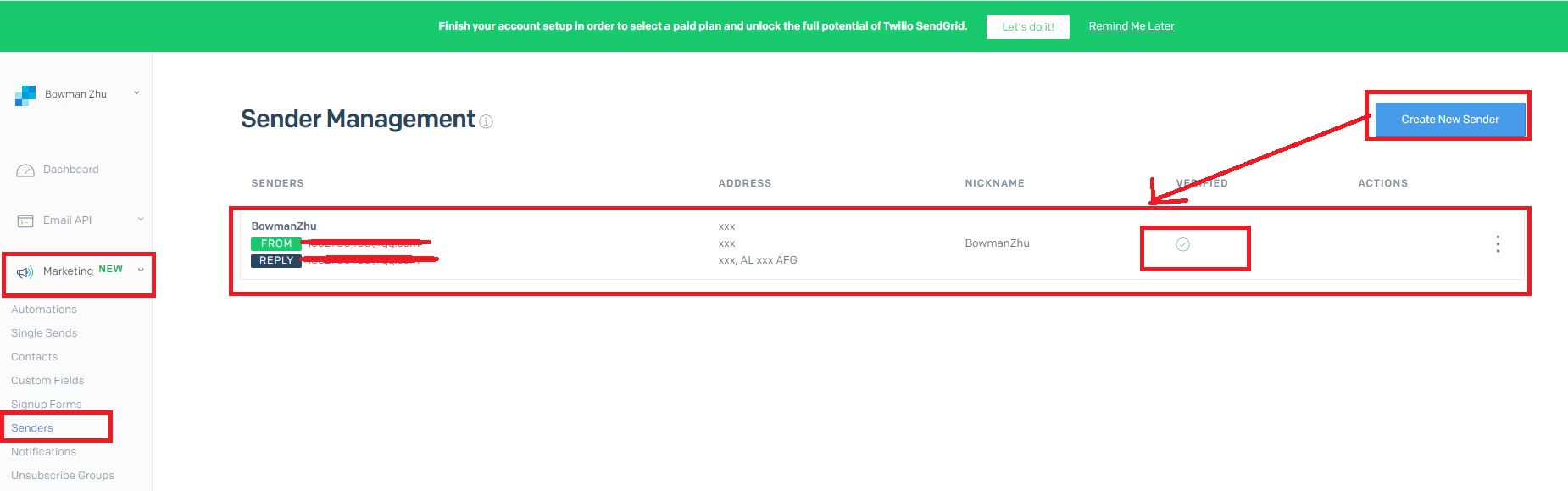
之后,email A准备通过sendgrid发送电子邮件。
现在,我们需要生成一个SendGrid API密钥,并复制和存储API键:(这将被填充在local.settings.json的Value部分,作为一个环境变量来读取)。
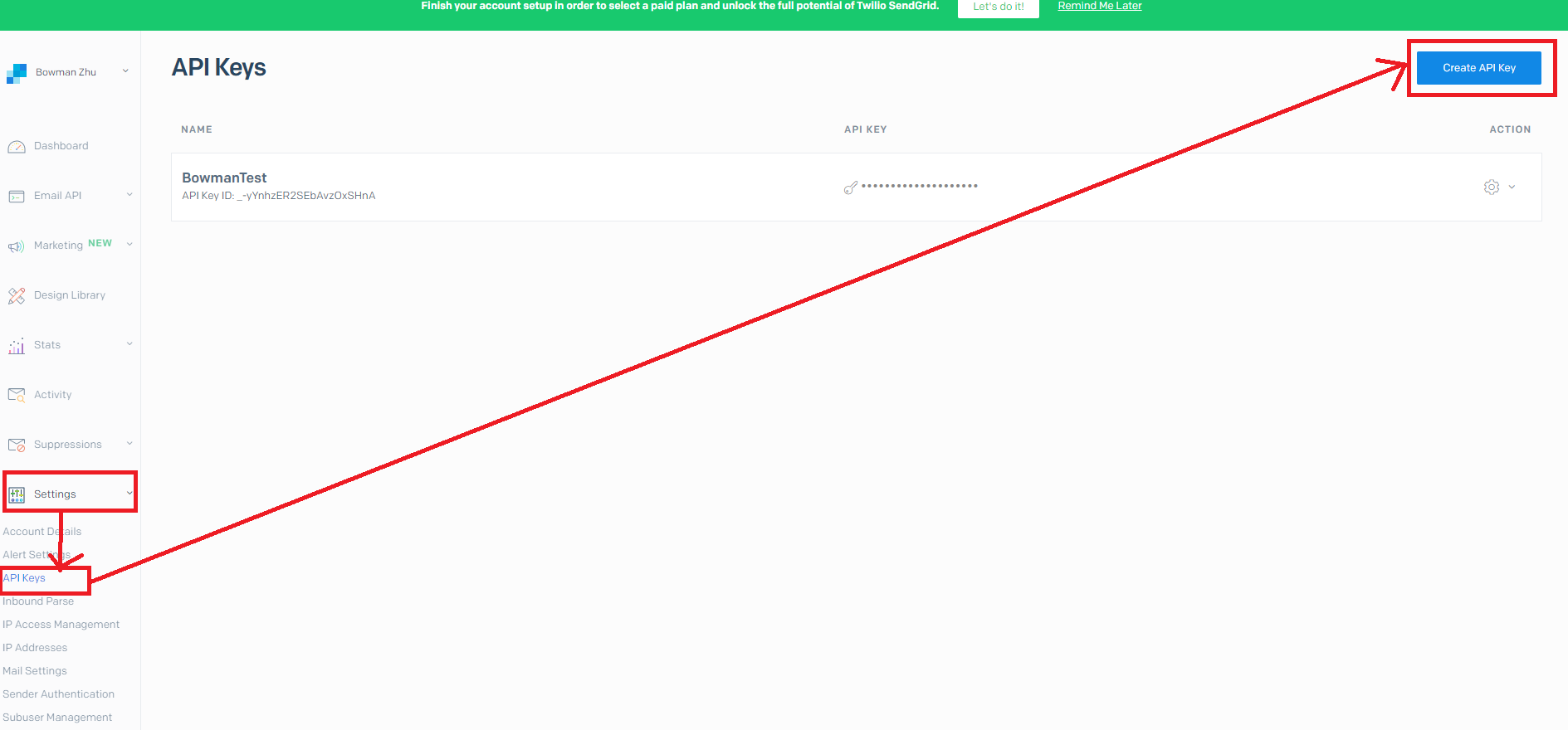
然后,你可以用它发送电子邮件:
host.json
{
  "version": "2.0",
  "logging": {
    "applicationInsights": {
      "samplingSettings": {
        "isEnabled": true,
        "excludedTypes": "Request"
      }
    }
  },
  "extensionBundle": {
    "id": "Microsoft.Azure.Functions.ExtensionBundle",
    "version": "[1.*, 3.1.0)"
  }
}
local.settings.json
{
  "IsEncrypted": false,
  "Values": {
    "AzureWebJobsStorage": "DefaultEndpointsProtocol=https;AccountName=0730bowmanwindow;AccountKey=xxxxxx;EndpointSuffix=core.windows.net",
    "FUNCTIONS_WORKER_RUNTIME": "python",
    "SendGrid_API_Key": "SG._-yYnhzER2SEbAvzOxSHnA.xxxxxx",
    "0730bowmanwindow_STORAGE": "DefaultEndpointsProtocol=https;AccountName=0730bowmanwindow;AccountKey=xxxxxx;EndpointSuffix=core.windows.net"
  }
}
function.json
{
  "scriptFile": "__init__.py",
  "bindings": [
    {
      "name": "msg",
      "type": "queueTrigger",
      "direction": "in",
      "queueName": "myqueue",
      "connection": "0730bowmanwindow_STORAGE"
    },
    {
      "type": "sendGrid",
      "name": "sendGridMessage",
      "direction": "out",
      "apiKey": "SendGrid_API_Key",
      "from": "emailA@emailA.com"
    }
  ]
}
__init__.py
import logging
import json
import azure.functions as func


def main(msg: func.QueueMessage, sendGridMessage: func.Out[str]) -> None:
    logging.info('Python queue trigger function processed a queue item: %s',
                 msg.get_body().decode('utf-8'))
    value = "Sent from Azure Functions"

    message = {
        "personalizations": [ {
          "to": [{
            "email": "emailB@emailB.com"
            }]}],
        "subject": "Azure Functions email with SendGrid",
        "content": [{
            "type": "text/plain",
            "value": value }]
    }
    sendGridMessage.set(json.dumps(message))
在此之后,我向“myqueue”发送了一条消息,emailB收到了电子邮件:

顺便说一下,这只能保证成功的传递,因为有些邮箱拒绝接受通过sendgrid发送的邮件。在这种情况下,您仍然会得到200个响应,但是收件人将不会接收邮件。(在这种情况下,收件人需要转到邮箱设置来解除相关限制。)
https://stackoverflow.com/questions/64905758
复制相似问题
腾讯云开发者

Copyright © 2013 - 2026 Tencent Cloud. All Rights Reserved. 腾讯云 版权所有
深圳市腾讯计算机系统有限公司 ICP备案/许可证号:粤B2-20090059  粤公网安备44030502008569号
腾讯云计算(北京)有限责任公司 京ICP证150476号 | 京ICP备11018762号