
反应-传单/反应-路由-机器:移除路线和路线点
我在地图上使用了以下软件包:
    "leaflet-routing-machine": "^3.2.12",
    "leaflet": "^1.7.1",
    "react-leaflet": "^2.7.0",
本质上,我有一个路由机组件,我已经集成了我的地图和标记,即(点击地图上的两个点,你得到的路线),你可以拖动每一个和路由更新!
然而,在这一点上,我有一个按钮,它重置一切,清除标记,相关的LAT & LONG。但我只想重新设定路线。
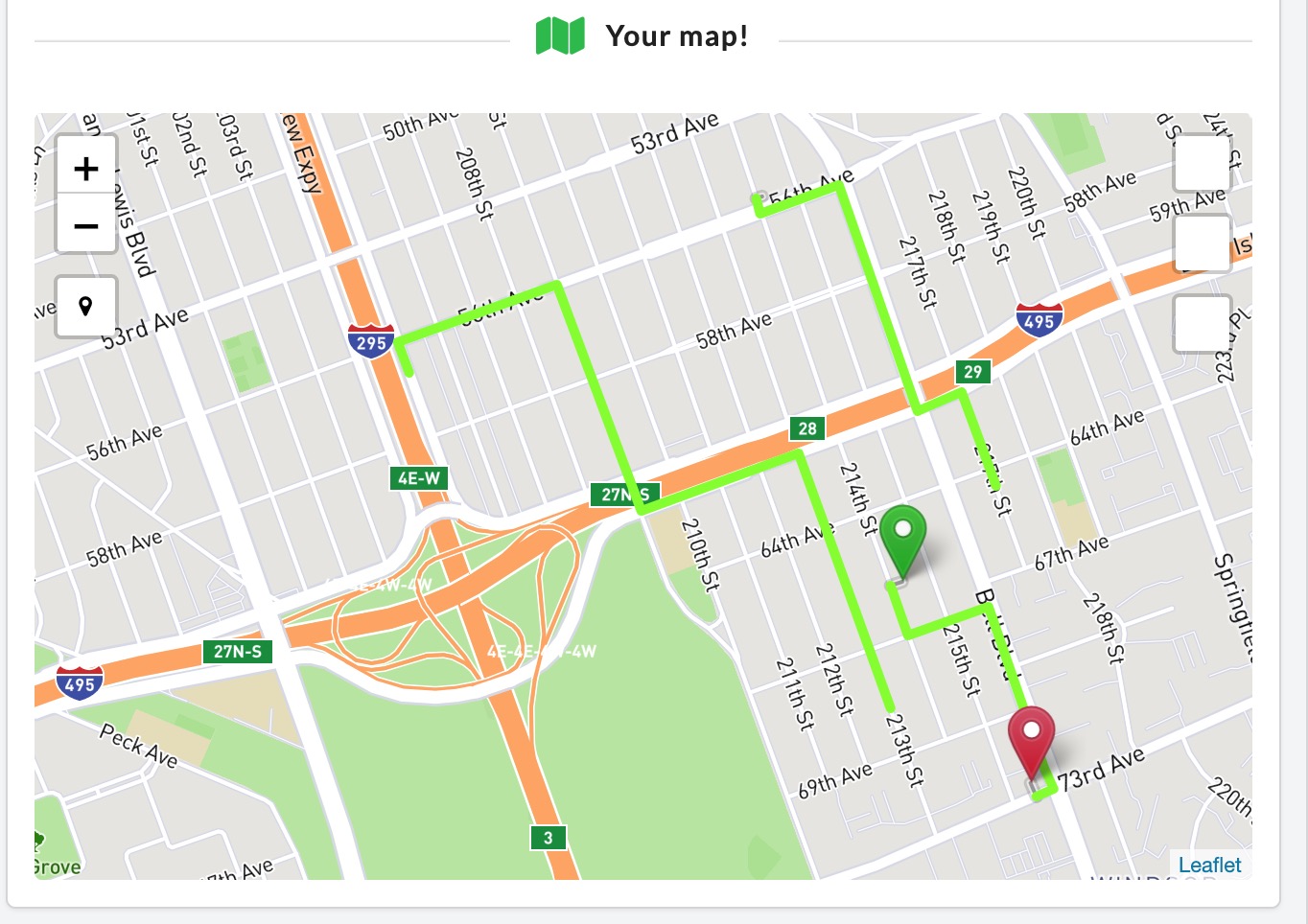
您可以看到以前的路线(在美丽的"chartreuse")停留在地图上。
现在,我有一个函数,它应该控制组件何时可见:
function clearMarkers(){
  setIsRoutingDone(false);
}

 {isRoutingDone &&  <Routing isRoutingDone={isRoutingDone} map={map} myMapRef={myMapRef} icon={{startIcon, endIcon}} userLocation={userLocation}  coords={{fromLat, fromLon, toLat, toLon}}  />}
这是我的路由机:
import { MapLayer } from "react-leaflet";
import L from "leaflet";
import "leaflet-routing-machine";
import { withLeaflet } from "react-leaflet";


class Routing extends MapLayer {
 constructor(props) {
    super(props);
  }

  createLeafletElement() {
    const { map, coords, icon,  removeFrom, removeTo } = this.props;


    var dStart = L.latLng(coords.fromLat, coords.fromLon);
    var dGoal = L.latLng(coords.toLat, coords.toLon);


    this.leafletElement = L.Routing.control({
      collapsible: true,
       lineOptions: {
      styles: [{color: 'chartreuse', opacity: 1, weight: 5}]
     },
      waypoints: [dStart, dGoal],
      createMarker: function(i, waypoints, n) {
        if (i === 0) {
         marker_icon = icon.startIcon;
        }


       var marker_icon;
        if (i === 0) {
         marker_icon = icon.startIcon;
        }
        else if (i == n - 1) {
         marker_icon = icon.endIcon
        }
        var marker = L.marker(i === 0 ? dStart : dGoal,{
         draggable: true,
         icon: marker_icon
        });
        return marker;
     }
    }).addTo(map.leafletElement);

    return this.leafletElement.getPlan();
  }

  updateLeafletElement(props) {
    if(this.leafletElement){
      if(this.props.isRoutingDone === false){
this.leafletElement.spliceWaypoints(0, 2); // <-- removes your route
      }
    }
  }

}
export default withLeaflet(Routing);实际上,我在updateLeafletElement函数和zzilch中记录了一些内容。
And this is my map:

    import React, { useState, useEffect, useRef } from 'react'
    import { Map, Marker } from 'react-leaflet';
    import LocateControl from '../LocateControl/LocateControl.jsx';
    import MapboxLayer from '../MapboxLayer/MapboxLayer.jsx';
    import Routing from '../RoutingMachine/RoutingMachine.jsx'

    export default function MyMap({getAddressFromLatLong, hillfinderFormButtonRef, setCurrentLocation, setCurrentDestination}) {

    var myMapRef = useRef();

      useEffect(() => {
       hillfinderFormButtonRef.current = clearMarkers;

        return() => {
          hillfinderFormButtonRef.current = null;
        }
      }, []);


    function resetHandler (){
        return myMapRef.current();
      };


    function clearMarkers(){
      console.log("markerData ", markerData);
      setMarkerData(markerData => [], ...markerData);
      setFromLat(fromLat => null);
      setFromLon(fromLon => null);
      setToLat(toLat => null)
      setToLon(toLon => null)
      setFrom(from => 0);
      setTo(to => 0);
      setIsRoutingDone(false);
      // setRemoveFrom(removeFrom => null)
      // setRemoveTo(removeTo => null)
    }


  function saveMap(map){
    setMap(map);
  }

  function handleOnLocationFound(e){
   setUserLocation(e.latlng)
  }

  function markerClick(e){
   e.originalEvent.view.L.DomEvent.stopPropagation(e)
  }

  return (
  <Map animate={animate} center={userLocation} onClick={setMarkers} onLocationFound={handleOnLocationFound} zoom={zoom} ref={saveMap}>

     {markerData && markerData.map((element, index) => {
      return (
      <Marker
        key={index}
        marker_index={index}
        position={element}
        draggable={true}
        onClick={markerClick}
        onDragend={updateMarker}
        icon={element.id === 0 ? startIcon : endIcon}
      />
      )
     })}
    <MapboxLayer
      accessToken={MAPBOX_ACCESS_TOKEN}
      style="mapbox://styles/mapbox/streets-v9"
    />
    <LocateControl startDirectly />

     {isRoutingDone &&  <Routing isRoutingDone={isRoutingDone} map={map} myMapRef={myMapRef} icon={{startIcon, endIcon}} userLocation={userLocation}  coords={{fromLat, fromLon, toLat, toLon}}  />}
  </Map>

  )
}
我摆脱了那些对当前问题不重要的代码!
提前感谢!
回答 1
Stack Overflow用户
发布于 2020-12-12 17:31:53
我最终还是自己解决了!
想想抓头的是什么,而反应-传单有它的lifeCycle方法,即createLeaflet,updateLeafletElement,你不应该忘记有规律的反应生活方法!
不确定它们是否重叠,但我发现添加了componentDidMount:
  componentDidMount() {
    const { map } = this.props;

    map.addControl(this.routing);
  }
对于updateLeafletElement (我现在正确地使用了函数的API ),它接受一个fromProps和toProps,只检查我传递给路由机的支柱的值。
  updateLeafletElement(fromProps, toProps) {
    if (toProps.removeRoutingMachine !== false) {
      this.routing.setWaypoints([]);
    }
}最后,在卸载时,使用传递到路由机的removeControl方法在map上删除路由器机器!
import { MapLayer } from 'react-leaflet';
import L from 'leaflet';
import 'leaflet-routing-machine';
import { withLeaflet } from 'react-leaflet';

class Routing extends MapLayer {
  constructor(props) {
    super(props);
  }

  createLeafletElement(props) {
    const { map, coords, icon } = this.props;

    var dStart = L.latLng(coords.fromLat, coords.fromLon);
    var dGoal = L.latLng(coords.toLat, coords.toLon);

    if (map && !this.routing) {
      this.routing = L.Routing.control({
        collapsible: true,
        position: 'bottomleft',
        lineOptions: {
          styles: [{ color: 'chartreuse', opacity: 1, weight: 5 }]
        },
        waypoints: [dStart, dGoal],
        createMarker: function(i, waypoints, n) {
          var marker_icon;

          if (i === 0) {
            marker_icon = icon.startIcon;
          } else if (i == n - 1) {
            marker_icon = icon.endIcon;
          }
          var marker = L.marker(i === 0 ? dStart : dGoal, {
            draggable: true,
            icon: marker_icon
          });
          return marker;
        }
      });
    }

    return this.routing.getPlan();
  }

  componentDidMount() {
    const { map } = this.props;

    console.log('map ', map);
    map.addControl(this.routing);
  }

  updateLeafletElement(fromProps, toProps) {
    if (toProps.removeRoutingMachine !== false) {
      this.routing.setWaypoints([]);
    }
  }

  componentWillUnmount() {
    this.destroyRouting();
  }

  destroyRouting() {
    if (this.props.map) {
      this.props.map.removeControl(this.routing);
    }
  }
}

export default withLeaflet(Routing);希望这能有所帮助!FYI:这是我正在使用的应用程序,如果您想浏览其他集成的话.
https://stackoverflow.com/questions/64963337
复制相似问题
腾讯云开发者

Copyright © 2013 - 2026 Tencent Cloud. All Rights Reserved. 腾讯云 版权所有
深圳市腾讯计算机系统有限公司 ICP备案/许可证号:粤B2-20090059  粤公网安备44030502008569号
腾讯云计算(北京)有限责任公司 京ICP证150476号 | 京ICP备11018762号