
用ImageView根据屏幕高度调整两个等宽ImageView的高度
用ImageView根据屏幕高度调整两个等宽ImageView的高度
提问于 2020-11-24 15:57:36
我想实现一个非常简单的视图,我可以编程完成,但我想知道是否可以只使用ConstraintLayout。
结构如下:
- ContraintLayout
- ImageView1
- ImageView2
一个ImageView位于另一个上面,如下所示:
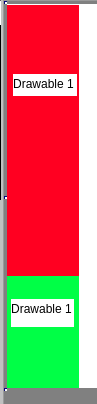
ImageView1有一个具有x1高度和w宽度的绘图。ImageView2有一个具有x2高度和w宽度的绘图。
我想要缩放两个绘图,保持他们的比例,并为Android调整宽度,使两个视图采取整个容器的高度。
现在,在使用以下函数布局视图之后,我将以编程方式执行该操作:
private int getWidthForHeight(int height) {
    Log.d(TAG, "getWidthForHeight: " + height);
    Drawable t = ContextCompat.getDrawable(this, R.drawable.ic_left_menu_mid_bg);
    int toh = t.getIntrinsicHeight();
    int tow = t.getIntrinsicWidth();
    Drawable b = ContextCompat.getDrawable(this, R.drawable.ic_left_menu_bottom_bg);
    int boh = b.getIntrinsicHeight();
    int bow = b.getIntrinsicWidth();

    // height = th + bh
    // (toh / tow) * w = th => w = (th * tow) / toh
    // (boh / bow) * w = bh => w = (bh * bow) / boh
    // (th * tow) / toh = (bh * bow) / boh => boh * th * tow = toh * bh * bow
    // boh * th * tow = toh * bh * bow => boh * th * tow = toh * (height - th) * bow
    // boh * th * tow = (toh * height - toh * th) * bow
    // boh * th * tow = bow * toh * height - bow * toh * th
    // th * (boh * tow + bow * toh) = bow * toh * height

    // th = (bow * toh * height) / (boh * tow + bow * toh)
    // bh = height - th

    float th = ((float) (bow * toh * height)) / ((float) (boh * tow + bow * toh));
    float bh = height - th;
    float width = (th * tow) / (float) toh;

    Log.d(TAG, "getWidthForHeight: th = " + th + ", bh = " + bh);
    Log.d(TAG, "getWidthForHeight: width = " + width);

    return Math.round(width);
}
然而,在我看来,这似乎有点麻烦,我相信在Android中有一种更简单的方法。但是,我一直没能找到它。
有人能为这件事照点光吗?
谢谢!
回答 1
Stack Overflow用户
发布于 2020-11-25 04:17:36
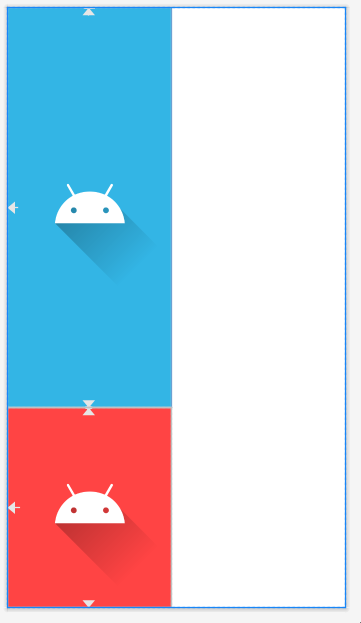
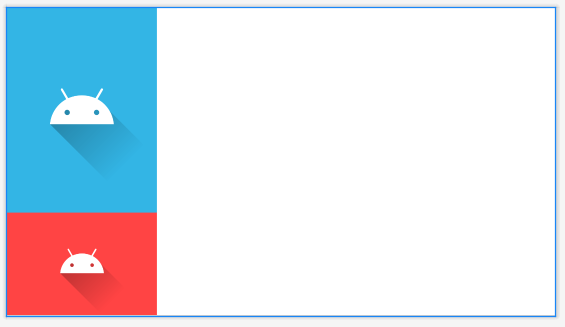
如果我理解你的问题,ImageView2是ImageView1的两倍高,不管屏幕方向或设备屏幕大小如何,你都希望2-1的比例能保持。
尝试在ImageViews和layout_height of 0dp (match_constraints)中使用垂直权重。
<androidx.constraintlayout.widget.ConstraintLayout
    android:layout_width="match_parent"
    android:layout_height="match_parent"
    tools:context=".MainActivity">

    <ImageView
        android:id="@+id/imageView"
        android:layout_width="200dp"
        android:layout_height="0dp"
        app:layout_constraintBottom_toTopOf="@+id/imageView2"
        app:layout_constraintStart_toStartOf="parent"
        app:layout_constraintTop_toTopOf="parent"
        app:layout_constraintVertical_weight="2"
        android:background="@android:color/holo_blue_light"
        tools:srcCompat="@drawable/ic_launcher_foreground" />

    <ImageView
        android:id="@+id/imageView2"
        android:layout_width="200dp"
        android:layout_height="0dp"
        app:layout_constraintBottom_toBottomOf="parent"
        app:layout_constraintStart_toStartOf="parent"
        app:layout_constraintTop_toBottomOf="@+id/imageView"
        app:layout_constraintVertical_weight="1"
        android:background="@android:color/holo_red_light"
        tools:srcCompat="@drawable/ic_launcher_foreground" />
</androidx.constraintlayout.widget.ConstraintLayout>
肖像
景观
页面原文内容由Stack Overflow提供。腾讯云小微IT领域专用引擎提供翻译支持
原文链接:
https://stackoverflow.com/questions/64990110
复制相关文章
相似问题
腾讯云开发者

Copyright © 2013 - 2026 Tencent Cloud. All Rights Reserved. 腾讯云 版权所有
深圳市腾讯计算机系统有限公司 ICP备案/许可证号:粤B2-20090059  粤公网安备44030502008569号
腾讯云计算(北京)有限责任公司 京ICP证150476号 | 京ICP备11018762号