
什么时候需要Modifier.composed {. }?
Modifier.composed { ... }什么时候有用?如果我可以简单地在Modifier.composed { PaddingModifier(...) }上执行Modifier.composed { PaddingModifier(...) },为什么我需要它?
回答 2
Stack Overflow用户
发布于 2020-12-01 03:36:48
Modifier.composed允许创建一个对物化实例特定的、有状态的修饰符有用的组合感知修饰符-工厂。从医生那里:
声明一个将为其修改的每个元素组成的修饰符的及时组合。组合可用于为每个被修改的元素实现具有实例特定状态的有状态修饰符,从而使同一个修饰符实例能够安全地重用多个元素,同时维护元素特定的状态。
换句话说,它允许您将悬挂状态注入到特定于元素的Modifier中,并使用remember、DisposableEffect、Ambient等:
fun Modifier.fancyModifier(
    enabled: Boolean = false,
    onClick: () -> Unit = {}
) = composed(inspectorInfo = debugInspectorInfo {
    name = "fancyModifier"
    value = enabled
}) {
    var paddingValue by remember { mutableStateOf(0.dp) }
    onCommit(enabled) {
        paddingValue = if (enabled) 16.dp else 0.dp
    }
    fillMaxWidth()
        .clickable { onClick() }
        .padding(paddingValue)
}LazyColumnFor(items = List(size = 10) { "$it" }) {
var enabled by remember { mutableStateOf(false) }
Text(
text = "fancy modifier",
modifier = Modifier.fancyModifier(enabled) {
enabled = !enabled
}
)
}还可以通过使用InspectorInfo声明debugInspectorInfo来帮助调试。从医生那里:
如果指定了inspectorInfo,则在开发期间,工具将可以看到此修饰符。指定原始修饰符的名称和参数。以及可选择地声明
InspectorInfo以帮助调试。
如果您想要跟踪的值超过了值,则可以使用properties字段而不是value。
注意:debugInspectorInfo lambda是从release构建中删除的。
class FancyModifierTest {

    @Before
    fun setup() {
        isDebugInspectorInfoEnabled = true
    }

    @After
    fun teardown() {
        isDebugInspectorInfoEnabled = false
    }

    @Test
    fun testFancyModifierInspectableValue() {
        val modifier = Modifier.fancyModifier() as InspectableValue
        assertEquals(modifier.nameFallback, "fancyModifier")
        assertEquals(modifier.valueOverride, false)
        assertEquals(modifier.inspectableElements.toList().size, 0)
    }

}
以下是一些更实际的例子:
Stack Overflow用户
发布于 2021-11-30 12:10:50
您可以使用它存储内存繁重的对象,以避免每次为特定元素调用修饰符时实例化。
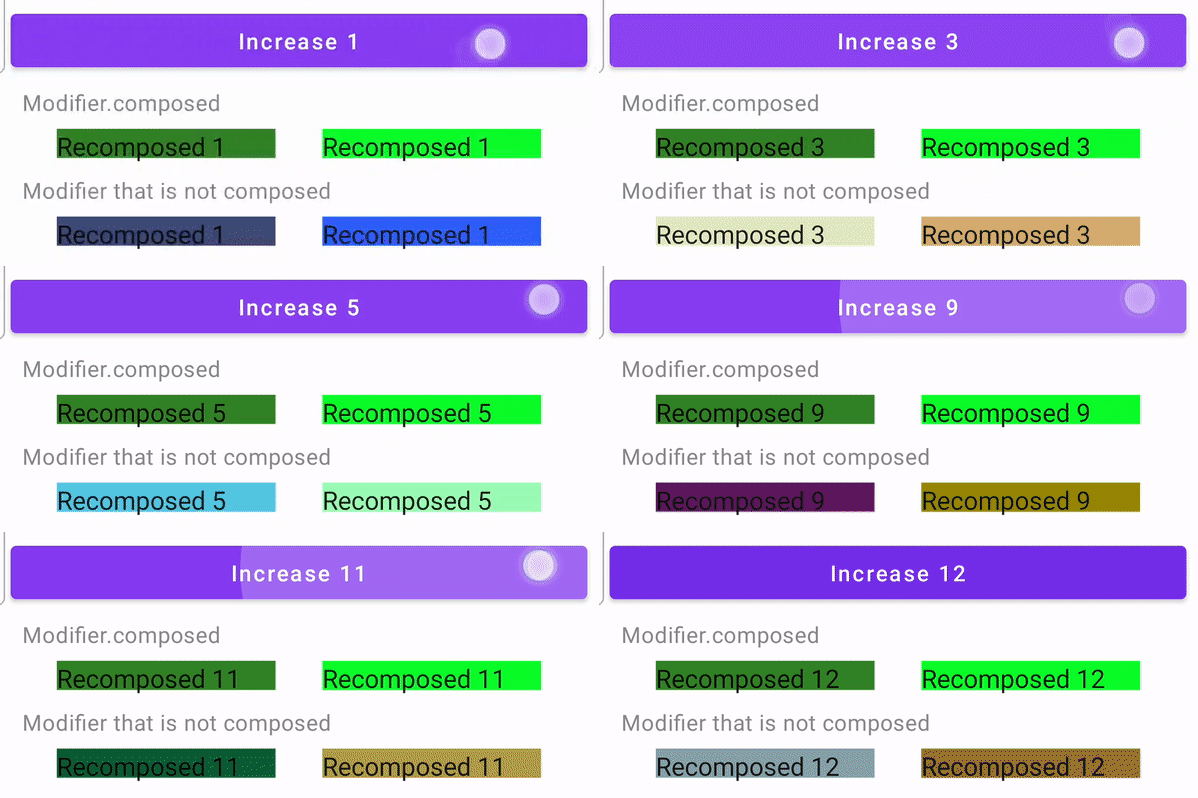
这一个组合记忆颜色和索引,因此,在每次重新组合之后,它返回最初随机创建的颜色。
// Creates stateful modifier with multiple arguments
fun Modifier.composedBackground(width: Dp, height: Dp, index: Int) = composed(
    // pass inspector information for debug
    inspectorInfo = debugInspectorInfo {
        // name should match the name of the modifier
        name = "myModifier"
        // add name and value of each argument
        properties["width"] = width
        properties["height"] = height
        properties["index"] = index
    },
    // pass your modifier implementation that resolved per modified element

    factory = {

        val density = LocalDensity.current

        val color: Color = remember(index) {
            Color(
                red = Random.nextInt(256),
                green = Random.nextInt(256),
                blue = Random.nextInt(256),
                alpha = 255
            )
        }

        // add your modifier implementation here
        Modifier.drawBehind {

            val widthInPx = with(density) { width.toPx() }
            val heightInPx = with(density) { height.toPx() }

            drawRect(color = color, topLeft = Offset.Zero, size = Size(widthInPx, heightInPx))
        }
    }
)
这个在每次可组合的时候都会创建一个颜色
fun Modifier.nonComposedBackground(width: Dp, height: Dp) = this.then(

    // add your modifier implementation here
    Modifier.drawBehind {

        //  Without remember this color is created every time item using this modifier composed
        val color: Color = Color(
            red = Random.nextInt(256),
            green = Random.nextInt(256),
            blue = Random.nextInt(256),
            alpha = 255
        )

        val widthInPx = width.toPx()
        val heightInPx = height.toPx()

        drawRect(color = color, topLeft = Offset.Zero, size = Size(widthInPx, heightInPx))
    }
)
用法
        var counter by remember { mutableStateOf(0) }

        Button(
            onClick = { counter++ },
            modifier = Modifier.fillMaxWidth()
        ) {
            Text(text = "Increase $counter")
        }

        TutorialText2(text = "Modifier.composed")
        Row(
            modifier = Modifier.fillMaxWidth(),
            horizontalArrangement = Arrangement.SpaceEvenly
        ) {

            Box(
                modifier = Modifier
                    .composedBackground(150.dp, 20.dp, 0)
                    .width(150.dp)
            ) {
                Text(text = "Recomposed $counter")
            }

            Box(
                modifier = Modifier
                    .composedBackground(150.dp, 20.dp, 1)
                    .width(150.dp)
            ) {
                Text(text = "Recomposed $counter")
            }
        }

        TutorialText2(text = "Modifier that is not composed")
        Row(
            modifier = Modifier.fillMaxWidth(),
            horizontalArrangement = Arrangement.SpaceEvenly
        ) {

            Box(
                modifier = Modifier
                    .nonComposedBackground(150.dp, 20.dp)
                    .width(150.dp)
            ) {
                Text(text = "Recomposed $counter")
            }

            Box(
                modifier = Modifier
                    .nonComposedBackground(150.dp, 20.dp)
                    .width(150.dp)
            ) {
                Text(text = "Recomposed $counter")
            }
        }
结果
另外,在实际应用中,您可以创建一个动画抖动修饰符。
fun Modifier.shake(enabled: Boolean) = composed(

    factory = {

        val scale by animateFloatAsState(
            targetValue = if (enabled) .9f else 1f,
            animationSpec = repeatable(
                iterations = 5,
                animation = tween(durationMillis = 50, easing = LinearEasing),
                repeatMode = RepeatMode.Reverse
            )
        )

        Modifier.graphicsLayer {
            scaleX = if (enabled) scale else 1f
            scaleY = if (enabled) scale else 1f
        }
    },
    inspectorInfo = debugInspectorInfo {
        name = "shake"
        properties["enabled"] = enabled
    }
)
用法
Icon(
    imageVector = Icons.Default.NotificationsActive,
    contentDescription = null,
    tint = Color.White,
    modifier = Modifier
        .shake(enabled)
        .background(Color.Red, CircleShape)
        .size(50.dp)
        .padding(10.dp)
)https://stackoverflow.com/questions/64989659
复制相似问题
腾讯云开发者

Copyright © 2013 - 2026 Tencent Cloud. All Rights Reserved. 腾讯云 版权所有
深圳市腾讯计算机系统有限公司 ICP备案/许可证号:粤B2-20090059  粤公网安备44030502008569号
腾讯云计算(北京)有限责任公司 京ICP证150476号 | 京ICP备11018762号