
XR按钮所有功能
XR按钮所有功能
提问于 2020-11-25 10:11:35
我正在使用来自统一的XR类,并试图将所有按钮输入添加到m_SelectUsage中。但不幸的是,它没有采用一系列的值。在图片中,你可以看到,只有一个按钮可以使用“抓地力”。有办法将所有按钮输入添加到这个类中吗?
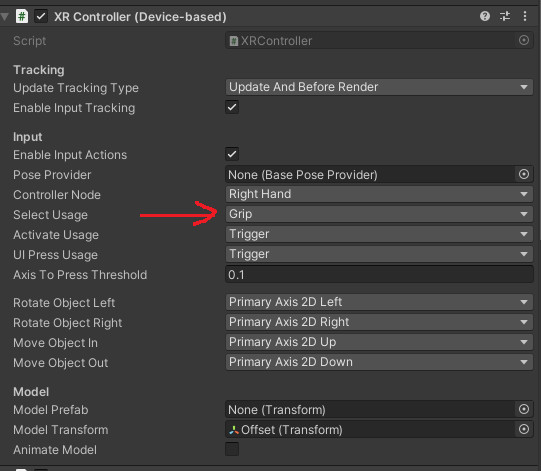
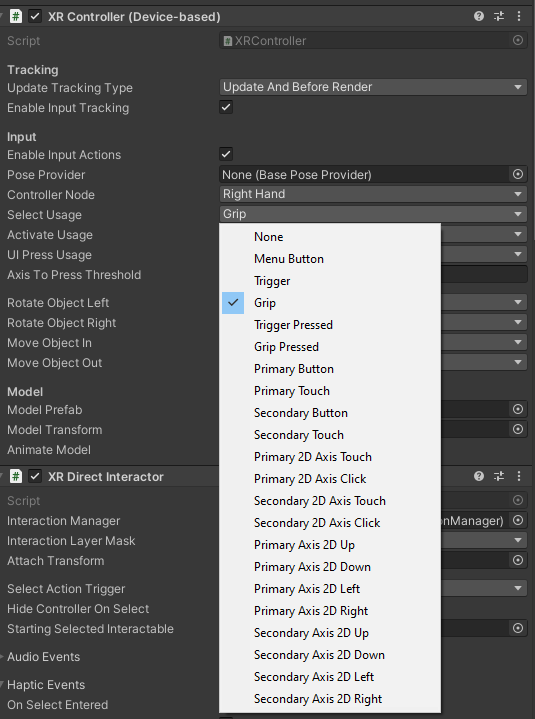
using UnityEngine.SpatialTracking;

#if LIH_PRESENT
using UnityEngine.Experimental.XR.Interaction;
#endif

namespace UnityEngine.XR.Interaction.Toolkit
{
    /// <summary>
    /// <see cref="XRBaseController"/> <see cref="MonoBehaviour"/> that interprets
    /// feature values on an input device in the XR input subsystem into
    /// XR Interaction Interactor position, rotation, and interaction states.
    /// </summary>
    [AddComponentMenu("XR/XR Controller (Device-based)")]
    public class XRController : XRBaseController
    {
        [SerializeField]
        [Tooltip("The XRNode for this controller.")]
        XRNode m_ControllerNode = XRNode.RightHand;

        /// <summary>
        /// The <see cref="XRNode"/> for this controller.
        /// </summary>
        public XRNode controllerNode
        {
            get => m_ControllerNode;
            set => m_ControllerNode = value;
        }

        [SerializeField]
        [Tooltip("The input to use for detecting a select.")]
        InputHelpers.Button m_SelectUsage = InputHelpers.Button.Grip;

        /// <summary>
        /// The input to use for detecting a select.
        /// </summary>
        public InputHelpers.Button selectUsage
        {
            get => m_SelectUsage;
            set => m_SelectUsage = value;
        }

        [SerializeField]
        [Tooltip("The input to use for detecting activation.")]
        InputHelpers.Button m_ActivateUsage = InputHelpers.Button.Trigger;

        /// <summary>
        /// The input to use for detecting activation.
        /// </summary>
        public InputHelpers.Button activateUsage
        {
            get => m_ActivateUsage;
            set => m_ActivateUsage = value;
        }

        [SerializeField]
        [Tooltip("The input to use for detecting a UI press.")]
        InputHelpers.Button m_UIPressUsage = InputHelpers.Button.Trigger;

        /// <summary>
        /// The input to use for detecting a UI press.
        /// </summary>
        public InputHelpers.Button uiPressUsage
        {
            get => m_UIPressUsage;
            set => m_UIPressUsage = value;
        }

        [SerializeField]
        [Tooltip("The amount an axis needs to be pressed to trigger an interaction event.")]
        float m_AxisToPressThreshold = 0.1f;

        /// <summary>
        /// The amount an axis needs to be pressed to trigger an interaction event.
        /// </summary>
        public float axisToPressThreshold
        {
            get => m_AxisToPressThreshold;
            set => m_AxisToPressThreshold = value;
        }

        [SerializeField]
        [Tooltip("The input to use to rotate an anchor to the Left.")]
        InputHelpers.Button m_RotateAnchorLeft = InputHelpers.Button.PrimaryAxis2DLeft;

        /// <summary>
        /// The input to use to rotate an anchor to the Left.
        /// </summary>
        public InputHelpers.Button rotateObjectLeft
        {
            get => m_RotateAnchorLeft;
            set => m_RotateAnchorLeft = value;
        }

        [SerializeField]
        [Tooltip("The input to use to rotate an anchor to the Right.")]
        InputHelpers.Button m_RotateAnchorRight = InputHelpers.Button.PrimaryAxis2DRight;

        /// <summary>
        /// The input to use to rotate an anchor to the Right.
        /// </summary>
        public InputHelpers.Button rotateObjectRight
        {
            get => m_RotateAnchorRight;
            set => m_RotateAnchorRight = value;
        }

        [SerializeField]
        [Tooltip("The input that will be used to translate the anchor away from the interactor.")]
        InputHelpers.Button m_MoveObjectIn = InputHelpers.Button.PrimaryAxis2DUp;

        /// <summary>
        /// The input that will be used to translate the anchor away from the interactor.
        /// </summary>
        public InputHelpers.Button moveObjectIn
        {
            get => m_MoveObjectIn;
            set => m_MoveObjectIn = value;
        }

        [SerializeField]
        [Tooltip("The input that will be used to translate the anchor towards the interactor.")]
        InputHelpers.Button m_MoveObjectOut = InputHelpers.Button.PrimaryAxis2DDown;

        /// <summary>
        /// The input that will be used to translate the anchor towards the interactor.
        /// </summary>
        public InputHelpers.Button moveObjectOut
        {
            get => m_MoveObjectOut;
            set => m_MoveObjectOut = value;
        }

#if LIH_PRESENT
        [SerializeField, Tooltip("Pose provider used to provide tracking data separate from the XR Node.")]
        BasePoseProvider m_PoseProvider;

        /// <summary>
        /// Pose provider used to provide tracking data separate from the <see cref="XRNode"/>.
        /// </summary>
        public BasePoseProvider poseProvider
        {
            get => m_PoseProvider;
            set => m_PoseProvider = value;
        }
#endif

        InputDevice m_InputDevice;
        /// <summary>
        /// (Read Only) The <see cref="InputDevice"/> being used to read data from.
        /// </summary>
        public InputDevice inputDevice => m_InputDevice.isValid ? m_InputDevice : m_InputDevice = InputDevices.GetDeviceAtXRNode(controllerNode);

        /// <inheritdoc />
        protected override void UpdateTrackingInput(XRControllerState controllerState)
        {
            controllerState.poseDataFlags = PoseDataFlags.NoData;
#if LIH_PRESENT_V1API
            if (m_PoseProvider != null)
            {
                if (m_PoseProvider.TryGetPoseFromProvider(out var poseProviderPose))
                {
                    controllerState.position = poseProviderPose.position;
                    controllerState.rotation = poseProviderPose.rotation;
                    controllerState.poseDataFlags = PoseDataFlags.Position | PoseDataFlags.Rotation;
                }
            }
            else
#elif LIH_PRESENT_V2API
            if (m_PoseProvider != null)
            {
                var retFlags = m_PoseProvider.GetPoseFromProvider(out var poseProviderPose);
                if ((retFlags & PoseDataFlags.Position) != 0)
                {
                    controllerState.position = poseProviderPose.position;
                    controllerState.poseDataFlags |= PoseDataFlags.Position;
                }
                if ((retFlags & PoseDataFlags.Rotation) != 0)
                {
                    controllerState.rotation = poseProviderPose.rotation;
                    controllerState.poseDataFlags |= PoseDataFlags.Rotation;
                }
            }
            else
#endif
            {
                if (inputDevice.TryGetFeatureValue(CommonUsages.devicePosition, out controllerState.position))
                {
                    controllerState.poseDataFlags |= PoseDataFlags.Position;
                }

                if (inputDevice.TryGetFeatureValue(CommonUsages.deviceRotation, out controllerState.rotation))
                {
                    controllerState.poseDataFlags |= PoseDataFlags.Rotation;
                }
            }
        }

        /// <inheritdoc />
        protected override void UpdateInput(XRControllerState controllerState)
        {
            controllerState.ResetFrameDependentStates();

            HandleInteractionAction(m_SelectUsage, ref controllerState.selectInteractionState);
            HandleInteractionAction(m_ActivateUsage, ref controllerState.activateInteractionState);
            HandleInteractionAction(m_UIPressUsage, ref controllerState.uiPressInteractionState);
        }

        void HandleInteractionAction(InputHelpers.Button button, ref InteractionState interactionState)
        {
            inputDevice.IsPressed(button, out var pressed, m_AxisToPressThreshold);

            if (pressed)
            {
                Debug.Log("Detect");
                if (!interactionState.active)
                {
                    interactionState.activatedThisFrame = true;
                    interactionState.active = true;
                }
            }
            else
            {
                if (interactionState.active)
                {
                    interactionState.deactivatedThisFrame = true;
                    interactionState.active = false;
                }
            }
        }

        /// <inheritdoc />
        public override bool SendHapticImpulse(float amplitude, float duration)
        {
            if (inputDevice.TryGetHapticCapabilities(out var capabilities) &&
                capabilities.supportsImpulse)
            {
                return inputDevice.SendHapticImpulse(0u, amplitude, duration);
            }
            return false;
        }

    }
}回答 1
Stack Overflow用户
回答已采纳
发布于 2020-11-25 17:07:03
您可以覆盖XRController来接受每个输入值的数组。
using UnityEngine;
using UnityEngine.XR.Interaction.Toolkit;


public class MyXRController : XRController
{
    [SerializeField]
    InputHelpers.Button[] m_SelectUsageArray;

    protected override void UpdateInput(XRControllerState controllerState)
    {
        // Because we use base input m_SelectUsage will still be accepted if provided
        base.UpdateInput(controllerState);

        // Iterate over all buttons
        foreach (var selectUsage in m_SelectUsageArray)
        {
            HandleInteractionAction(selectUsage, ref controllerState.selectInteractionState);
        }
    }
}
您可以以类似的方式覆盖其他交互。
然后在您的GameObject中,使用MyXRController而不是XRController
页面原文内容由Stack Overflow提供。腾讯云小微IT领域专用引擎提供翻译支持
原文链接:
https://stackoverflow.com/questions/65002536
复制相关文章
相似问题
腾讯云开发者

Copyright © 2013 - 2026 Tencent Cloud. All Rights Reserved. 腾讯云 版权所有
深圳市腾讯计算机系统有限公司 ICP备案/许可证号:粤B2-20090059  粤公网安备44030502008569号
腾讯云计算(北京)有限责任公司 京ICP证150476号 | 京ICP备11018762号