
当用户在评估页面上输入正确的数据时,在ASP .NET核心(Razor)中的cshtml中的选项卡视图上显示另一个名为“查看评估”的选项卡。
我必须建立一个图书评估市场,学生可以输入他们的书的数据(标题,ISBN,版本,价格)。如果数据输入正确,则在另一个名为“查看评估”的选项卡中显示数据。现在,我已经做了这个选项卡,一切正常,但我必须增加一个功能,将显示视图评估选项卡在所有页面的选项卡,在选项卡栏,一旦用户输入正确的数据。
我将添加我的所有代码来创建程序。
型号:
    namespace Lab4_Students4CheapTexts.Models
    {
        public class Textbooks
        {
            // declaring data members and getter/setter

            [Required]
            [StringLength(100)]
            public string title { get; set; }

            public int ISBN { get; set; }
            public int version { get; set; }

            [Required]
            public int price { get; set; }

            // no parameter constructor
            public Textbooks()
            {
            }

            // full parameter constructor
            public Textbooks(string title, int ISBN, int version, int price)
            {
                this.title = title;
                this.ISBN = ISBN;
                this.version = version;
                this.price = price;
            }

            public override string ToString()
            {
                return "Your textbook: " + this.title + ", version: " + this.version + " was appraised at: " + this.price;
            }
        }
    }
主计长:
public class HomeController : Controller
{
    List<Textbooks> textbooksList = new List<Textbooks>();

    public IActionResult Index()
    {
        return View();
    }

    [HttpGet]
    public IActionResult Appraise()
    {
        return View();
    }

    [HttpPost]
    public IActionResult Appraise(Textbooks textbooks)
    {
            if (ModelState.IsValid)
            {
                ViewData["Message"] = "Your textbook: " +
                                        textbooks.title +
                                        ", Version: " +
                                        textbooks.version +
                                        " was priced at: " +
                                        textbooks.price;

                return View("view_appraisals", textbooks);
            }
            else
            {
                return View("Bad");
            }
        }
    }
}
视图:
INDEX.CSHTML
<article id="box">
    <header>
        <h1>Students4CheapTexts</h1>
        <img src="~/Images/logo.png"
             alt="Logo"
             height="50"
             width="50" />
    </header>

    <ul>
        <li><a class="active" href=".~/Home/Index">Home</a></li>
        <li><a href="~/Home/Appraise">Appraise</a></li>
    </ul>

    <p>
        index
    </p>
  </article>
APPRAISE.CSHTML
<ul>
    <li><a href="~/Home/Index">Home</a></li>
    <li><a class="active" href="~/Home/Appraise">Appraise</a></li>
</ul>

<form action="~/Home/Appraise" method="POST">
    <div>
        <label for="title">Textbook Title:</label>
        <input type="text" id="make" name="title" placeholder="" />
        <br />
    </div>

    <div>
        <label for="isbn">Textbook ISBN:</label>
        <input type="text" id="isbn" name="isbn" placeholder="" />
        <br />
    </div>

    <div>
        <label for="version">Textbook Version:</label>
        <input type="text" id="version" name="version" placeholder="" />
        <br />
    </div>

    <div>
        <label for="originalPrice">Original Purchase Price:</label>
        <input type="text"
               id="originalPrice"
               name="originalPrice"
               placeholder="" />
        <br />
    </div>

    <div>
        <label for="condition">Condition:</label>
        <select name="condition" id="condition">
            <option value="likeNew">Like New</option>
            <option value="saab">Saab</option>
            <option value="opel">Opel</option>
            <option value="audi">Audi</option>
        </select>
        <br />
    </div>

    <input type="submit" value="Appraise" />
</form>
VIEW_APPRAISALS.CSHTML
<header>
    <h1>All Entered Books List</h1>
    <img src="~/Images/logo.png" alt="Logo" height="50" width="50" />
</header>
<ul>
    <li><a href="~/Home/Index">Home</a></li>
    <li><a href="~/Home/Appraise">Appraise</a></li>
    <li><a class="active" href="~/Home/view_appraisals">View Appraisals</a></li>


</ul>

<h3> The model car could not be created because you have entered something incorrectly.</h3>
BAD.CSHTML
<header>
    <h1>Incorrect input</h1>
    <img src="~/Images/logo.png" alt="Logo" height="50" width="50" />
</header>
<ul>
    <li><a href="~/Home/Index">Home</a></li>
    <li><a href="~/Home/Appraise">Appraise</a></li>


</ul>

<h3> The model car could not be created because you have entered something incorrectly.</h3>
用于我所有HTML页面的CSS:
/* Please see documentation at https://learn.microsoft.com/aspnet/core/client-side/bundling-and-minification
   for details on configuring this project to bundle and minify static web assets. */

    a.navbar-brand {
        white-space: normal;
        text-align: center;
        word-break: break-all;
    }

    /* Provide sufficient contrast against white background */
    a {
        color: #0366d6;
    }

    .btn-primary {
        color: #fff;
        background-color: #1b6ec2;
        border-color: #1861ac;
    }

    .nav-pills .nav-link.active,
    .nav-pills .show > .nav-link {
        color: #fff;
        background-color: #1b6ec2;
        border-color: #1861ac;
    }

    /* Sticky footer styles
    -------------------------------------------------- */
    html {
        font-size: 14px;
    }

    @media (min-width: 768px) {
        html {
            font-size: 16px;
        }
    }

    .border-top {
        border-top: 1px solid #e5e5e5;
    }

    .border-bottom {
        border-bottom: 1px solid #e5e5e5;
    }

    .box-shadow {
        box-shadow: 0 0.25rem 0.75rem rgba(0, 0, 0, 0.05);
    }

    button.accept-policy {
        font-size: 1rem;
        line-height: inherit;
    }

    /* Sticky footer styles
    -------------------------------------------------- */

    * {
        margin: 0;
        padding: 0;
        box-sizing: border-box;
        outline: none;
    }

    html {
        position: relative;
        min-height: 100%;
        font-family: sans-serif;
    }

    body {
        /* Margin bottom by footer height */
        margin: 60px;
        text-align: center;
    }

    .footer {
        position: absolute;
        bottom: 0;
        width: 100%;
        white-space: nowrap;
        line-height: 60px; /* Vertically center the text there */
    }

    ul {
        display: inline-block;
        margin: 20px;
        padding: 20px 0;
        background: #aaa;
        border: 1px solid #000;
    }

        ul li {
            display: inline-block;
        }

            ul li a {
                text-decoration: none;
                color: #000;
                padding: 20px 30px;
                font-size: large;
                font-weight: bold;
            }

                ul li a.active {
                    background: #eee;
                }

    p {
        width: 40vw;
        text-align: justify;
        margin: auto;
        line-height: 35px;
    }

    article.box {
        background-color: #ddd;
    }

    form {
        border: 1px dotted #000;
        width: 60vw;
        padding: 20px 0;
        margin: auto;
    }

        form div {
            margin: 20px 0;
        }

            form div input {
                border: 1px solid #000;
            }

        form input[type=submit] {
            padding: 10px 20px;
        }

    header h1 {
        font-size: 40px;
}回答 2
Stack Overflow用户
发布于 2020-11-28 10:36:56
您也许可以将部分标记Helper放在您希望包含在任何选项卡中的每个cshtml页面上。
Index.cshtml
<article id="box">
<header>
    <h1>Students4CheapTexts</h1>
    <img src="~/Images/logo.png"
         alt="Logo"
         height="50"
         width="50" />
</header>

<ul>
    <li><a class="active" href=".~/Home/Index">Home</a></li>
    <li><a href="~/Home/Appraise">Appraise</a></li>
</ul>

<p>
    Here is stuff from indes page and below is the stuff from View_Appraisals. You can include it anywhere.
    <hr />
    <partial name="VIEW_APPRAISALS">
</p>Stack Overflow用户
发布于 2020-12-03 08:26:33
如果数据输入正确,则在另一个名为“查看评估”的选项卡中显示数据。现在,我已经做了这个选项卡,一切正常,但我必须增加一个功能,将显示视图评估选项卡在所有页面的选项卡,在选项卡栏,一旦用户输入正确的数据。
您可以尝试使用布局页显示选项卡栏导航链接,代码如下:
_layout.cshtml:(检查肚脐)
<!DOCTYPE html>
<html lang="en">
<head>
<meta charset="utf-8" />
<meta name="viewport" content="width=device-width, initial-scale=1.0" />
<title>@ViewData["Title"] - WebApplication1</title>
<link rel="stylesheet" href="~/lib/bootstrap/dist/css/bootstrap.min.css" />
<link rel="stylesheet" href="~/css/site.css" />
</head>
<body>
<header>
<nav class="navbar navbar-expand-sm navbar-toggleable-sm navbar-light bg-white border-bottom box-shadow mb-3">
<div class="container">
<a class="navbar-brand" asp-area="" asp-controller="Home" asp-action="Index">WebApplication1</a>
<button class="navbar-toggler" type="button" data-toggle="collapse" data-target=".navbar-collapse" aria-controls="navbarSupportedContent"
aria-expanded="false" aria-label="Toggle navigation">
<span class="navbar-toggler-icon"></span>
</button>
<div class="navbar-collapse collapse d-sm-inline-flex justify-content-between">
<ul class="navbar-nav flex-grow-1">
<li class="nav-item">
<a class="nav-link text-dark" asp-area="" asp-controller="Home" asp-action="Index">Home</a>
</li>
<li class="nav-item">
<a class="nav-link text-dark" href="~/Home/Appraise">Appraise</a>
</li>
<li class="nav-item">
<a class="nav-link text-dark" href ="~/Home/view_appraisals">View Appraisals</a>
</li>
</ul>
</div>
</div>
</nav>
</header>
<div class="container">
<main role="main" class="pb-3">
@RenderBody()
</main>
</div>
<footer class="border-top footer text-muted">
<div class="container">
© 2020 - WebApplication1 - <a asp-area="" asp-controller="Home" asp-action="Privacy">Privacy</a>
</div>
</footer>
<script src="~/lib/jquery/dist/jquery.min.js"></script>
<script src="~/lib/bootstrap/dist/js/bootstrap.bundle.min.js"></script>
<script src="~/js/site.js" asp-append-version="true"></script>
@await RenderSectionAsync("Scripts", required: false)
</body>
</html>然后,在其他视图中,不需要添加导航链接,只需使用布局页面,代码如下:
Index.cshtml:
    @{
        ViewData["Title"] = "Home Page";

        Layout = "~/Views/Shared/_Layout.cshtml";
    }

        <article id="box">
        <p>
            index Page
        </p>
      </article>
Appraise.cshtml页面中的代码:
    <h1>Appraise</h1>

    @*<ul>
        <li><a href="~/Home/Index">Home</a></li>
        <li><a class="active" href="~/Home/Appraise">Appraise</a></li>
    </ul>*@

    <form action="~/Home/Appraise" method="POST">
        <div>
            <label for="title">Textbook Title:</label>
            <input type="text" id="make" name="title" placeholder="" />
            <br />
        </div>

        <div>
            <label for="isbn">Textbook ISBN:</label>
            <input type="text" id="isbn" name="isbn" placeholder="" />
            <br />
        </div>

        <div>
            <label for="version">Textbook Version:</label>
            <input type="text" id="version" name="version" placeholder="" />
            <br />
        </div>

        <div>
            <label for="originalPrice">Original Purchase Price:</label>
            <input type="text"
                   id="originalPrice"
                   name="originalPrice"
                   placeholder="" />
            <br />
        </div>

        <div>
            <label for="condition">Condition:</label>
            <select name="condition" id="condition">
                <option value="likeNew">Like New</option>
                <option value="saab">Saab</option>
                <option value="opel">Opel</option>
                <option value="audi">Audi</option>
            </select>
            <br />
        </div>

        <input type="submit" value="Appraise" />
    </form>
view_appraisals视图中的代码:
    @model IEnumerable<WebApplication1.Models.Textbooks>
    <table class="table">
          @* list all model *@
</table>在控制器中,我将使用会话来存储正确的数据。提交正确的数据后,将数据存储到会话中,然后从会话中获取数据并显示所有记录。您也可以将它们存储到数据库中。(要在asp.net核心中使用会话,请检查ASP.NET核中的会话与状态管理,然后配置会话状态并添加SessionExtensions (用于存储复杂对象))。
    public IActionResult Index()
    {
        return View();
    }

    [HttpGet]
    public IActionResult Appraise()
    {
        return View();
    }

    [HttpPost]
    public IActionResult Appraise(Textbooks textbooks)
    {
        if (ModelState.IsValid)
        {
            ViewData["Message"] = "Your textbook: " +
                                    textbooks.title +
                                    ", Version: " +
                                    textbooks.version +
                                    " was priced at: " +
                                    textbooks.price;
            //check if session exist and the the data.
            if (HttpContext.Session.Get<List<Textbooks>>("textbooks") != null)
            {
                textbooksList = HttpContext.Session.Get<List<Textbooks>>("textbooks");
            }

            textbooksList.Add(textbooks);
            HttpContext.Session.Set<List<Textbooks>>("textbooks", textbooksList);
            // ViewData["isDisplay"] = true;
            return View("view_appraisals", textbooksList);
        }
        else
        {
            return View("Bad");
        }
    }

    public IActionResult view_appraisals()
    {
        if (HttpContext.Session.Get<List<Textbooks>>("textbooks") == null)
        {
            HttpContext.Session.Set<List<Textbooks>>("textbooks", textbooksList);
        }
        else
        {
            textbooksList = HttpContext.Session.Get<List<Textbooks>>("textbooks");
        }

        if (textbooksList.Count>0)
        {
           // ViewData["isDisplay"] = true;
            return View("view_appraisals", textbooksList);
        }
        else
        {
            return View("bad");
        }
    }
结果如下:(如果输入的数据正确,它将直接重定向到view_appraisal页面)
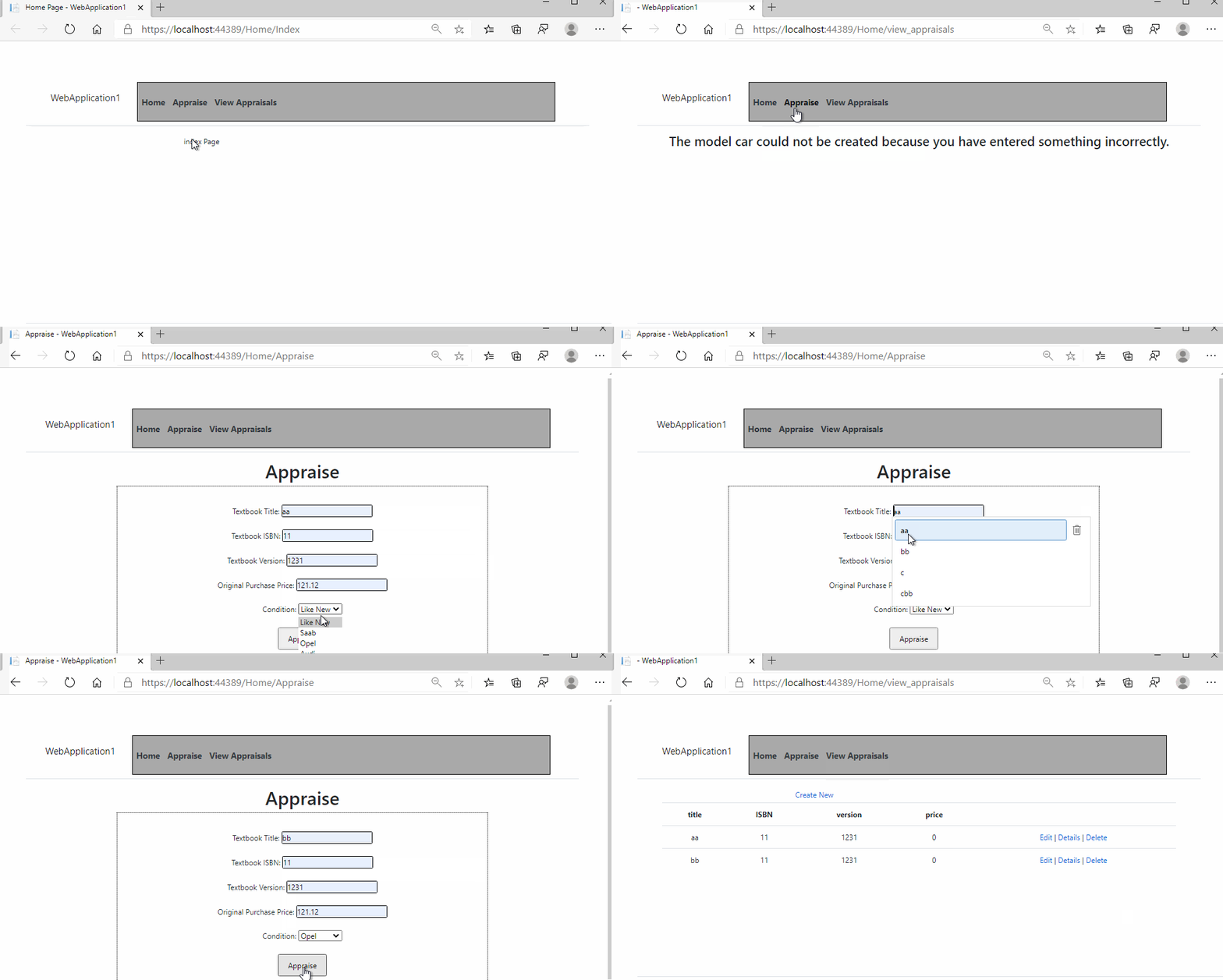
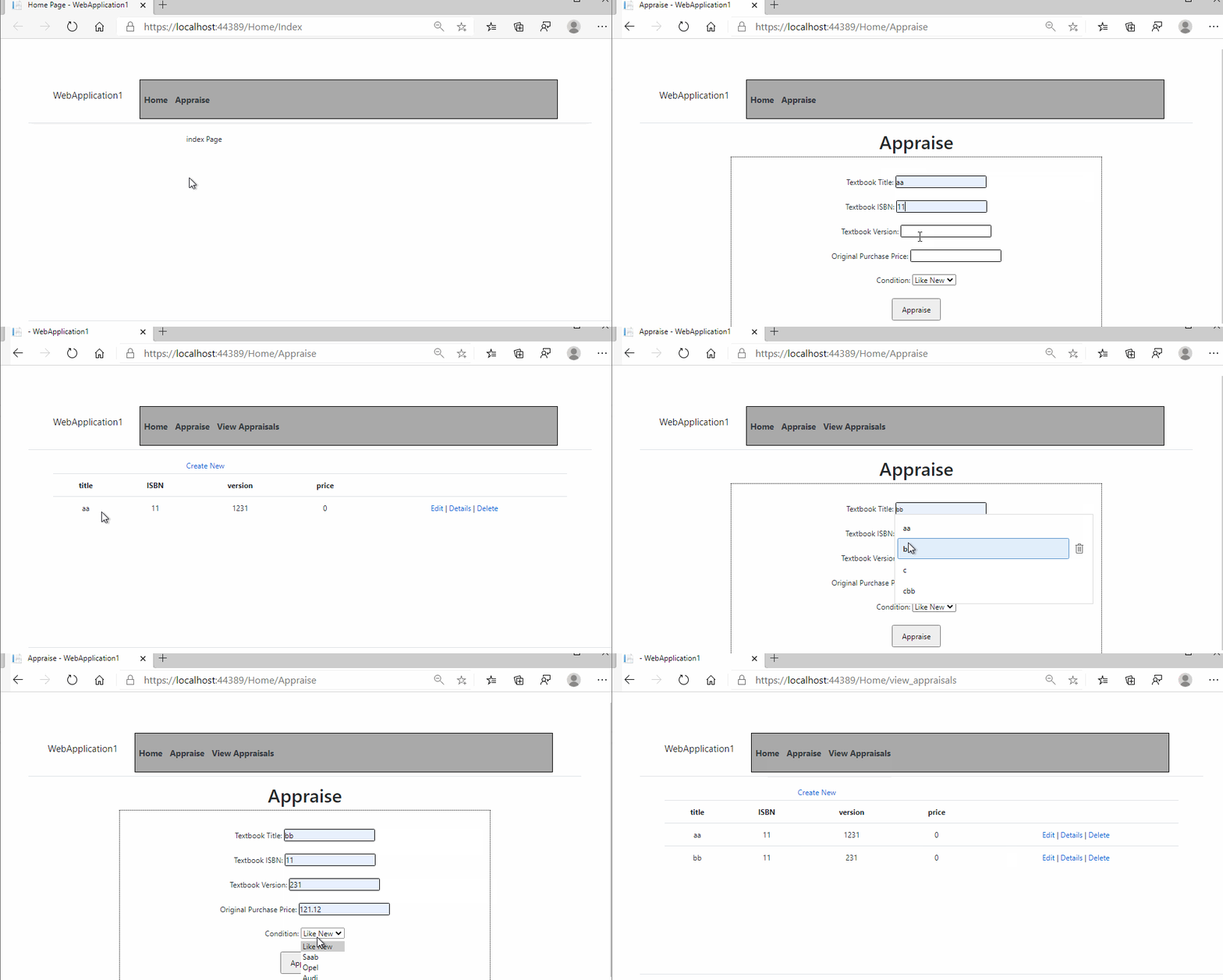
如果没有数据,您可能需要隐藏“查看评估”导航链接,如果有记录,则显示“查看评估”导航链接。如果是这样的话,尝试修改导航代码(在_layout.cshtml中)如下:
                    @{
                        var isdisplay = "none";  //default value, hidden the View Appraisals link.
                        if (ViewData["isDisplay"] != null)
                        {
                            isdisplay = "block";
                        }
                    }
                    <li class="nav-item">
                        <a  class="nav-link text-dark" style="display:@isdisplay" href ="~/Home/view_appraisals">View Appraisals</a>
                    </li>
然后,如果要在控制器中显示链接,请为"ViewData"isDisplay"“设置一个值,代码如下:
    public IActionResult Index()
    {
        return View();
    }

    [HttpGet]
    public IActionResult Appraise()
    {
        if (HttpContext.Session.Get<List<Textbooks>>("textbooks") != null)
        {
            ViewData["isDisplay"] = true;
        }
        return View();
    }

    [HttpPost]
    public IActionResult Appraise(Textbooks textbooks)
    {
        if (ModelState.IsValid)
        {
            ViewData["Message"] = "Your textbook: " +
                                    textbooks.title +
                                    ", Version: " +
                                    textbooks.version +
                                    " was priced at: " +
                                    textbooks.price;

            if (HttpContext.Session.Get<List<Textbooks>>("textbooks") != null)
            {
                textbooksList = HttpContext.Session.Get<List<Textbooks>>("textbooks");
            }

            textbooksList.Add(textbooks);
            HttpContext.Session.Set<List<Textbooks>>("textbooks", textbooksList);
            ViewData["isDisplay"] = true;
            return View("view_appraisals", textbooksList);
        }
        else
        {
            return View("Bad");
        }
    }

    public IActionResult view_appraisals()
    {
        if (HttpContext.Session.Get<List<Textbooks>>("textbooks") == null)
        {
            HttpContext.Session.Set<List<Textbooks>>("textbooks", textbooksList);
        }
        else
        {
            textbooksList = HttpContext.Session.Get<List<Textbooks>>("textbooks");
        }

        if (textbooksList.Count>0)
        {
            ViewData["isDisplay"] = true;
            return View("view_appraisals", textbooksList);
        }
        else
        {
            return View("bad");
        }
    }
然后,结果如下:
https://stackoverflow.com/questions/65036387
复制相似问题
腾讯云开发者

Copyright © 2013 - 2026 Tencent Cloud. All Rights Reserved. 腾讯云 版权所有
深圳市腾讯计算机系统有限公司 ICP备案/许可证号:粤B2-20090059  粤公网安备44030502008569号
腾讯云计算(北京)有限责任公司 京ICP证150476号 | 京ICP备11018762号