
循环页面并将内容保存在Python网站的Excel文件中
循环页面并将内容保存在Python网站的Excel文件中
提问于 2020-12-02 10:15:10
我试图从这个链接循环页面并提取有趣的部分。
请在下面的图片中看到红色圆圈的内容。
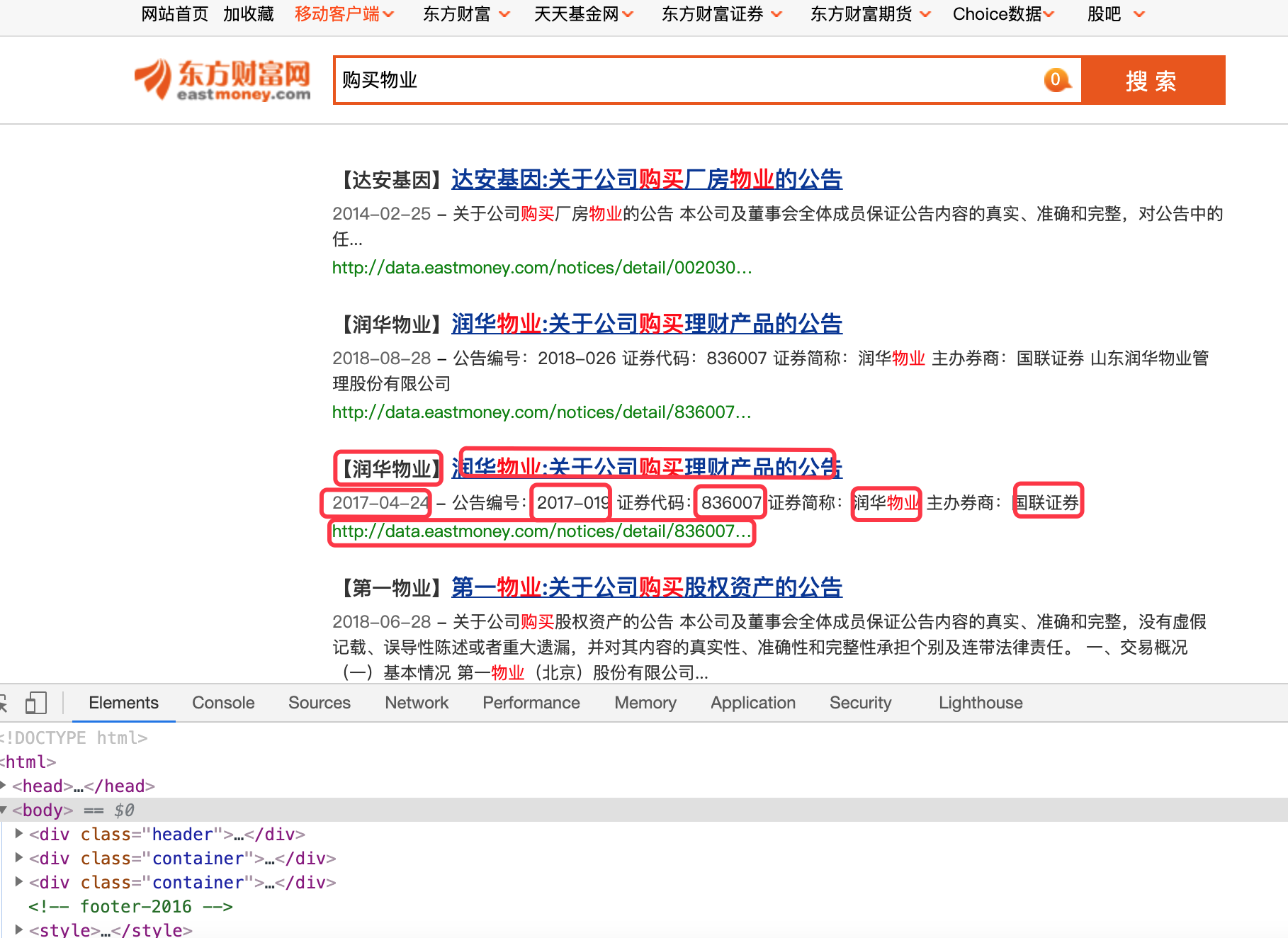
以下是我尝试过的:
url = 'http://so.eastmoney.com/Ann/s?keyword=购买物业&pageindex={}'
for page in range(10):
    r = requests.get(url.format(page))
    soup = BeautifulSoup(r.content, "html.parser")
    print(soup)
每个元素的xpath (对于那些不读中文的元素可能有帮助):
/html/body/div[3]/div/div[2]/div[2]/div[3]/h3/span  --> 【润华物业】
/html/body/div[3]/div/div[2]/div[2]/div[3]/h3/a --> 润华物业:关于公司购买理财产品的公告
/html/body/div[3]/div/div[2]/div[2]/div[3]/p/label --> 2017-04-24
/html/body/div[3]/div/div[2]/div[2]/div[3]/p/span --> 公告编号:2017-019 证券代码:836007 证券简称:润华物业  主办券商:国联证券
/html/body/div[3]/div/div[2]/div[2]/div[3]/a --> http://data.eastmoney.com/notices/detail/836007/AN201704250530124271,JWU2JWI2JWE2JWU1JThkJThlJWU3JTg5JWE5JWU0JWI4JTlh.html
我需要将输出保存到Excel文件中。我怎么能用Python做到这一点呢?非常感谢。
回答 2
Stack Overflow用户
回答已采纳
发布于 2020-12-02 10:56:27
BeautifulSoup不会看到这些东西,因为它是由JS动态呈现的,但是您可以查询一个API端点来获取您想要的内容。
下面是操作步骤:
import requests
import pandas as pd


def clean_up(text: str) -> str:
    return text.replace('</em>', '').replace(':<em>', '').replace('<em>', '')


def get_data(page_number: int) -> dict:
    url = f"http://searchapi.eastmoney.com/business/Web/GetSearchList?type=401&pageindex={page_number}&pagesize=10&keyword=购买物业&name=normal"
    headers = {
        "Referer": f"http://so.eastmoney.com/Ann/s?keyword=%E8%B4%AD%E4%B9%B0%E7%89%A9%E4%B8%9A&pageindex={page_number}",
        "User-Agent": "Mozilla/5.0 (Macintosh; Intel Mac OS X 10.15; rv:83.0) Gecko/20100101 Firefox/83.0",
    }
    return requests.get(url, headers=headers).json()


def parse_response(response: dict) -> list:
    for item in response["Data"]:
        title = clean_up(item['NoticeTitle'])
        date = item['NoticeDate']
        url = item['Url']
        notice_content = clean_up(" ".join(item['NoticeContent'].split()))
        company_name = item['SecurityFullName']
        print(f"{company_name} - {title} - {date}")
        yield [title, url, date, company_name, notice_content]


def save_results(parsed_response: list):
    df = pd.DataFrame(
        parsed_response,
        columns=['title', 'url', 'date', 'company_name', 'content'],
    )
    df.to_excel("test_output.xlsx", index=False)


if __name__ == "__main__":
    output = []
    for page in range(1, 11):
        for parsed_row in parse_response(get_data(page)):
            output.append(parsed_row)

    save_results(output)
这一产出如下:
栖霞物业购买资产的公告 - 2019-09-03 16:00:00 - 871792
索克物业购买资产的公告 - 2020-08-17 00:00:00 - 832816
中都物业购买股权的公告 - 2019-12-09 16:00:00 - 872955
开元物业:开元物业购买银行理财产品的公告 - 2015-05-21 16:00:00 - 831971
开元物业:开元物业购买银行理财产品的公告 - 2015-04-12 16:00:00 - 831971
盛全物业:拟购买房产的公告 - 2017-10-30 16:00:00 - 834070
润华物业购买资产暨关联交易公告 - 2016-08-23 16:00:00 - 836007
润华物业购买资产暨关联交易公告 - 2017-08-14 16:00:00 - 836007
萃华珠宝:关于拟购买物业并签署购买意向协议的公告 - 2017-07-10 16:00:00 - 002731
赛意信息:关于购买办公物业的公告 - 2020-12-02 00:00:00 - 300687并将其保存到一个.csv文件中,该文件可由excel轻松处理。

PS。我不懂中文。因此,您必须查看响应内容,并从中挑选更多的内容。
Stack Overflow用户
发布于 2020-12-02 15:14:29
更新的答案基于@baduker的解决方案,但不适用于循环页。
import requests
import pandas as pd

for page in range(10):
    url = "http://searchapi.eastmoney.com/business/Web/GetSearchList?type=401&pageindex={}&pagesize=10&keyword=购买物业&name=normal"
    headers = {
        "Referer": "http://so.eastmoney.com/Ann/s?keyword=%E8%B4%AD%E4%B9%B0%E7%89%A9%E4%B8%9A&pageindex={}",
        "User-Agent": "Mozilla/5.0 (Macintosh; Intel Mac OS X 10.15; rv:83.0) Gecko/20100101 Firefox/83.0",
    }

    response = requests.get(url, headers=headers).json()

    output_data = []
    for item in response["Data"]:
        # print(item)
        # print('*' * 40)
        title = item['NoticeTitle'].replace('</em>', '').replace(':<em>', '').replace('<em>', '')
        url = item['Url']
        date = item['NoticeDate'].split(' ')[0]
        company_name = item['SecurityFullName']
        content = item['NoticeContent'].replace('</em>', '').replace(':<em>', '').replace('<em>', '')
        # url_code = item['Url'].split('/')[5]
        output_data.append([title, url, date, company_name, content])

names = ['title', 'url', 'date', 'company_name', 'content']
df = pd.DataFrame(output_data, columns = names)
df.to_excel('test.xlsx', index = False)页面原文内容由Stack Overflow提供。腾讯云小微IT领域专用引擎提供翻译支持
原文链接:
https://stackoverflow.com/questions/65106061
复制相关文章
相似问题
腾讯云开发者

Copyright © 2013 - 2026 Tencent Cloud. All Rights Reserved. 腾讯云 版权所有
深圳市腾讯计算机系统有限公司 ICP备案/许可证号:粤B2-20090059  粤公网安备44030502008569号
腾讯云计算(北京)有限责任公司 京ICP证150476号 | 京ICP备11018762号