
带有React自定义钩子的API调用不接受更新的参数
带有React自定义钩子的API调用不接受更新的参数
提问于 2020-12-03 16:34:15
我使用一个自定义钩子来调用OpenRouteService API,并检索从A点到B点的最安全的路由。我现在尝试在车辆之间切换(这应该会给出不同的路径),但是车辆在API调用中没有更新,即使参数已经更新了,如果我记录了它。请参阅下面的代码和附加的屏幕。
为什么我的API调用不接受更新的参数?
Routehook.js
import { useState, useEffect } from 'react';
import Directions from '../apis/openRouteService';
import _ from 'lodash'

const useRoute = (initialCoordinates, avoidPolygons, vehicle) => {
    const [route, setRoute] = useState({route: {}})
    const [coordinates, setCoordinates] = useState(initialCoordinates);
    const [routeLoading, setRouteLoading] = useState(true);
    const [routeError, setRouteError] = useState(false);

    useEffect(() => {
        const fetchRoute = async () => {
            setRouteError(false);
            setRouteLoading(true);

            try {
                // Swap coordinates for openrouteservice
                const copy = _.cloneDeep(coordinates)
                let startLocation = copy[0];
                let endLocation = copy[1];

                console.log(vehicle);
                // Logs 'cycling-regular' or 'driving-car'
                // depending on the parameter when I call the hook

                // Call openrouteservice api
                const result = await Directions.calculate({
                    coordinates: [
                        [startLocation.latLng.lng, startLocation.latLng.lat],
                        [endLocation.latLng.lng, endLocation.latLng.lat],
                    ],
                    profile: vehicle,
                    format: 'geojson',
                    avoid_polygons: avoidPolygons
                })

                console.log(result)
                // When I check the result the query profile does not contain
                // the updated parameter (see screencaps below).

                setRoute(result);
            } catch (error) {
                setRouteError(true);
            }

            setRouteLoading(false);
        }

        fetchRoute();
    }, [coordinates, avoidPolygons, vehicle]);

    return [{ route, routeLoading, routeError }, setCoordinates];
}

export default useRoute;
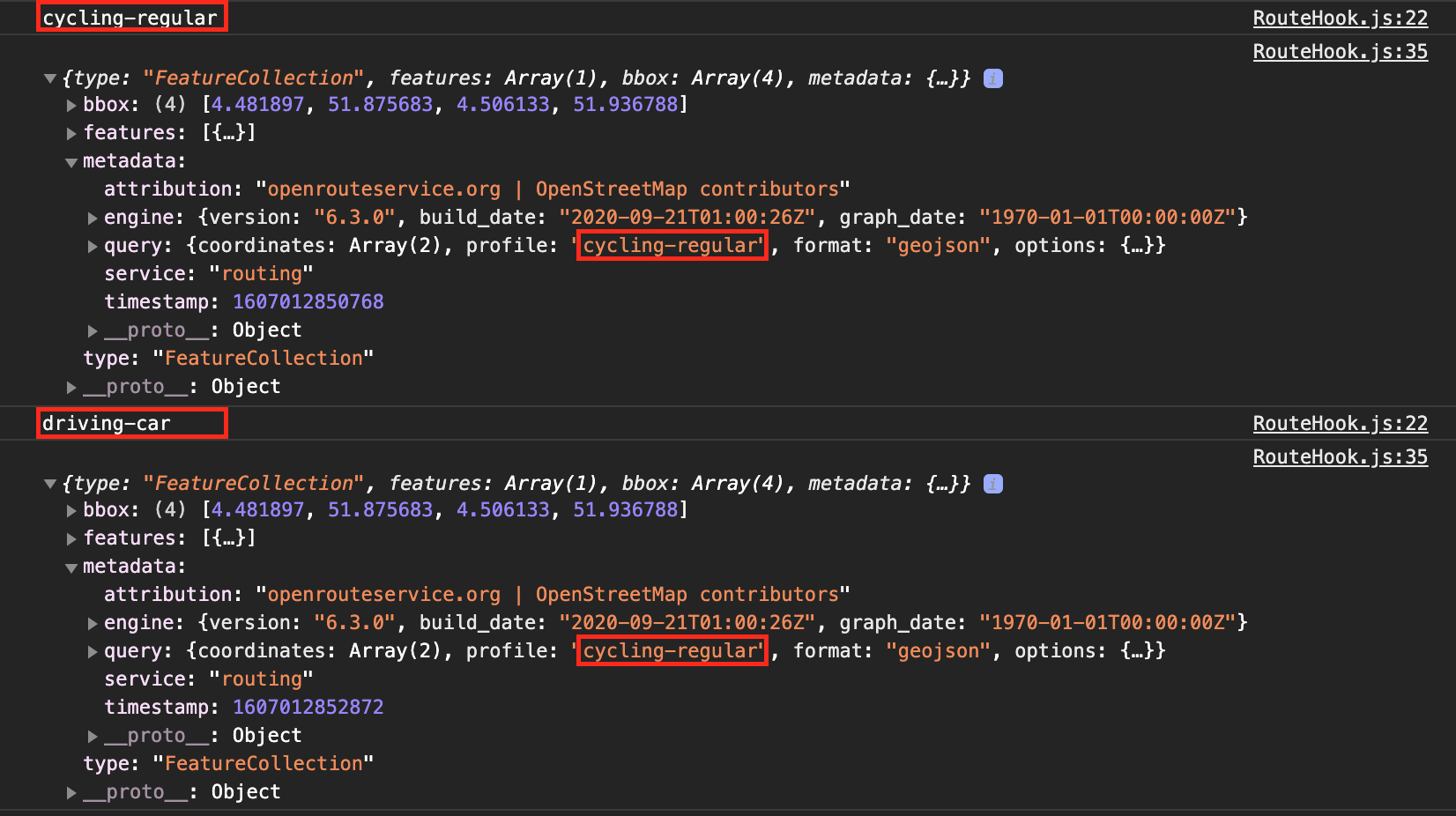
给出一个完整的概述。在主组件(VanillaMap.js)中,我有以下相关的片段:
const [vehicle, setVehicle] = useState('cycling-regular')
const [{ route, routeLoading, routeError }, setCoordinates] = useRoute([startLocation, endLocation], avoidPolygons, vehicle);

const updateVehicle = (state) => {
    setVehicle(state);
}

<RouteInfo
    route={route}
    routeLoading={routeLoading}
    routeError={routeError}
    vehicle={vehicle}
    updateVehicle={updateVehicle}
 />
然后,通过updateVehicle组件中的RouteInfo.js函数更新车辆。
回答 1
Stack Overflow用户
回答已采纳
发布于 2020-12-07 15:49:34
通过创建Directions对象的新实例来解决此问题,每个调用:
const Directions = new openrouteservice.Directions({
    api_key: "XXXXX"
});页面原文内容由Stack Overflow提供。腾讯云小微IT领域专用引擎提供翻译支持
原文链接:
https://stackoverflow.com/questions/65130114
复制相关文章
相似问题
腾讯云开发者

Copyright © 2013 - 2026 Tencent Cloud. All Rights Reserved. 腾讯云 版权所有
深圳市腾讯计算机系统有限公司 ICP备案/许可证号:粤B2-20090059  粤公网安备44030502008569号
腾讯云计算(北京)有限责任公司 京ICP证150476号 | 京ICP备11018762号