
为什么在此之后,我关闭了一个定义为子组件的PrimeNG模型,我不能再次打开它?
我正在使用PrimeNG开发一个角度应用程序,我有以下问题。
我有一个包含在内部定义的PrimeNG对话框的组件(这个是:https://www.primefaces.org/primeng/showcase/#/dialog ),它工作得很好。
为了保持代码整洁,我决定重构它,并创建了一个只包含PrimeNG对话框的子组件。所以基本上现在我有这样的东西:
父组件
<app-employee-add-form [displayNewEmployeeDialog]="displayNewEmployeeDialog"></app-employee-add-form>

<div class="container">


    <!-- TOOLBAR -->
    <div class="card" id="toolbar-card">
        <div class="toolbar-container">
        <div class="row">
            <div id="toolbar-left" class="col-6 d-flex justify-content-start">
            <button pButton pRipple label="New" icon="pi pi-plus"
                    class="p-button-success p-mr-2"
                    (click)="showNewEmployeeDialog()">
            </button>

            <button pButton pRipple icon="pi pi-trash" class="p-button-danger"></button>
            </div>
            <div id="toolbar-right" class="col-6 d-flex justify-content-end">
            <!--<p-fileUpload mode="basic" accept="image/*" [maxFileSize]="1000000" label="Import" chooseLabel="Import" class="p-mr-2 p-d-inline-block"></p-fileUpload>-->
            <button type="button" pButton pRipple label="Export" icon="pi pi-file-excel"
                    class="p-button-success p-mr-2"
                    pTooltip="XLS" tooltipPosition="bottom"></button>
            </div>
        </div>
        </div>
    </div>
所以基本上第一行:
<app-employee-add-form [displayNewEmployeeDialog]="displayNewEmployeeDialog"></app-employee-add-form>然后,我定义了一个New按钮,它将调用一个方法,以便将定义为子组件的对话框显示出来。
定义将显示将displayNewEmployeeDialog父组件绑定到子模态组件的displayNewEmployeeDialog的模式的子组件,以便在父组件页面中显示或不显示该模式。
这是我的父组件的相关TypeScript代码:
@Component({
  selector: 'app-employee-list',
  templateUrl: './employee-list.component.html',
  styleUrls: ['./employee-list.component.scss']
})
export class EmployeeListComponent implements OnInit {

    displayNewEmployeeDialog = false;
    customers: Customer[];

    selectedCustomers: Customer[];

    representatives: Representative[];

    statuses: any[];

    loading: boolean = true;

    @ViewChild('dt') table: Table;

    constructor(private customerService: CustomerService, private primengConfig: PrimeNGConfig) { }

    ngOnInit() {
        this.customerService.getCustomersLarge().then(customers => {
            this.customers = customers;
            this.loading = false;
        });

        this.representatives = [
            {name: "Amy Elsner", image: 'amyelsner.png'},
            {name: "Anna Fali", image: 'annafali.png'},
            {name: "Asiya Javayant", image: 'asiyajavayant.png'},
            {name: "Bernardo Dominic", image: 'bernardodominic.png'},
            {name: "Elwin Sharvill", image: 'elwinsharvill.png'},
            {name: "Ioni Bowcher", image: 'ionibowcher.png'},
            {name: "Ivan Magalhaes",image: 'ivanmagalhaes.png'},
            {name: "Onyama Limba", image: 'onyamalimba.png'},
            {name: "Stephen Shaw", image: 'stephenshaw.png'},
            {name: "XuXue Feng", image: 'xuxuefeng.png'}
        ];

        this.statuses = [
            {label: 'Unqualified', value: 'unqualified'},
            {label: 'Qualified', value: 'qualified'},
            {label: 'New', value: 'new'},
            {label: 'Negotiation', value: 'negotiation'},
            {label: 'Renewal', value: 'renewal'},
            {label: 'Proposal', value: 'proposal'}
        ]
        this.primengConfig.ripple = true;
    }

    onActivityChange(event) {
        const value = event.target.value;
        if (value && value.trim().length) {
            const activity = parseInt(value);

            if (!isNaN(activity)) {
                this.table.filter(activity, 'activity', 'gte');
            }
        }
    }

    onDateSelect(value) {
        this.table.filter(this.formatDate(value), 'date', 'equals')
    }

    formatDate(date) {
        let month = date.getMonth() + 1;
        let day = date.getDate();

        if (month < 10) {
            month = '0' + month;
        }

        if (day < 10) {
            day = '0' + day;
        }

        return date.getFullYear() + '-' + month + '-' + day;
    }

    onRepresentativeChange(event) {
        this.table.filter(event.value, 'representative', 'in')
    }

    showNewEmployeeDialog() {
        console.log("showNewEmployeeDialog() START !!!");
        this.displayNewEmployeeDialog = true;
    }
}基本上,与我的问题相关的是这一行,它将displayNewEmployeeDialog定义为false,以避免在加载此父组件的页面时显示对话框子组件:
displayNewEmployeeDialog = false;该方法更改此变量的值,以便在用户单击新建按钮时打开我的对话框:
showNewEmployeeDialog() {
    console.log("showNewEmployeeDialog() START !!!");
    this.displayNewEmployeeDialog = true;
}
然后,这是我的子组件的视图代码:
<p-dialog header="Inserire un nuovo impiegato"
          maximizable="true"
          [(visible)]="displayNewEmployeeDialog"
          position="top"
          [style]="{width: '50vw'}">

          <form [formGroup]="newEmployeeForm" id="addEmployeeForm">

                <div class="row">
                    <div class="col-2">
                      <p>Nome</p>
                    </div>
                    <div class="col-10">
                        <input id="name" formControlName="name" type="text" pInputText />
                    </div>
                </div>

          </form>

          <p-footer>
            <span class="p-buttonset">
              <button pButton type="button" label="Save" icon="pi pi-check"></button>
              <button pButton type="button" label="Cancel" icon="pi pi-times" (click)="closeDialog()"></button>
          </span>
          </p-footer>
</p-dialog>目前它包含一种极简的形式。当displayNewEmployeeDialog值设置为true时,它被设置为可见,否则它将不可见。
这是这个子组件的TypeScript代码:
@Component({
  selector: 'app-employee-add-form',
  templateUrl: './employee-add-form.component.html',
  styleUrls: ['./employee-add-form.component.scss']
})
export class EmployeeAddFormComponent implements OnInit {

  @Input()
  displayNewEmployeeDialog: boolean;

  newEmployeeForm: FormGroup;

  constructor() { }

  ngOnInit(): void {
    console.log("bla");
  }

  closeDialog() {
    this.displayNewEmployeeDialog = false;
    this.ngOnInit();
  }

}如您所见,我只是使用@Input() decoreator从父服务器导入值,以便分离更改并打开和关闭我的模式。
问题是,当我第一次单击父组件中的"Add“按钮时,我的模式将被正确打开,如下所示:
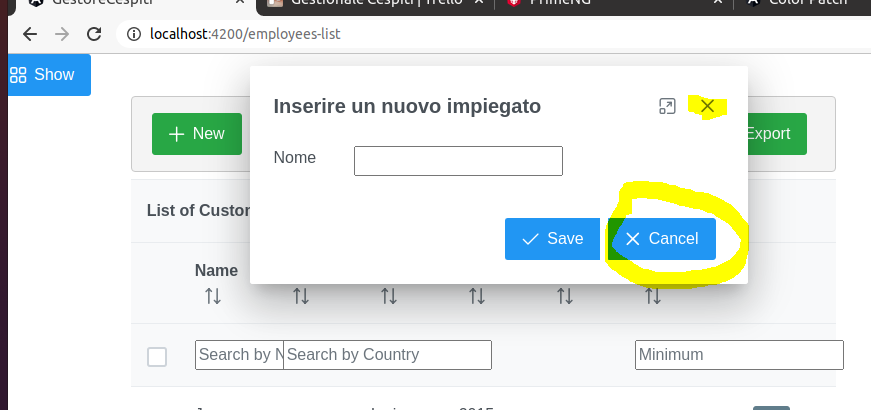
问题是,如果我试图打开一个新的模式(再次单击父组件的“添加”按钮),则关闭此模式单击右上角X图标或“取消”按钮时,模式将不会出现。控制台中没有错误。
为什么会有这种行为?单击父组件的"Add“按钮,子组件应该将值接收为"true”,因此模式应该再次显示,但不会发生吗?我遗漏了什么?我怎样才能解决这个问题?
回答 1
Stack Overflow用户
发布于 2020-12-05 14:40:51
您需要定义两个属性,一个输入属性和一个输出属性来发出on关闭事件。displayNewEmployeeDialog属性应仅由父组件控制:
child.component.ts
export class EmployeeAddFormComponent implements OnInit {

  @Input()
  displayNewEmployeeDialog: boolean;
  @Output
  onDialogClose: EventEmitter<any> = new EventEmitter();

  //..

  closeDialog() {
    this.onDialogClose.emit();
  }

}
parent.component.html
<app-employee-add-form [displayNewEmployeeDialog]="displayNewEmployeeDialog" (onDialogClose)="closeDialog()"></app-employee-add-form>parent.component.ts
closeDialog(): void {
  this.displayNewEmployeeDialog=false;
}https://stackoverflow.com/questions/65157140
复制相似问题
腾讯云开发者

Copyright © 2013 - 2026 Tencent Cloud. All Rights Reserved. 腾讯云 版权所有
深圳市腾讯计算机系统有限公司 ICP备案/许可证号:粤B2-20090059  粤公网安备44030502008569号
腾讯云计算(北京)有限责任公司 京ICP证150476号 | 京ICP备11018762号