
Google @将云编写器连接到Cloud
非常感谢谷歌团队推出了一些优秀的云产品。希望有人能指出我在下面的实现中遗漏了什么。
我目前正在通过气流组织TFX管道,并扩展- Composer。您可以查看下面代码的精简版本:
# other code setting up unrelated variables above ...
metadata_config = metadata.mysql_metadata_connection_config(host=DATABASE_IP, port=3306,
                                                            database=DATABASE_NAME, username=USERNAME,
                                                            password=PASSWORD)

def create_pipeline(pipeline_name, pipeline_root, data_root, transform_module, train_module, serving_root,
                    beam_pipeline_args, metadata_config=None):
    """create beam pipeline"""
    example_gen = CsvExampleGen(input_base=data_root)

    # unrelated tfx code ....

    return pipeline.Pipeline(
        pipeline_name=pipeline_name,
        pipeline_root=pipeline_root,
        components=[
            example_gen,
            # ...other components ...
        ],
        enable_cache=True,
        beam_pipeline_args=beam_pipeline_args,
        metadata_connection_config=metadata_config
    )

# var for airflow to detect DAG
DAG = AirflowDagRunner(AirflowPipelineConfig(airflow_config)).run(
    create_pipeline(pipeline_name=beam_pipeline_name, pipeline_root=beam_pipeline_root, data_root=data_root,
                    transform_module=transform_module, train_module=train_module, serving_root=serving_root,
                    metadata_config=metadata_config,
                    beam_pipeline_args=local_pipeline_args)
)管道在本地机器上运行良好,但在尝试访问Cloud中的元数据存储时失败。关键是在尝试通过CsvExampleGenComponent读取/写入元数据时执行metadata_config失败。
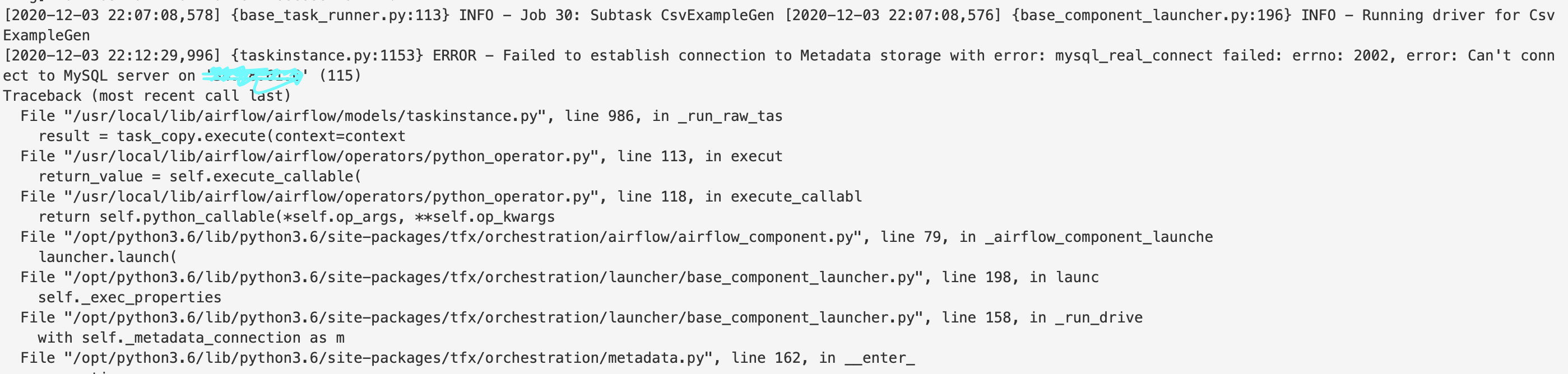
因此,我继续阅读了Google提供的关于如何在Composer & Cloud之间配置连接的文档:
从Google https://cloud.google.com/sql/docs/mysql/connect-kubernetes-engine连接
在云编写器 https://cloud.google.com/composer/docs/how-to/managing/connections中管理气流连接
按照第一个指南的指导,我为Cloud代理创建了一个yaml文件:
apiVersion: apps/v1
kind: Deployment
metadata:
  name: cloudsql-proxy
spec:
  selector:
    matchLabels:
      app: cloudsql-proxy
  template:
    metadata:
      labels:
        app: cloudsql-proxy
    spec:
      containers:
      - name: cloudsql-proxy
        #image: gcr.io/cloudsql-docker/gce-proxy:1.17
        # ... other container configuration
        env:
        - name: DB_USER
          valueFrom:
            secretKeyRef:
              name: cloudsql-token
              key: username
        - name: DB_PASS
          valueFrom:
            secretKeyRef:
              name: cloudsql-token
              key: password
        - name: DB_NAME
          valueFrom:
            secretKeyRef:
              name: cloudsql-token
              key: database
        - name: "PORT"
          value: "50001"
      #- name: cloud-sql-proxy
        # It is recommended to use the latest version of the Cloud SQL proxy
        # Make sure to update on a regular schedule!
        image: gcr.io/cloudsql-docker/gce-proxy:1.17
        command:
          - "/cloud_sql_proxy"

          # If connecting from a VPC-native GKE cluster, you can use the
          # following flag to have the proxy connect over private IP
          # - "-ip_address_types=PRIVATE"

          # Replace DB_PORT with the port the proxy should listen on
          # Defaults: MySQL: 3306, Postgres: 5432, SQLServer: 1433
          - "-instances=vm-intro-285512:us-central1:recommender-metadata=tcp:3306"

        # [START cloud_sql_proxy_k8s_volume_mount]
          # This flag specifies where the service account key can be found
          - "-credential_file=/Users/michaelma/.gcp/credentials/credentials.json"
        securityContext:
          # The default Cloud SQL proxy image runs as the
          # "nonroot" user and group (uid: 65532) by default.
          runAsNonRoot: true
        volumeMounts:
        - name: service-account-token
          mountPath: /Users/michaelma/.gcp/credentials
          readOnly: true
          # [END cloud_sql_proxy_k8s_volume_mount]
      # [START cloud_sql_proxy_k8s_volume_secret]
      volumes:
      - name: service-account-token
        secret:
          secretName: service-account-token
# [START cloud_sql_proxy_k8s_volume_secret]这里要注意的是,我对Google提供的这里模板做了一些修改,因为该版本包含两个容器:一个用于用户应用程序,另一个用于代理。由于Composer正在通过气流管理我的应用程序,所以我删除了第一个容器,并纯粹启动代理容器。,这会是问题吗?
按照第二个指南的指示,我还为服务创建了一个yaml文件,用于公开上述代理:
apiVersion: v1
kind: Service
metadata:
  name: cloudsql-proxy-service
spec:
  type: LoadBalancer
  selector:
    app: cloudsql-proxy
  ports:
  - protocol: TCP
    port: 60000
    targetPort: 50001
然后,我使用默认设置创建了Composer环境,并通过云控制台添加了以下PyPi包:
numpy==1.16.0
tfx==0.25.0
tensorflow-model-analysis==0.25.0然后,我将DAG和数据文件移动到composer环境的指定桶中的适当文件夹中,启动了CloudSQL代理和通过kubectl公开它的服务(上面的指南指定了所有其他配置指令),并通过气流UI触发了DAG。
我也受到同样令人愉快的错误的欢迎。
尽管有CloudSQL代理pod和服务,但是DAG仍然无法访问CloudSQL实例。
我尝试过的另一件事是将代理的外部IP添加到CloudSQL实例可以连接到->的IP列表中,这不会产生任何变化。还值得注意的是,与项目关联的服务帐户具有Editor权限。
这里有线索吗?我怀疑这可能只是我的YAML文件或CloudSQL配置中的一些东西.
回答 1
Stack Overflow用户
发布于 2021-01-11 16:18:11
1.您必须确保cloudsql代理部署和服务部署在与气流工作者(即由google composer创建的名称空间)相同的名称空间中。使用以下命令获取命名空间(确保已连接到google的kubernetes集群):
kubectl get namespaces | grep composer | cut -d ' ' -f1
// e.g. composer-1-12-4-airflow-1-10-10-xxxxxxx您可以将namespace添加到yaml文件中,用于metadata下的部署和服务。
...
kind: Deployment
metadata:
  name: cloudsql-proxy
  namespace: composer-1-12-4-airflow-1-10-10-xxxxxxx
...-
...
kind: Service
metadata:
  name: cloudsql-proxy-service
  namespace: composer-1-12-4-airflow-1-10-10-xxxxxxx
...
2.在创建连接时,请使用服务名称作为主机:
metadata_config = metadata.mysql_metadata_connection_config(host="cloudsql-proxy-service", ...)https://stackoverflow.com/questions/65164274
复制相似问题
腾讯云开发者

Copyright © 2013 - 2026 Tencent Cloud. All Rights Reserved. 腾讯云 版权所有
深圳市腾讯计算机系统有限公司 ICP备案/许可证号:粤B2-20090059  粤公网安备44030502008569号
腾讯云计算(北京)有限责任公司 京ICP证150476号 | 京ICP备11018762号