
在节点高寒环境中,使用LibreOffice执行pdf转换除特殊字符和数字外,其他所有字符都会中断。
在节点高寒环境中,使用LibreOffice执行pdf转换除特殊字符和数字外,其他所有字符都会中断。
提问于 2020-12-08 06:28:39
我在码头上安装了一个节点服务器,并且正在使用Libre。它在Windows环境下正常工作,但在Docker环境中,字符被破坏,原因不明。下面是码头文件和破损字母的图片。
FROM node:12-alpine

WORKDIR "/app"

COPY package*.json ./

RUN apk update && apk add libreoffice

# RUN npm install
RUN npm ci --only=production

COPY . .

CMD ["npm", "start"]
皈依,
const libre = require(`libreoffice-convert`)

// Read file
        const file = fs.readFileSync(enterPath);
        // Convert it to pdf format with undefined filter (see Libreoffice doc about filter)
        const status = await new Promise((resolve, reject) => {
            libre.convert(file, pdfExtend, undefined, (err, done) => {
                if (err) {
                    console.log(err)
                    reject(err)
                }
                // Here in done you have pdf file which you can save or transfer in another stream
                fs.writeFileSync(outputPath, done);
                resolve(200)
            });
        })
结果,
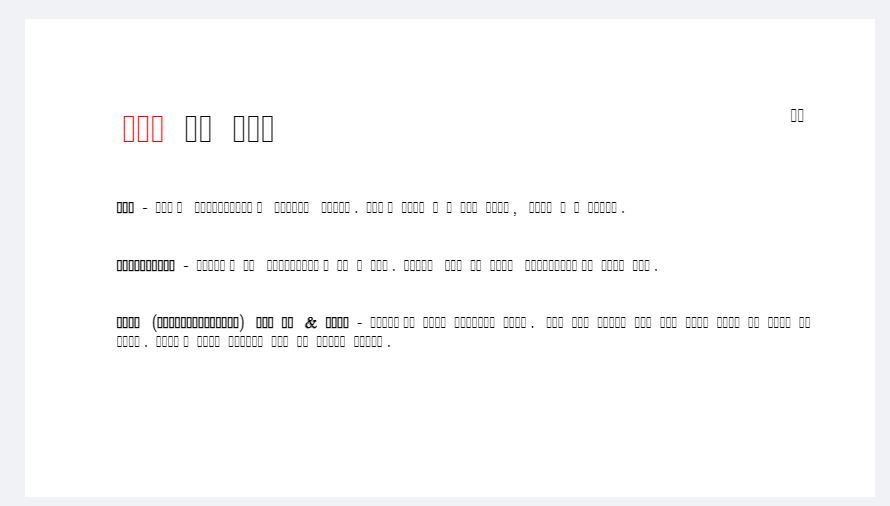
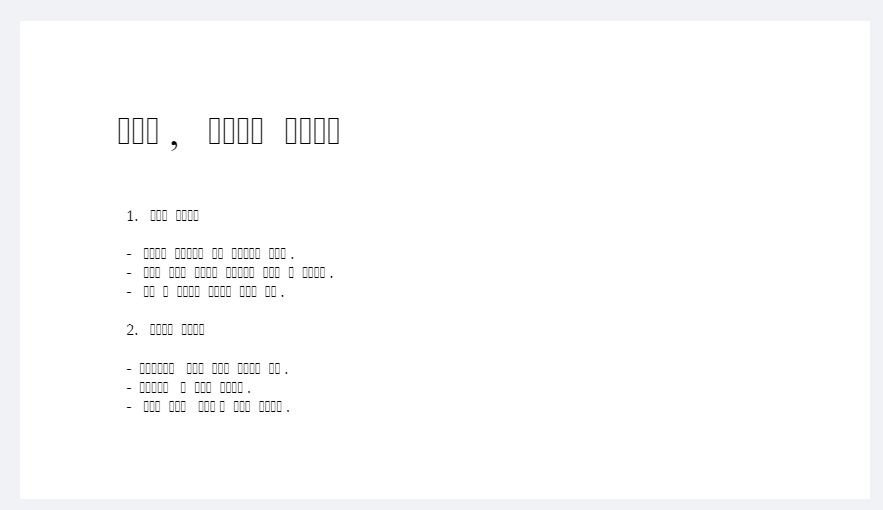
帮帮我
回答 1
Stack Overflow用户
回答已采纳
发布于 2020-12-08 06:40:30
我认为阿尔卑斯Linux中缺少字体,现在出现了两个解决方案。(码头图片:节点:12-高山)
image
- There
- change并不能保证它能运行
。
FROM node:12-slimfonts
- I推荐solution
- image的大小可以达到1GB。
- ref:stackoverflow/alpine-linux-fonts
FROM node:12-alpine

WORKDIR "/app"

COPY package*.json ./

RUN apk update && apk add libreoffice
RUN apk add --no-cache msttcorefonts-installer fontconfig
RUN update-ms-fonts

# Google fonts
RUN wget https://github.com/google/fonts/archive/main.tar.gz -O gf.tar.gz --no-check-certificate
RUN tar -xf gf.tar.gz
RUN mkdir -p /usr/share/fonts/truetype/google-fonts
RUN find $PWD/fonts-main/ -name "*.ttf" -exec install -m644 {} /usr/share/fonts/truetype/google-fonts/ \; || return 1
RUN rm -f gf.tar.gz
RUN fc-cache -f && rm -rf /var/cache/*

# RUN npm install
RUN npm ci --only=production

COPY . .

CMD ["npm", "start"]页面原文内容由Stack Overflow提供。腾讯云小微IT领域专用引擎提供翻译支持
原文链接:
https://stackoverflow.com/questions/65194122
复制相关文章
相似问题
腾讯云开发者

Copyright © 2013 - 2026 Tencent Cloud. All Rights Reserved. 腾讯云 版权所有
深圳市腾讯计算机系统有限公司 ICP备案/许可证号:粤B2-20090059  粤公网安备44030502008569号
腾讯云计算(北京)有限责任公司 京ICP证150476号 | 京ICP备11018762号