
远程控制/检查现有的GTK应用程序
远程控制/检查现有的GTK应用程序
提问于 2020-12-07 22:44:57
如何访问现有non-interactively应用程序的小部件树?我想查询一个小部件的坐标,如果可能的话,发送事件(悬停,点击,按下键,…)。
使用GTKInspector,我可以交互地浏览小部件树,并查看小部件的大小和坐标。我想使用命令行工具来访问这些信息,或者在任何语言中使用一些GTK。
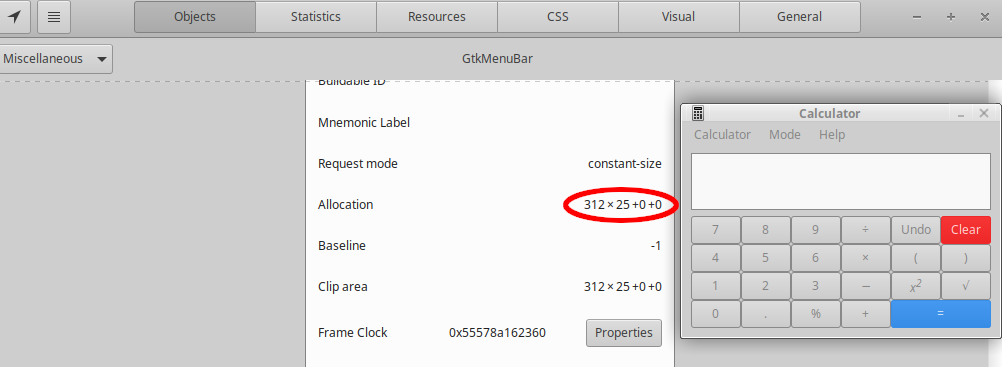
# Steps to do this interactively, I'd like a non-interactive version.
sudo apt install libgtk-3-dev
gsettings set org.gtk.Settings.Debug enable-inspector-keybinding true
GTK_DEBUG=interactive mate-calc

# Then go to `MathWindow → GtkBox → GtkMenuBar`
# click on the (i) icon to show the details view
# `allocation` indicates the `width×height+x+y`, here it's `312×25+0+0`
我考虑过的解决方案:
- 使用xdotool自动控制GTKInspector (预期性能不佳+需要在QT应用程序上增加一个GTKInspector窗口)。
- 使用dbus,但是
d-feet没有显示小部件树,我怀疑它显示的关于interface的内容是关于OOP或d-bus接口的,而不是以前的一些用户 - ,我们可以在QT应用程序中使用
dcop做类似的事情,但是当然,对于GTK.
是行不通的。
回答 1
Stack Overflow用户
发布于 2020-12-07 23:50:54
dogtail使用辅助技术访问应用程序的小部件树。在Xubuntu 20.04上测试。
$ sudo apt install python3-dogtail
$ sniff # explore using a GUI, it will enable assistive technologies for you.
dogtail-example.py
#!/usr/bin/env python3
from dogtail.tree import *
app = root.application('mate-calc')
menuBar = app.findChildren(predicate.GenericPredicate(roleName="menu bar"))[0]
print('On-screen coordinates: ', menuBar.position)
print('Size:                  ', menuBar.size)
# to preview the nodes available in the menu bar, use menuBar.dump()
输出:
$ python3 dogtail-example.py
On-screen coordinates: (529, 431)
Size: (312, 25)/usr/share/doc/python3-dogtail/examples/中有一些示例,但实际的"doc“位于该目录中的/usr/lib/python3/dist-packages/dogtail/tree.py和其他文件的文档字符串中。
页面原文内容由Stack Overflow提供。腾讯云小微IT领域专用引擎提供翻译支持
原文链接:
https://stackoverflow.com/questions/65190543
复制相关文章
相似问题
腾讯云开发者

Copyright © 2013 - 2026 Tencent Cloud. All Rights Reserved. 腾讯云 版权所有
深圳市腾讯计算机系统有限公司 ICP备案/许可证号:粤B2-20090059  粤公网安备44030502008569号
腾讯云计算(北京)有限责任公司 京ICP证150476号 | 京ICP备11018762号