
有人知道为什么我的滑块在头上而不是在身体上吗?
有人知道为什么我的滑块在头上而不是在身体上吗?
提问于 2020-12-13 17:58:24
我不知道为什么我的滑块在顶部而不是底部。我尝试过更改标题的宽度和高度,但这似乎并没有改变错误。见图:
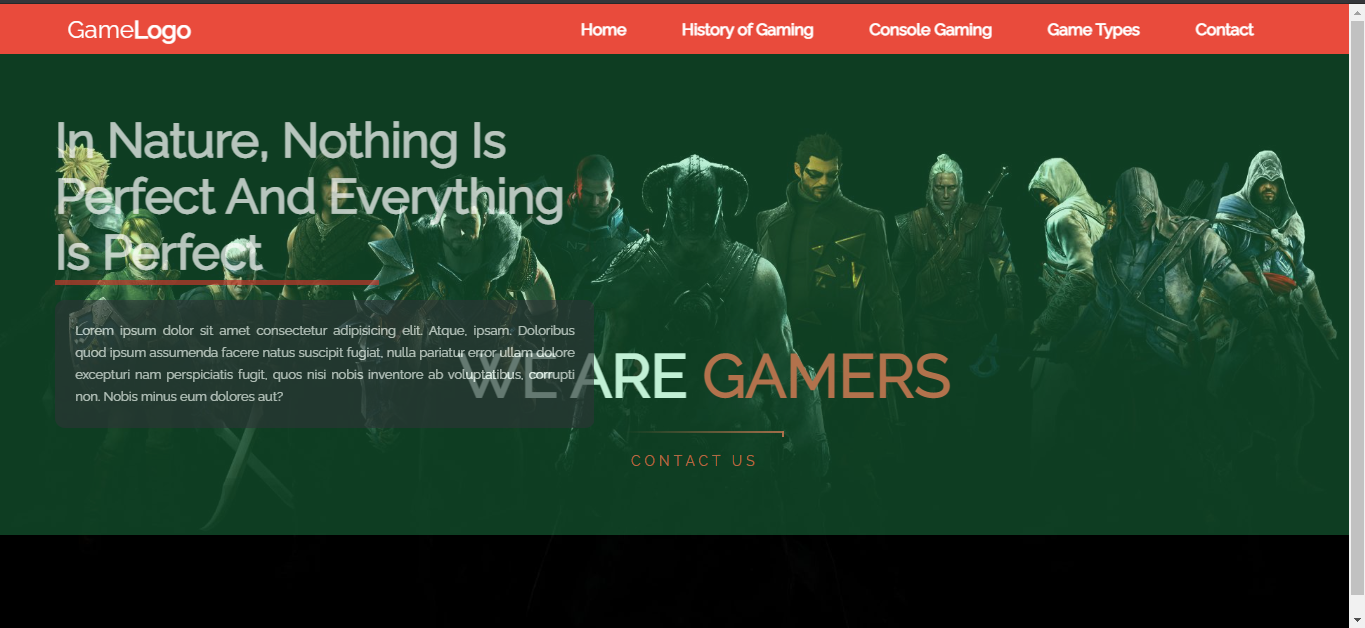
这是我的CSS代码:
html {
    scroll-behavior: smooth;
}
* {
    margin: 0;
    padding: 0;
}

body {
    font-family: 'Raleway', sans-serif;
    justify-content: center;
    align-items: center;
    background-color: black;
    /* background colours for sections */
}
.wrapper {
    width: 1170px;
    margin: auto;
}

header {
    background-image: url(../images/Game.jpg);
    height: 100vh;
    -webkit-background-size: cover;
    background-size: cover;
    background-position: center center;
    position: relative;
}
nav {
    position: fixed;
    z-index: 10;
    left: 0;
    right: 0;
    top: 0;
    padding: 0 5%;
    height: 50px;
    background-color: #E94B3CFF;
}
nav .logo {
    float: left;
    width: 40%;
    height: 100%;
    display: flex;
    align-items: center;
    font-size: 24px;
    color: #fff;
}
nav a:hover {
  border-top: 2px red;
  border-bottom: 4px solid white;
  padding: 6px 0;
}

nav .nav-bar {
    float: right;
    padding: 0;
    margin: 0;
    width: 60%;
    height: 100%;
    display: flex;
    justify-content: space-around;
    align-items: center;
}
nav .nav-bar li {
    list-style: none;
}
nav .nav-bar a {
    display: block;
    padding: 1em;
    font-size: 16px;
    font-weight: bold;
    color: #fff;
    text-decoration: none;
}
#nav-toggle {
    position: absolute;
    top: -100px;
}
nav .icon-burger {
    display: none;
    position: absolute;
    right: 5%;
    top: 50%;
    transform: translateY(-50%);
}
nav .icon-burger .line {
    width: 30px;
    height: 5px;
    background-color: #fff;
    margin: 5px;
    border-radius: 3px;
    transition: all .3s ease-in-out;
}
@media screen and (max-width: 768px) {
    nav .logo {
        float: none;
        width: auto;
        justify-content: center;
    }
    nav .nav-bar {
        float: none;
        position: fixed;
        z-index: 9;
        left: 0;
        right: 0;
        top: 100px;
        bottom: 100%;
        width: auto;
        height: auto;
        flex-direction: column;
        justify-content: space-evenly;
        background-color: rgba(0,0,0,.8);
        overflow: hidden;
        box-sizing: border-box;
        transition: all .5s ease-in-out;
    }
    nav .nav-bar a {
        font-size: 20px;
    }
    nav :checked ~ .nav-bar {
        bottom: 0;
    }
    nav .icon-burger {
        display: block;
    }
    nav :checked ~ .icon-burger .line:nth-child(1) {
        transform: translateY(10px) rotate(225deg);
    }
    nav :checked ~ .icon-burger .line:nth-child(3) {
        transform: translateY(-10px) rotate(-225deg);
    }
    nav :checked ~ .icon-burger .line:nth-child(2) {
        opacity: 0;
    }
}

.welcome-text {
    position: absolute;
    width: 600px;
    height: 300px;
    margin: 25% 30%;
    text-align: center;
}
.welcome-text h1 {
    text-align: center;
    color: #fff;
    text-transform: uppercase;
    font-size: 60px;
}
.welcome-text h1 span {
    color: #E94B3CFF;
}
.welcome-text a {
    padding: 22px 25px;
    text-decoration: none;
    text-transform: uppercase;
    font-size: 14px;
    margin-top: 20px;
    display: inline-block;
}

.glow{
    position: relative;
    display: inline-block;
    padding: 20px 15px;
    margin: 10px 1;
    color: #E94B3CFF;
    text-decoration: none;
    text-transform: uppercase;
    transition: 0.5s;
    letter-spacing: 4px;
    overflow: hidden;
    margin-right: 20px;

}
.glow:hover{
    background: #E94B3CFF;
    color: #050801;
    box-shadow: 0 0 5px #E94B3CFF,
                0 0 25px #E94B3CFF,
                0 0 50px #E94B3CFF,
                0 0 200px #E94B3CFF;
     -webkit-box-reflect:below 1px linear-gradient(transparent, #0005);
}

.glow span{
    position: absolute;
    display: block;
}
.glow span:nth-child(1){
    top: 0;
    left: 0;
    width: 100%;
    height: 2px;
    background: linear-gradient(90deg,transparent,#E94B3CFF);
    animation: animate1 1s linear infinite;
}
@keyframes animate1{
    0%{
        left: -100%;
    }
    50%,100%{
        left: 100%;
    }
}
.glow span:nth-child(2){
    top: -100%;
    right: 0;
    width: 2px;
    height: 100%;
    background: linear-gradient(180deg,transparent,#E94B3CFF);
    animation: animate2 1s linear infinite;
    animation-delay: 0.25s;
}
@keyframes animate2{
    0%{
        top: -100%;
    }
    50%,100%{
        top: 100%;
    }
}
.glow span:nth-child(3){
    bottom: 0;
    right: 0;
    width: 100%;
    height: 2px;
    background: linear-gradient(270deg,transparent,#E94B3CFF);
    animation: animate3 1s linear infinite;
    animation-delay: 0.50s;
}
@keyframes animate3{
    0%{
        right: -100%;
    }
    50%,100%{
        right: 100%;
    }
}


.glow span:nth-child(4){
    bottom: -100%;
    left: 0;
    width: 2px;
    height: 100%;
    background: linear-gradient(360deg,transparent,#E94B3CFF);
    animation: animate4 1s linear infinite;
    animation-delay: 0.75s;
}
@keyframes animate4{
0%{
        bottom: -100%;
    }
50%,100%{
        bottom: 100%;
    }
}/*resposive for mobile and tablets*/
@media (max-width:600px) {
.wrapper {
        width: 100%;
    }
.logo {
        float: none;
        width: 50%;
        text-align: center;
        margin: auto;
    }
img {
        width: ;
    }
.welcome-text {
        width: 100%;
        height: auto;
        margin: 30% 0;
    }
.welcome-text h1 {
        font-size: 30px;
    }
}
,这是我的滑块代码,紧随其后的是:
.slider > div{
    width: 100%;
    height: 100%;
    position: absolute;
    left: 0;
    top: 0;
    overflow: hidden;
    transition: all 0.5s ease-in;
}
.slider > div::before{
    content: '';
    position: absolute;
    top: 0;
    left: 0;
    z-index: 0;
    width: 100%;
    height: 100%;
    background: #2ecc71;
    opacity: 0.3;
}

.slider {
    width: 120%;
    height: 120%;
    animation: zoom-o 5s linear infinite;
}

.text{
    width: 40%;
    position: absolute;
    top: 50%;
    left: 2%;
    transform: translate(0%, -50%);
    color: #fff;
    opacity: 0.6;
    animation: text-left 5s linear infinite;
}

.text h1{
    position: relative;
    font-size: 4rem;
    text-transform: capitalize;
}

.text span{
    position: absolute;
    background: #c0392b;
    width: 60%;
    height: 5px;
}

.text p{
    font-size: 0.9rem;
    font-weight: 300;
    background: rgb(45, 52, 54, 0.9);
    padding: 20px;
    text-align: justify;
    line-height: 1.4rem;
    margin-top: 20px;
    border-radius: 10px;
}

/* Main Animations and Keyframes */
.slider-1{
    animation: slide1 25s linear infinite;
}

.slider-2{
    animation: slide2 25s linear infinite;
}

.slider-3{
    animation: slide3 25s linear infinite;
}

.slider-4{
    animation: slide4 25s linear infinite;
}

.slider-5{
    animation: slide5 25s linear infinite;
}

/* For Slides */
@keyframes slide1{
    0%{
        visibility: visible;
    }
    20%{
        visibility: hidden;
    }
    40%{
        visibility: hidden;
    }
    60%{
        visibility: hidden;
    }
    80%{
        visibility: hidden;
    }
    100%{
        visibility: hidden;
    }
}

@keyframes slide2{
    0%{
        visibility: hidden;
    }
    20%{
        visibility: hidden;
    }
    40%{
        visibility: visible;
    }
    60%{
        visibility: hidden;
    }
    80%{
        visibility: hidden;
    }
    100%{
        visibility: hidden;
    }
}

@keyframes slide3{
    0%{
        visibility: hidden;
    }
    20%{
        visibility: hidden;
    }
    40%{
        visibility: hidden;
    }
    60%{
        visibility: visible;
    }
    80%{
        visibility: hidden;
    }
    100%{
        visibility: hidden;
    }
}

@keyframes slide4{
    0%{
        visibility: hidden;
    }
    20%{
        visibility: hidden;
    }
    40%{
        visibility: hidden;
    }
    60%{
        visibility: hidden;
    }
    80%{
        visibility: visible;
    }
    100%{
        visibility: hidden;
    }
}

@keyframes slide5{
    0%{
        visibility: hidden;
    }
    20%{
        visibility: hidden;
    }
    40%{
        visibility: hidden;
    }
    60%{
        visibility: hidden;
    }
    80%{
        visibility: hidden;
    }
    100%{
        visibility: visible;
    }
}

/* For Image */
@keyframes zoom-o{
    100%{
        width: 100%;
        height: 100%;
    }
}

/* For Text */
@keyframes text-left{
    100%{
        left: 10%;
        opacity: 1;
    }
}

/* Responsive */
@media(max-width: 1400px){
.slider > div{
    height: 85%;
}

.text p{
    font-size: 0.8rem;
}

.text h1{
    font-size: 3rem;
    }
}

@media(max-width: 1000px){
.slider > div{
    height: 75%;
}

.text p{
    font-size: 0.7rem;
    line-height: 1.2rem;
}

.text h1{
    font-size: 2.2rem;
    }
}

@media(max-width: 800px){
.slider > div{
    height: 65%;
    }

.text p{
    font-size: 0.6rem;
    line-height: 1rem;
}

.text h1{
    font-size: 2rem;
    }
}

@media(max-width: 800px){
.slider > div{
    height: 50%;
}

.text h1{
    font-size: 1.8rem;
    }
}回答 1
Stack Overflow用户
发布于 2020-12-13 18:55:36
如果您想要使您的标题在页面底部:只需将top: 0替换为bottom: 0,它将出现在底部。
为什么?因为您使用绝对(固定)位置,它将使0从底部,而不是顶部。
nav {
   position: fixed;
   z-index: 10;
   left: 0;
   right: 0;
   bottom: 0;
   padding: 0 5%;
   height: 50px;
   background-color: #E94B3CFF;
}
或者您想要更改滑块的位置,只需将顶部更改为85%或更高。
.text {
   width: 40%;
   position: absolute;
   top: 85%;
   left: 2%;
   transform: translate(0%, -50%);
   color: #fff;
   opacity: 0.6;
   animation: text-left 5s linear infinite;
}页面原文内容由Stack Overflow提供。腾讯云小微IT领域专用引擎提供翻译支持
原文链接:
https://stackoverflow.com/questions/65278869
复制相关文章
相似问题
腾讯云开发者

Copyright © 2013 - 2026 Tencent Cloud. All Rights Reserved. 腾讯云 版权所有
深圳市腾讯计算机系统有限公司 ICP备案/许可证号:粤B2-20090059  粤公网安备44030502008569号
腾讯云计算(北京)有限责任公司 京ICP证150476号 | 京ICP备11018762号